Adobe Live cycle Designer ES4 uninstallation issue | Community
Skip to main content
New Participant
June 14, 2021
Solved

Adobe Live cycle Designer ES4 uninstallation issue

  • June 14, 2021
  • 2 replies
  • 4160 views

Hi,


Am trying to uninstall Adobe Live Cycle Designer ES4 from the device. Am facing the below error.
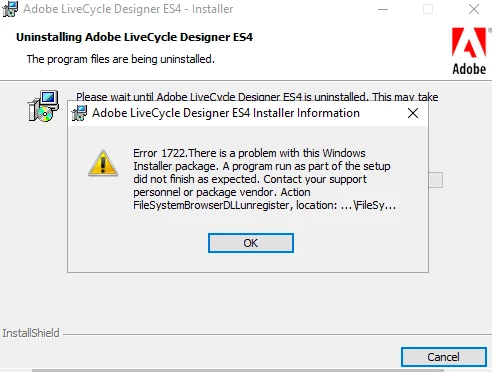
 

Can some one please suggest.

This post is no longer active and is closed to new replies. Need help? Start a new post to ask your question.
Best answer by Pulkit_Jain_

@roshkiran 

Here are the detailed steps:

1: Install 2010,2012 and 2013 VC runtimes (32 bit)
• Microsoft Visual C++ 2013 redistributable package x86
• Microsoft Visual C++ 2012 redistributable package x86
• Microsoft Visual C++ 2010 redistributable package x86

2: Open CMD in Administrator mode and run the following commands:
• C:\Windows\SysWOW64>regsvr32.exe "c:\Program Files (x86)\Adobe\Adobe Experience Manager Forms Designer\FileSystemBrowser.dll"
• C:\Windows\SysWOW64>regsvr32.exe "c:\Program File (x86)\Adobe\Adobe Experience Manager Forms Designer\ImageFileBrowserIDL.dll"
• C:\Windows\SysWOW64>"c:\Program Files (x86)\Adobe\Adobe Experience Manager Forms Designer\FormDesigner.exe" /regserver

3: Uninstall Designer


Steps to Repair Designer:

1: Install 2010,2012 and 2013 VC runtimes (32 bit)
• Microsoft Visual C++ 2013 redistributable package x86
• Microsoft Visual C++ 2012 redistributable package x86
• Microsoft Visual C++ 2010 redistributable package x86


2: Click on Repair Designer while installing again.


Hope this helps!

2 replies

Pulkit_Jain_
Pulkit_Jain_Accepted solution
Employee
June 15, 2021

@roshkiran 

Here are the detailed steps:

1: Install 2010,2012 and 2013 VC runtimes (32 bit)
• Microsoft Visual C++ 2013 redistributable package x86
• Microsoft Visual C++ 2012 redistributable package x86
• Microsoft Visual C++ 2010 redistributable package x86

2: Open CMD in Administrator mode and run the following commands:
• C:\Windows\SysWOW64>regsvr32.exe "c:\Program Files (x86)\Adobe\Adobe Experience Manager Forms Designer\FileSystemBrowser.dll"
• C:\Windows\SysWOW64>regsvr32.exe "c:\Program File (x86)\Adobe\Adobe Experience Manager Forms Designer\ImageFileBrowserIDL.dll"
• C:\Windows\SysWOW64>"c:\Program Files (x86)\Adobe\Adobe Experience Manager Forms Designer\FormDesigner.exe" /regserver

3: Uninstall Designer


Steps to Repair Designer:

1: Install 2010,2012 and 2013 VC runtimes (32 bit)
• Microsoft Visual C++ 2013 redistributable package x86
• Microsoft Visual C++ 2012 redistributable package x86
• Microsoft Visual C++ 2010 redistributable package x86


2: Click on Repair Designer while installing again.


Hope this helps!

roshkiranAuthor
New Participant
June 15, 2021
Thank you i was able to unisntall.
New Participant
June 14, 2021

@roshkiran - Make sure you have updated Windows and Visual Studio ++ and try to uninstall.