Adobe LiveCycle designer - How to create dynamic table rows and columns at a time? | Community
Skip to main content
New Participant
March 22, 2022
Solved

Adobe LiveCycle designer - How to create dynamic table rows and columns at a time?

  • March 22, 2022
  • 1 reply
  • 2647 views

Hi,


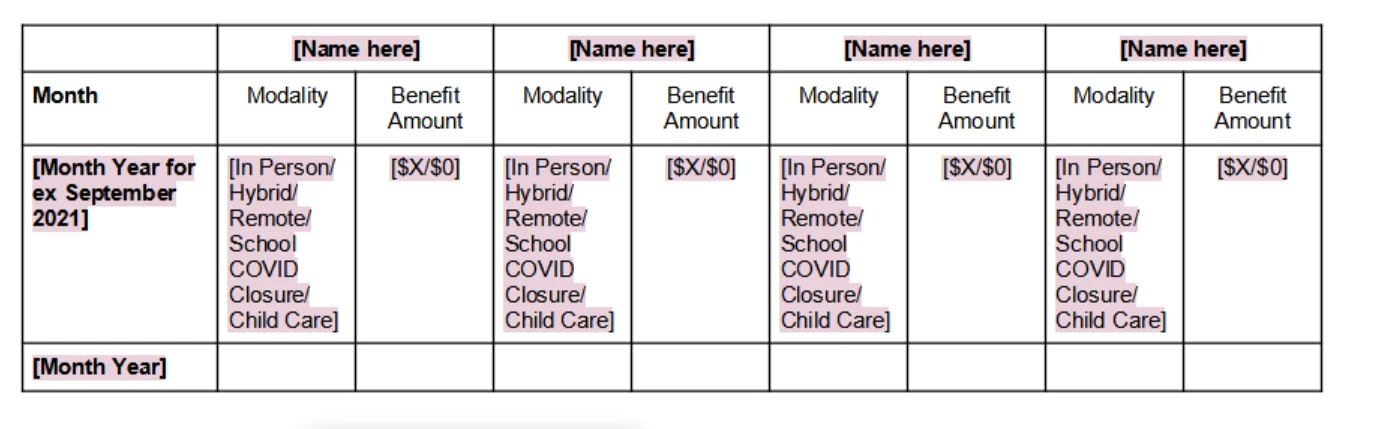
I have a requirement where I need to dynamically increase the number of rows and columns of a table at a time. If you look in the picture below here the [Name here] column needs to be increased based upon the values from the database and the Month row also needs to be increased dynamically based on the number of months in the database.


Please Help me with this. @kosta_prokopiu1,  @poweruserone 
This post is no longer active and is closed to new replies. Need help? Start a new post to ask your question.
Best answer by PowerUserOne

how are you getting the values from the database? is it in JSON text form?  if so please copy and paste just a sample of the data.


also here is a good article on what you are trying to achieve by Stefan Cameron.

Scripting Table Columns - Stefan Cameron on Forms (stefcameron.com)


1 reply

PowerUserOneAccepted solution
New Participant
March 22, 2022

how are you getting the values from the database? is it in JSON text form?  if so please copy and paste just a sample of the data.


also here is a good article on what you are trying to achieve by Stefan Cameron.

Scripting Table Columns - Stefan Cameron on Forms (stefcameron.com)


New Participant
March 22, 2022

We are getting the values in XML format like below:


<root>
<StudentInfo>

<StdInfo>
<StdName> AAAA </StdName>
</StdInfo>
<StdInfo>
<StdName> BBBB </StdName>
</StdInfo>


<MonthData>

<rowData>

<BenAmt>$81.84</BenAmt>
<Mode>Hybrid</Mode>
</rowData>
<rowData>

<BenAmt>$87.84</BenAmt>
<Mode>Public</Mode>
</rowData>

<Month>Sep 2021</Month>

</MonthData>

<MonthData>

<rowData>

<BenAmt>$89.84</BenAmt>
<Mode>Child Care</Mode>
</rowData>
<rowData>

<BenAmt>$80.84</BenAmt>
<Mode>Hybrid</Mode>
</rowData>

<Month>Oct 2021</Month>

</MonthData>
<MonthData>

<rowData>

<BenAmt>$89.84</BenAmt>
<Mode>Child Care</Mode>
</rowData>
<rowData>

<BenAmt>$80.84</BenAmt>
<Mode>Hybrid</Mode>
</rowData>

<Month>Nov 2021</Month>

</MonthData>

</StudentInfo>
</root>