AEM form email template - Read repeatable fields | Community
Skip to main content
New Participant
January 28, 2022
Solved

AEM form email template - Read repeatable fields

  • January 28, 2022
  • 2 replies
  • 4871 views

Hi,


We are working on a form where we have a panel with 5 fields repeated 10 times. These fields are text fields and user is supposed to enter values. Now we want to read user entered values of these fields and send in email.

We can read the value in Javascript using guideBridge as follows => guideBridge.resolveNode('parentPanel').instanceManager.instances[2].field1.value;.

But we are not able to read this value in email template. Any pointers will help here.

Sample form screen shot: - 
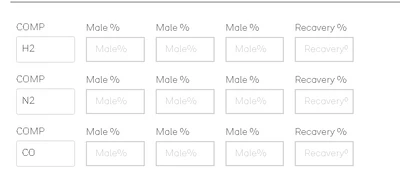
 

As you can see the rows are repeated 10 times using repeatable settings.

This post is no longer active and is closed to new replies. Need help? Start a new post to ask your question.
Best answer by workflowuser

I have created a custom workflow process step. In this step you pass the repeatable panel name,field in the repeatable panel, and the metadata property you want to store the value in

The form has this repeatable panel

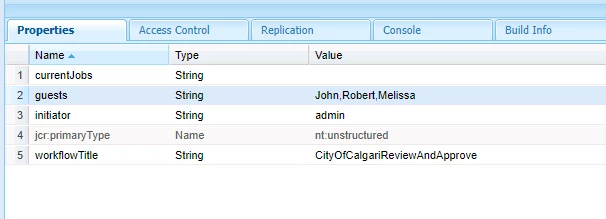
When you submit this form the following metadata property gets created with the values entered in the form


You can then use the "guests" metadata property in your email template

Let me know if you need the code for the workflow process step

2 replies

workflowuserAccepted solution
Employee
January 28, 2022

I have created a custom workflow process step. In this step you pass the repeatable panel name,field in the repeatable panel, and the metadata property you want to store the value in

The form has this repeatable panel

When you submit this form the following metadata property gets created with the values entered in the form


You can then use the "guests" metadata property in your email template

Let me know if you need the code for the workflow process step

New Participant
February 1, 2022

Thank you for your response. 

IF we have to write custom code, I was thinking to capture it using clientlib (by using guideBridge instancemanager) and then call rest api. It will work for us because we also have an api to send email.


Please do share your code for reference.


Thank you

Employee
February 2, 2022

the folowing is the code(no way production ready), but should allows you to test the functionality.

This code will be associated with the process step in your workfow. 

import java.io.InputStream;
import java.util.HashMap;
import java.util.Map;

import javax.jcr.Node;
import javax.jcr.Session;
import javax.xml.parsers.DocumentBuilder;
import javax.xml.parsers.DocumentBuilderFactory;
import javax.xml.xpath.XPath;

import org.osgi.framework.Constants;
import org.osgi.service.component.annotations.Component;
import org.slf4j.Logger;
import org.slf4j.LoggerFactory;
import org.w3c.dom.Document;
import org.w3c.dom.Element;

import com.adobe.granite.workflow.WorkflowException;
import com.adobe.granite.workflow.WorkflowSession;
import com.adobe.granite.workflow.exec.WorkItem;
import com.adobe.granite.workflow.exec.WorkflowData;
import com.adobe.granite.workflow.exec.WorkflowProcess;
import com.adobe.granite.workflow.metadata.MetaDataMap;
@8220494(property={Constants.SERVICE_DESCRIPTION+"=GetRepeatablePanelValues",
Constants.SERVICE_VENDOR+"=Adobe Systems",
"process.label"+"=Repeatable Panel Values"})

public class GetRepeatablePanelValues implements WorkflowProcess {
private static final Logger log = LoggerFactory.getLogger(GetRepeatablePanelValues.class);

@9944223
public void execute(WorkItem workItem, WorkflowSession workflowSession, MetaDataMap arg2) throws WorkflowException {
log.debug("The process arguments passed ..."+arg2.get("PROCESS_ARGS","string").toString());
String params = arg2.get("PROCESS_ARGS","string").toString();

String parameters[] = params.split(",");
String repeatablePanelName = parameters[0];
String repeatableField = parameters[1];
String metadatapropertyName = parameters[2];
System.out.println("The %%%% length of parameters is "+parameters.length+repeatablePanelName+ "$$$$"+repeatableField);

Map<String, String> map = new HashMap<>();

WorkflowData wfData = workItem.getWorkflowData();
String payloadPath = workItem.getWorkflowData().getPayload().toString();

String dataFilePath = payloadPath+"/Data.xml/jcr:content";
Session session = workflowSession.adaptTo(Session.class);
workflowSession.updateWorkflowData(workItem.getWorkflow(),wfData);
DocumentBuilderFactory factory = null;
DocumentBuilder builder = null;
Document xmlDocument= null;
Node xmlDataNode = null;

try {

xmlDataNode = session.getNode(dataFilePath);
InputStream xmlDataStream = xmlDataNode.getProperty("jcr:data").getBinary().getStream();
log.debug("Got InputStream.... and the size available is ..."+xmlDataStream.available());
XPath xPath = javax.xml.xpath.XPathFactory.newInstance().newXPath();
factory = DocumentBuilderFactory.newInstance();
builder = factory.newDocumentBuilder();
xmlDocument = builder.parse(xmlDataStream);
//org.w3c.dom.NodeList nodeList = (org.w3c.dom.NodeList)xPath.compile(repeatablePanelPath).evaluate(xmlDocument, javax.xml.xpath.XPathConstants.NODESET);
//System.out.println("The repeatable panels lenght is "+nodeList.getLength());
//System.out.println("The items are "+xmlDocument.getElementsByTagName("panel1565381130739").getLength());
org.w3c.dom.NodeList repeatablePanels = xmlDocument.getElementsByTagName(repeatablePanelName);
String value = "";
for(int i=0;i<repeatablePanels.getLength();i++)
{
Element repeatablePanel = (Element)repeatablePanels.item(i);

System.out.println(xPath.evaluate(repeatableField,repeatablePanel));

value = value+","+xPath.evaluate(repeatableField,repeatablePanel);
}
wfData.getMetaDataMap().put(metadatapropertyName,value.substring(1));

workflowSession.updateWorkflowData(workItem.getWorkflow(),wfData);
System.out.println("$$$$ Done updating the map"+value);
xmlDataStream.close();


}
catch(Exception e)
{
System.out.println(e.getMessage());
}


}

}

New Participant
January 28, 2022

It would need some custom code

how would you want the repeatable values to show up in the email?


New Participant
February 1, 2022

We want to capture all the fields entered by user in a table in email. I was hoping to find if there is an out of the box way to capture this (similar to text field  =>${textFieldName})