AEM Forms Checkbox Component - How to Allow Free Text | Community
Skip to main content
New Participant
Jun 14, 2022 6:21 PM UTC
Solved

AEM Forms Checkbox Component - How to Allow Free Text

Hello,


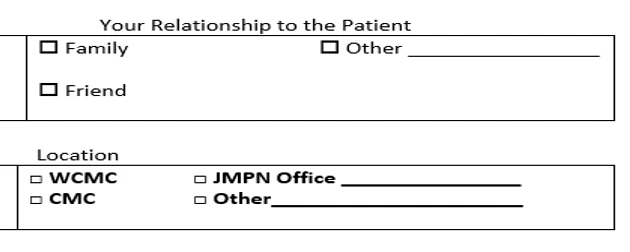
I'm seeking help with AEM Forms. Is there a way to allow free text within a Checkbox component? Please see the image below.


For example, if user selects "Other", then they should be able to enter free text.


Thanks in advance for your help!


Cindy 

 

This post is no longer active and is closed to new replies. Need help? Start a new post to ask your question.
Pulkit_Jain_
Pulkit_Jain_Accepted solution
Employee
Jun 15, 2022 6:30 AM UTC

@cindychenjmh 

OOTB it's not possible but you can unhide a text box just below the checkbox component using the rule editor, to enter the free text whenever an end-user selects the "Other" option. For other selections, this text box will be hidden.

I can share a sample with you, please DM your email id.

3 replies

Pulkit_Jain_
Pulkit_Jain_Accepted solution
Employee
Jun 15, 2022 6:30 AM UTC

@cindychenjmh 

OOTB it's not possible but you can unhide a text box just below the checkbox component using the rule editor, to enter the free text whenever an end-user selects the "Other" option. For other selections, this text box will be hidden.

I can share a sample with you, please DM your email id.

Translate
Employee
Jun 14, 2022 7:02 PM UTC

Is this in designer?

Translate
New Participant
Jun 14, 2022 7:04 PM UTC

@workflowuser 

In the Form Editor:


Translate