Calculating subtotals/page totals | Community
Skip to main content
New Participant
November 9, 2018
Solved

Calculating subtotals/page totals

  • November 9, 2018
  • 15 replies
  • 17786 views

Hello;

I'm trying to calculate row subtotals and a page total within a repeating table (see below).
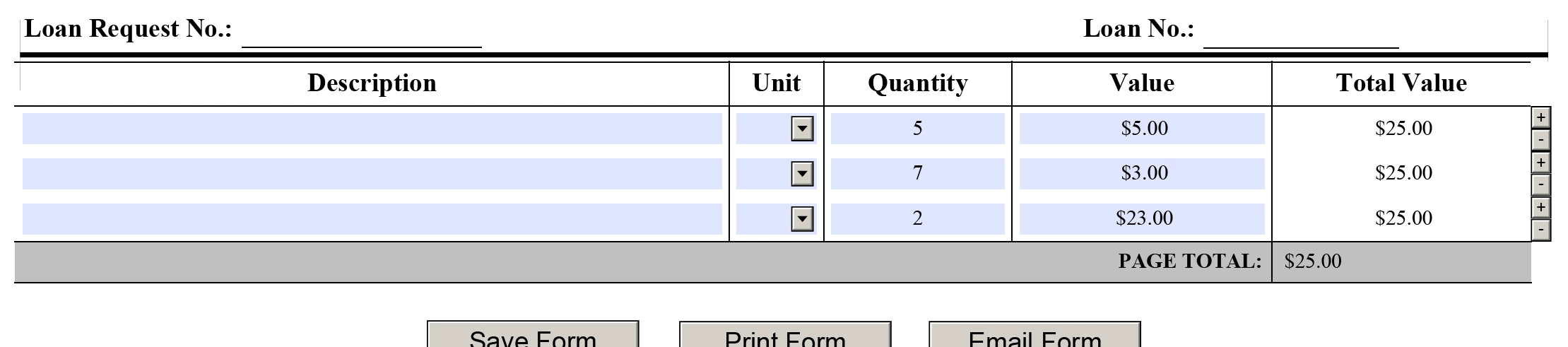
What code should I be using for the Total Value column to total each row and then the Page Total row at the bottom to add up all of the rows in the Total Value column? I know the easiest way is with FormCalc but everything I've tried has duplicated the values from the previous row to the new row when the Add '+' button is clicked.

I appreciate your help.

This post is no longer active and is closed to new replies. Need help? Start a new post to ask your question.
Best answer by radzmar

Well, the total value per row should be calculated with:

$ = Quantity * Value

And the page total with:

$ = Sum(Row1[*].TotalValue)

Both scripts are in FormCalc not JavaScript!

15 replies

New Participant
January 17, 2019

Another quick question regarding this solution;

Is it possible, since this table contains repeating table rows that might extend across multiple pages, to have the footer row of each additional page sub-total all of the calculations for that particular page - not just the total of all calculations going on in the form (if that makes any sense)? So if the footer row is on the final page, it totals everything but if it extends to another page, the footer row for that page only calculates that page's sub-totals.

I appreciate the help.

New Participant
November 15, 2018

Thanks for the insight, BR001​.

I appreciate all your help.

_Bruce_Robertson
New Participant
November 15, 2018

Hi,

I would use the shortest path possible, I also use the script editor to insert the path for me.

1) Ensure that the Script field of the Script Editor has the focus and the cursor is positioned where you want to insert the object reference.

2) Hold down the Ctrl key and on your form design view, click the object you want to reference. The cursor pointer changes to a 'V' when you when you are over a valid object.

If you did want an absolute path then you can use Shift-Ctrl-Click to insert a reference.

Bruce

New Participant
November 14, 2018

Thanks radzmar​ and BR001​! Works perfectly now.

So quick question; when is it ideal to have the rest of the path in the expression? I think I do it absentmindedly but clearly there are times when an absolute path isn't necessary.

Thanks again!!

_Bruce_Robertson
New Participant
November 14, 2018

Hi,

Have a look at this version

https://sites.google.com/site/livecycledesignercookbooks/home/loanrequest_111318a.updated.pdf?attredirects=0&d=1

The row total calculation expression needs to be "$ = Quantity * Value" ... which is what radzmar suggested.

Regards

Bruce

New Participant
November 13, 2018

Thanks. Yeah, the basic calculation is scripted in FormCalc and works fine. It's when a row has been calculated and then the user needs to add another row to fill in more data in the table, the subtotal from the previous row is then duplicated to the new row (see screenshot below).

In this example, the subtotal for the first row ($25) has been duplicated down through rows 2 and 3 despite the Quantity and Value columns containing differing values. Even if the values for Quantity and Value are blank, the Total Value column duplicates the value to the new row. Something tells me I need a script at the click event of the "Add Row" (i.e., '+' button) to clear the Total Value column for the next row when it's clicked. I also thought for a second that maybe that event could clear the Quantity or Value columns because apparently, one of those columns triggers the calculation in the Total Value column (Total Value column is blank until a number is entered in both Quantity and Value) but alas, could not solve the problem.

I managed to get the problematic page from the form up on DropBox:

https://www.dropbox.com/s/i6afbcuxuws376x/loanrequest_111318a.pdf?dl=0

Let me know if you don't have access to it.

Thanks again!

radzmar
radzmarAccepted solution
New Participant
November 13, 2018

Well, the total value per row should be calculated with:

$ = Quantity * Value

And the page total with:

$ = Sum(Row1[*].TotalValue)

Both scripts are in FormCalc not JavaScript!

New Participant
November 13, 2018

Thanks radzmar​. Here's the layout (if necessary) and the structure (hierarchy) for the form as I have it. I would post the code that I have in the Total Value cell at the moment but I've modified it and switched it around so much trying different things, I'm not sure if I should... LOL

Layout:

Hierarchy:

I can't post this particular form but let me know if there's anything else that I can supply that you can use to help me figure this out.

I really appreciate everything.

radzmar
New Participant
November 13, 2018

How does the structure of you table look like? Please upload you form or post at least some screenshots.

New Participant
November 13, 2018

try67​ ok, thanks.