calling AEM servlet from form | Community
Skip to main content
New Participant
November 8, 2022
Solved

calling AEM servlet from form

  • November 8, 2022
  • 2 replies
  • 998 views

I have a rest endpoint that I want to invoke. I dont want to use fdm, how to invoke AEM servlet from form? can we set checkbox dynamically with servlet response?

This post is no longer active and is closed to new replies. Need help? Start a new post to ask your question.
Best answer by Mayank_Gandhi

@formuser1 

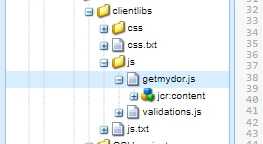
1. Create a client libs folder 


2. In the JS file create a function


function getPdf() {
var settings = {
"async": true,
"url": "URL will go here",
"method": "POST",
data: {
'data': result.data
}
}
$.ajax(settings).done(function(response) {
guideBridge.resolveNode("pdf").value = response;
})

}


3. Go to form, map your client libs.

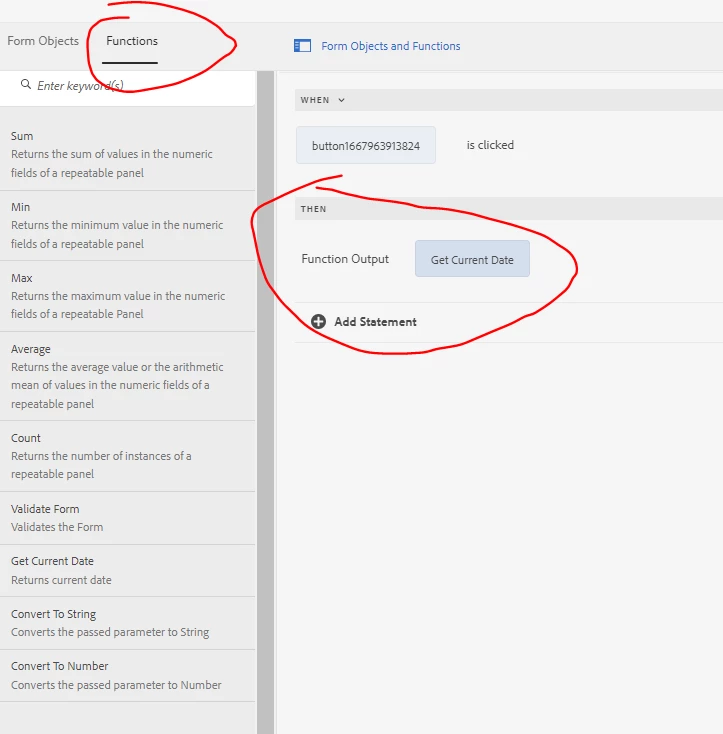
4. Go to rule editor/code editor and map the function which is making ajax call as shown below:
 

2 replies

Mayank_Gandhi
Mayank_GandhiAccepted solution
Employee
November 9, 2022

@formuser1 

1. Create a client libs folder 


2. In the JS file create a function


function getPdf() {
var settings = {
"async": true,
"url": "URL will go here",
"method": "POST",
data: {
'data': result.data
}
}
$.ajax(settings).done(function(response) {
guideBridge.resolveNode("pdf").value = response;
})

}


3. Go to form, map your client libs.

4. Go to rule editor/code editor and map the function which is making ajax call as shown below:


formuser1Author
New Participant
November 9, 2022

@mayank_gandhi this worked. thanks!

Employee
November 8, 2022

you can use javascript to make the call. Create a client library and in that client library have your javascript make the call to the servlet. You can capture the response and display the value in the form using the guide bridge 

formuser1Author
New Participant
November 9, 2022

thanks @workflowuser