character displayed in text box when filled | Community
Skip to main content
Level 2
Feb 22, 2023 7:30 AM UTC
Solved

character displayed in text box when filled

Hello!

I have a dynamic form created with AEM Designer Forms and when it is filled in some fields display the following character in the right bottom corner of the text field:
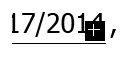
I noticed it usually appears if the text that is being filled in has an empty space at the end or if the text has been copied from a word file and pasted back here.

Is there a way for this character to not be displayed anymore?

Thanks!

This post is no longer active and is closed to new replies. Need help? Start a new post to ask your question.
radzmar
radzmarAccepted solution
Level 10
Feb 26, 2023 6:24 PM UTC

The [+] symbol is an indicator of fields that there isn't enough space to display its entire content. You can't control it it's visible or not. Just make sure the fields are big enough for the content. To deal with those trailing spaces, you can use a script in the fields exit to get rid of those.


if (!this.isNull) { this.rawValue = this.rawValue.replace(/\s*$/g, ""); }


6 replies

radzmar
radzmarAccepted solution
Level 10
Feb 26, 2023 6:24 PM UTC

The [+] symbol is an indicator of fields that there isn't enough space to display its entire content. You can't control it it's visible or not. Just make sure the fields are big enough for the content. To deal with those trailing spaces, you can use a script in the fields exit to get rid of those.


if (!this.isNull) { this.rawValue = this.rawValue.replace(/\s*$/g, ""); }


Translate
CilonXAuthor
Level 2
Feb 27, 2023 6:16 AM UTC

The script works great. Thanks!

Translate
Vijay_Katoch
New Participant
Feb 22, 2023 7:56 AM UTC

The below reason should be for this case.

Your field is small to hold a lot of text.

Maybe you can do following:

Set its Options for multi-line,

increase the width of the text field,

or reduce the font size for the text field.

Translate
CilonXAuthor
Level 2
Feb 22, 2023 8:02 AM UTC

The field is not fixed, it is configured as expand to fit and it does expand, but sometimes if you copy-paste text from word or leave an empty space at the end of the text that character is displayed.

Translate
Vijay_Katoch
New Participant
Feb 22, 2023 9:18 AM UTC

I created a field and copied the text from word, even entering the space at the end, but not able to replicate the issue.


Maybe you can share your form on google drive(vkatoch07@gmail.com) with test data. I will have a look.

I hope you made the field multiline.

Translate