Checkbox doesn't change value using xpd template binding on adaptative form | Community
Skip to main content
New Participant
October 27, 2020
Solved

Checkbox doesn't change value using xpd template binding on adaptative form

  • October 27, 2020
  • 3 replies
  • 1340 views

Hi,


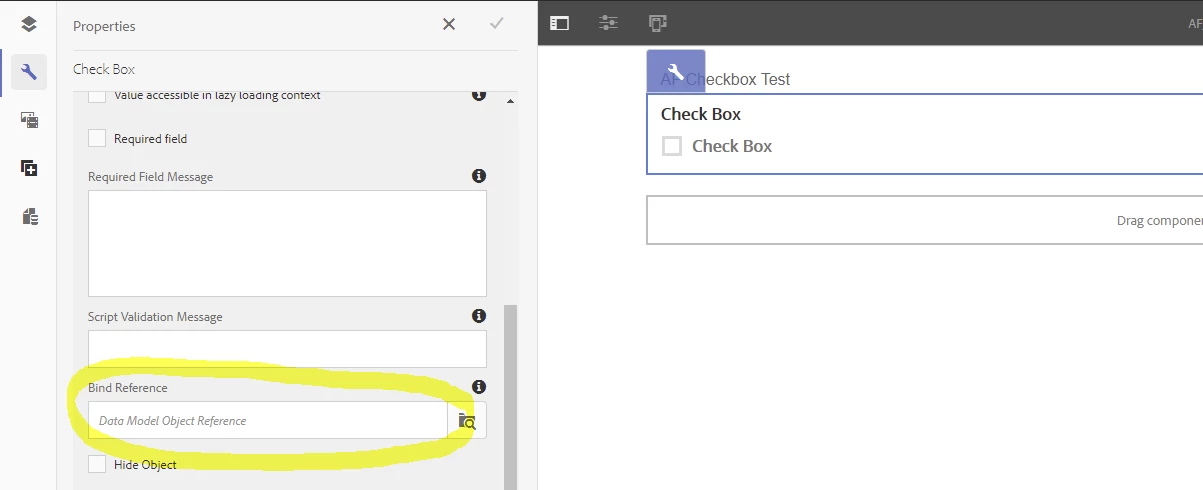
I am working on Aem forms designer and AEM 6.5, I have created a xdp template on Designer and using it with an adaptive template when I drag a check box from the Data source tab but the value of the checkbox never changes always is 1. I have defined two-state values on Designer.
This post is no longer active and is closed to new replies. Need help? Start a new post to ask your question.
Best answer by Kosta_Prokopiu1

I did a quick test and I can reproduce your issue - btw it not only keeps the value=1 but also after one toggle the checkbox will not change any more. Instead of value we get new properties in the DIV section (checked=true) but the visuals do not show the state. This seems to be a bug and you may want to open a case with Adobe support to see if there is a fix.I run on AEM Forms 6.5.5 - maybe 6.5.6 has that resolved?

The only workaround was to do away with the binding as it then works again - but that may produce issues when you submit the form. Has anyone here seen this before and got a working solution?


3 replies

Mayank_Gandhi
Employee
November 5, 2020

@adolfos35734979  I similar fix will be delivered in the upcoming release of 6.5.7 and 6.4.8.

Kosta_Prokopiu1
Kosta_Prokopiu1Accepted solution
Employee
October 28, 2020

I did a quick test and I can reproduce your issue - btw it not only keeps the value=1 but also after one toggle the checkbox will not change any more. Instead of value we get new properties in the DIV section (checked=true) but the visuals do not show the state. This seems to be a bug and you may want to open a case with Adobe support to see if there is a fix.I run on AEM Forms 6.5.5 - maybe 6.5.6 has that resolved?

The only workaround was to do away with the binding as it then works again - but that may produce issues when you submit the form. Has anyone here seen this before and got a working solution?


New Participant
October 27, 2020