Combining PDF Attachments with DDX, then send separately with Document of Record in AEM OSGi Workflow | Community
Skip to main content
New Participant
September 15, 2020
Solved

Combining PDF Attachments with DDX, then send separately with Document of Record in AEM OSGi Workflow

  • September 15, 2020
  • 22 replies
  • 10011 views

I have a dynamic number of pdf attachments as input from an adaptive form, and would like to merge all attached pdfs into a single pdf using DDX, then have it send separately with the Document of Record with the Send Email step. However I encountered an issue with the Send Email step with the following: 


Caused by: com.adobe.granite.workflow.WorkflowException: GetPropertyValue failed as value corresponding to VARIABLE:attachments for type class java.lang.Object is NULL


The DDX is as follows:


<DDX xmlns="http://ns.adobe.com/DDX/1.0/"> <PDF result="Attachments.pdf"> <PDF source="fileAttachment"/> </PDF> </DDX>


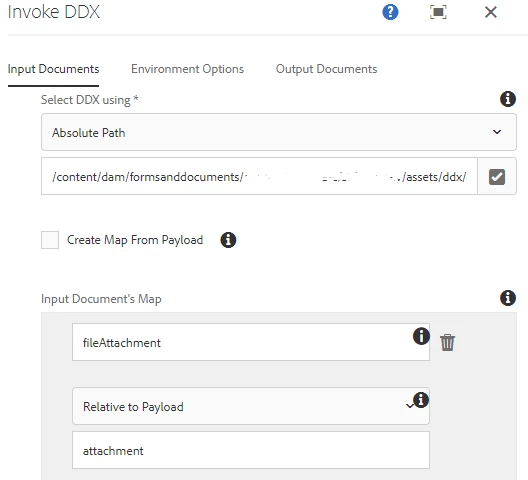
Input map for invoke ddx:

The "attachment" path matches the output attachment folder of the adaptive form
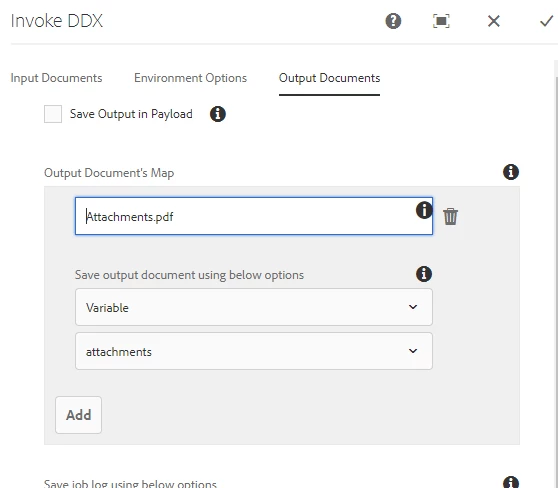
Output map:

The output document is saved into the "attachments" document variable
Send Email step with Document of Record and attachments document:
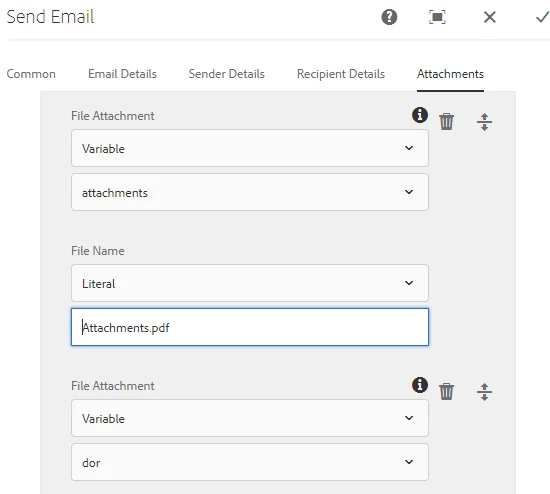
 

 I am unsure why the value for attachments is NULL. Any help on this is appreciated, thank you!


EDIT - testing workflowuser's process:

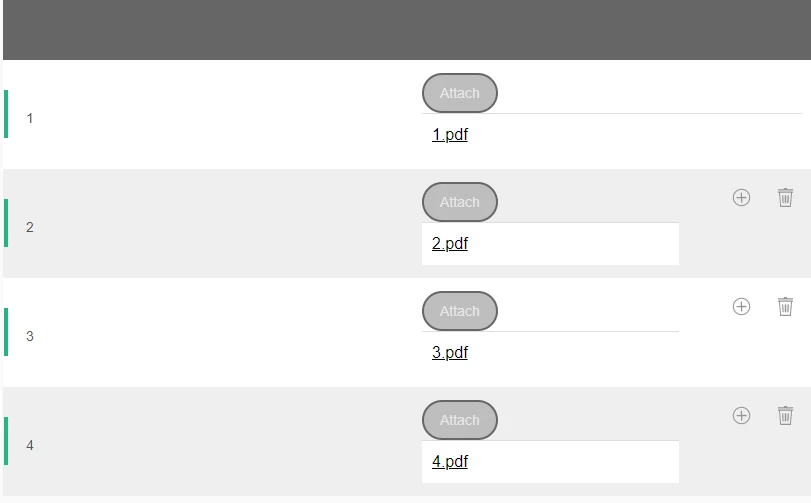
The following is the dynamic table with file attachments. The ordering is PDFs 1,2,3,4, but the resultant PDF from the process gives ordering 2,3,4,1. 
 

This post is no longer active and is closed to new replies. Need help? Start a new post to ask your question.
Best answer by GirishBedekar

please log a support ticket with Adobe if you are having problems with 20 or more attachments in the form

22 replies

Employee
September 16, 2020

Deploy and start the custom bundle and do the following. in your workflow drop process step component.( this will replace the invoke DDX step) associate the process with Assemble Task Attachments. this code assembles the  PDF  attachments of the Adaptive Form and stores it in a file called assembled-pdf.pdf under the payload folder. Create a variable called assembledPDF of type Document. Use the Set Variable component to initialize the variable as shown in the screen shot . You can use this variable in your send email step

Let me know if you have trouble getting this to work

In the meantime, I will investigate why the invoke DDX step is not working

BTW the code also writes the assembledpdf to the folder of your aem installation


techddxAuthor
New Participant
September 16, 2020
Hi workflowuser, I tested your process locally and it works great. Is it possible to reorder the attachments? I currently have a dynamic table where each row has an attach file button. The first row is static and the following rows can be added dynamically. In the resultant PDF from the process, the ordering of the attachments prioritizes the dynamic rows over the first static row, when it should be the first row then the dynamic rows. I will add a screenshot to my original post to explain better.
Employee
September 15, 2020

are the form attachments getting assembled into one pdf?

techddxAuthor
New Participant
September 16, 2020
Hi workflowuser, yes, the goal is to assemble all form attachments into one pdf, then have it send as a separate attachment with the Document of Record.