Conversion of showhide xtype to Touch UI
HI ,
We're in the process of converting all of our Classic UI dialogs to Touch UI using the dialog conversion tool. We're using the showhide xtype in a lot of our form field components and we're looking for an equivalent or alternative widget for the Touch UI. Any suggestions?
Description about showhide xtype widgets:-
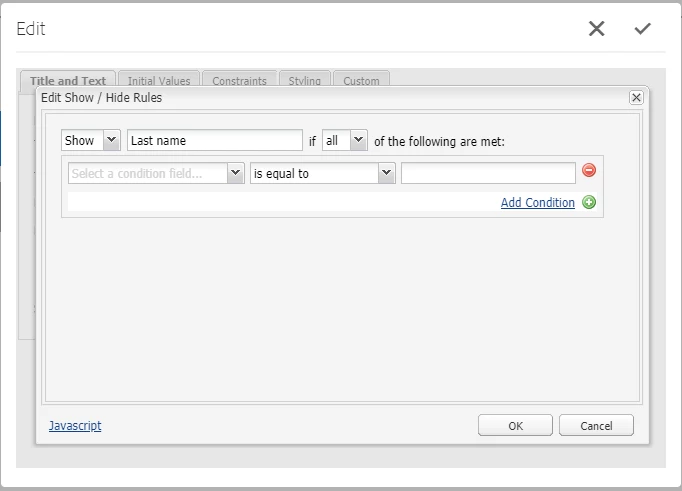
I'm referring to the specific showhide xtype which handles show/hide logic for the HTML elements in a web form, not widgets in a dialog. The values captured in this xtype are passed along to the Abacus JS which handles form logic for components that extend OOTB form field components. Below is a screenshot of the showhide xtype. Clicking that checkbox in the background dialog opens the 2nd dialog that allows authors to configure show/hide logic for elements that are present on the web form.
Dialog shown below for more clarity:
Thanks a lot in advance 🙂
@marcush35887118 @shruti93sinha
Jeetendra