Editing Adobe Livecycle forms in AEM Forms Designer - enabling extended features not supported | Community
Skip to main content
New Participant
January 6, 2021
Solved

Editing Adobe Livecycle forms in AEM Forms Designer - enabling extended features not supported

  • January 6, 2021
  • 4 replies
  • 3926 views

We have a number of forms that were created using Adobe Livecycle and when moving to Windows 10 were advised to use AEM Forms Designer, as Adobe Livecycle was no longer supported. The Adobe Livecycle forms had enabled extended features in Adobe Reader as the forms are shared on our public web site for downloading. The user completes the form (using Adobe Reader) and emails it to us.

We have now discovered that when we try to edit the original forms in AEM Forms Designer that the enabled extended features in Adobe Reader are no longer supported. Please see attached message when we import one of the forms into AEM Forms Designer.
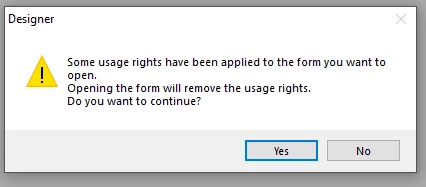
 

We can edit the form using AEM Forms Designer but the option to save the PDF with enabled extended features in Adobe Reader is not available – it was previously available in Adobe Livecycle.

Can you please advise how we can create our forms are fillable and saveable in Adobe Reader?

Best regards,

Martin

This post is no longer active and is closed to new replies. Need help? Start a new post to ask your question.
Best answer by ManojDarisi

Martin,


Usually, enabling usage rights for a form is done outside of the designer (Either in LiveCycle Designer or AEM Forms Designer). You need to have the Reader Extensions certificate to do this. The below link will help you get more information on this.


https://help.adobe.com/en_US/AEMForms/6.1/AdminHelp/WS92d06802c76abadb-5145d5d12905ce07e7-7ffa.2.html


Thanks,

Manoj 

4 replies

MHWinter
New Participant
January 8, 2021

In my environment, LiveCycle and AEM Forms were not configured to save in a reader-extended format so I use a 2-step process to Reader-Extend my forms:

1. In LiveCycle or AEM Forms, I save the form as generated by the program.

2. In Acrobat, I open the file and "Save as Other > Reader-Extended PDF".

MTraynorAuthor
New Participant
January 8, 2021
Hi, thanks for your suggestion. Will explore this but wonder if AEM dynamic forms will work once they have been saved again in Acrobat. Thanks again Martin
New Participant
January 8, 2021
Hi Martin,
 
As far as I know, we can not apply usage rights only by using LiveCycle designer or AEM Forms Designer. Reader Extensions is a server module and you need licenses to use that. I am not sure what kind of support you have from Adobe. You can reach out to them and figure out the options of using the Reader Extensions in AEM Forms designer.
 
Earlier you might be using Acrobat Professional along with LiveCycle Designer and do the Reader Extensions. You can do partial reader extensions with Acrobat Professional. 
 
If you want to use LiveCycle Designer itself in Windows 10 as a work around you can still do that.
 
To install LiveCycle Designer in Windows 10, you need to run the LiveCycle Designer installer file in the Compatibility Mode of Windows 7. This will install the LiveCycle designer in Windows 10 and keep using it without any issues. I have done this on my Windows 10 machine at my workplace and been using it for almost 2 years. I did not see any problems with the forms using the LiveCycle Designer in Windows 10.
 
Thanks,
Manoj
MTraynorAuthor
New Participant
January 8, 2021
Hi Manoj, will explore the compatibility mode option for Livecycle in W10. I feel the server option is almost overkill for how we are using these forms but may be the only way to go. Thanks again Martin
MTraynorAuthor
New Participant
January 7, 2021

Hi Manoj,


Thanks for your response.


We were able to enable extend extended features in Livecycle without using a server or certificate and expected we would do the same in a stand alone version of AEM Forms Designer.


We only have AEM Forms Designer and do not have a server set up. Does setting up a server require an additional licence?


Best regards,

Martin

ManojDarisiAccepted solution
New Participant
January 6, 2021

Martin,


Usually, enabling usage rights for a form is done outside of the designer (Either in LiveCycle Designer or AEM Forms Designer). You need to have the Reader Extensions certificate to do this. The below link will help you get more information on this.


https://help.adobe.com/en_US/AEMForms/6.1/AdminHelp/WS92d06802c76abadb-5145d5d12905ce07e7-7ffa.2.html


Thanks,

Manoj 

MTraynorAuthor
New Participant
January 7, 2021
Hi Manoj,