error "Resource /aem/.1.json not found" when trying to create AEM Form | Community
Skip to main content
New Participant
November 1, 2017
Solved

error "Resource /aem/.1.json not found" when trying to create AEM Form

  • November 1, 2017
  • 13 replies
  • 6544 views

Running AEM 6.2 CFP7 with geometrixx sample content, AEM-FORMS-6.2-SP1-CFP7-WIN-3.2.124 and AEM-FORMS-6.2-GOV-REF-SITE-3.0.14.

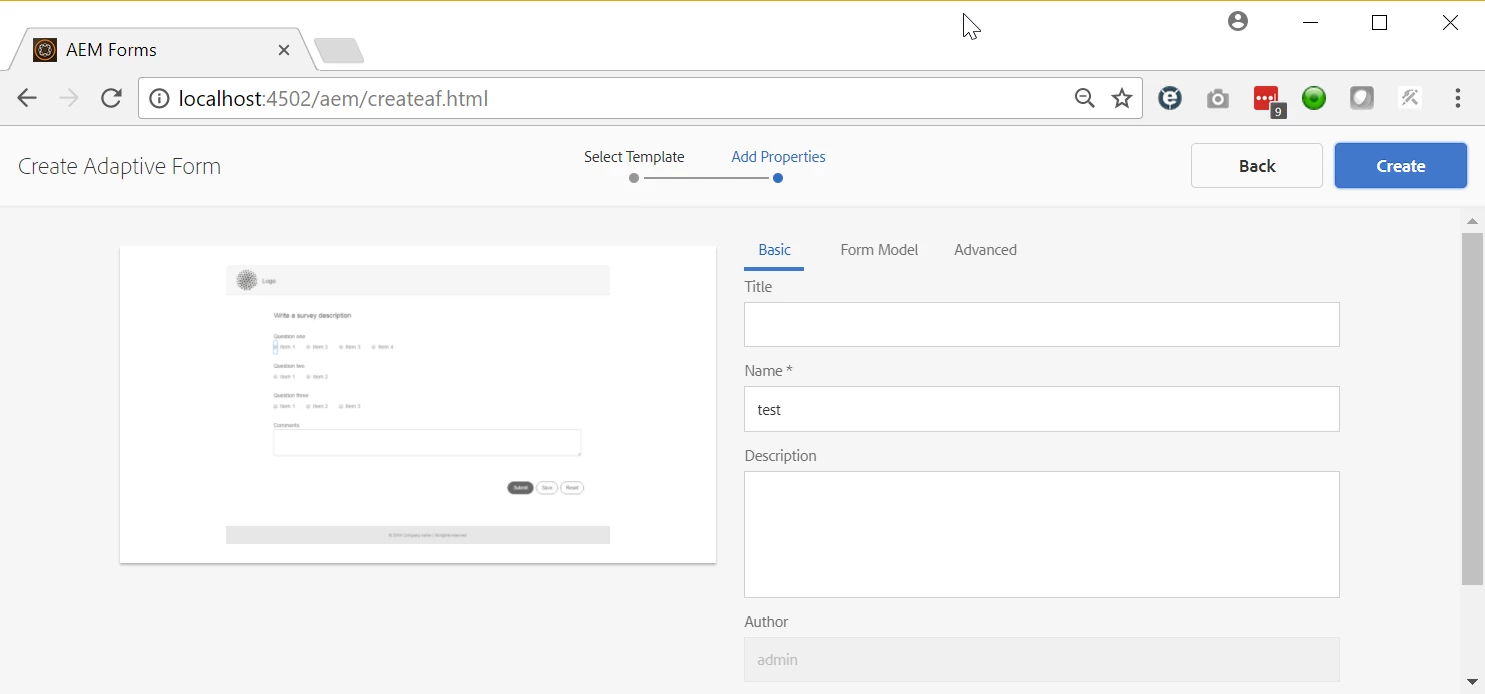
When I click the "Create" button for an Adaptive Form, nothing happens in the browser, and the error below shows up in the error.log.

What could cause this?

01.11.2017 12:06:30.703 *INFO* [0:0:0:0:0:0:0:1 [1509563190702] GET /aem/.1.json HTTP/1.1] org.apache.sling.engine.impl.SlingRequestProcessorImpl service: Resource /aem/.1.json not found

Here's the screen where this happens (clicking the blue Create button):
This post is no longer active and is closed to new replies. Need help? Start a new post to ask your question.
Best answer by alexr21

After extensive testing with several people, I've been able to determine that the problem is browser-related.

The issue is correlated to the browser used, regardless of what server platform AEM is deployed on:

1) Chrome, Firefox, or Edge on Windows, same problem.

2) AEM on a Linux server or a Windows server, browser on Windows, same problem.

3) Chrome browser on MacOS, or Internet Explorer on Windows = NO PROBLEM!

We have a ticket opened in Daycare.

13 replies

Mayank_Gandhi
Employee
June 26, 2018

Please elaborate the issue you are facing along with the environment details. Also, confirm if the forms add-on package has been installed on the system?

smacdonald2008
New Participant
June 19, 2018

AEM Support can provide information about this.

fabianh12876403
New Participant
June 19, 2018

I have the same Problem in AEM 6.4. Why is this issue still not fixed?

alexr21Author
New Participant
February 1, 2018

Daycare eventually tracked down the issue on this. It was a result of bad interactions between AEM, a modern browser, and the touchscreen API on Windows 10 laptops. A workaround for Chrome is to turn off the touchscreen API.

smacdonald2008
New Participant
November 8, 2017

Thanks for posting

alexr21AuthorAccepted solution
New Participant
November 2, 2017

After extensive testing with several people, I've been able to determine that the problem is browser-related.

The issue is correlated to the browser used, regardless of what server platform AEM is deployed on:

1) Chrome, Firefox, or Edge on Windows, same problem.

2) AEM on a Linux server or a Windows server, browser on Windows, same problem.

3) Chrome browser on MacOS, or Internet Explorer on Windows = NO PROBLEM!

We have a ticket opened in Daycare.

alexr21Author
New Participant
November 1, 2017

Here's a 3-minute video showing all my steps on a fresh instance of AEM 6.2 (edited to reduce AEM start-up time):

.

alexr21Author
New Participant
November 1, 2017

Hi Scott, my colleague was able to get this working on an instance with SP1, CFP3, ACS3.9, without the Forms Add-On. I'm now going to try to replicate this exact combination. The only remaining difference would be that I'm on Windows while he is on MacOS.

smacdonald2008
New Participant
November 1, 2017

There is an issue with your instance. To see this work the way its suppose to work - try on a fresh instance. Copy the Qucik Start JAR to a new folder and start again. Then try again - to see it working successfully.

For you current AEM Server - looks like you loaded a package that is causing an issue.

alexr21Author
New Participant
November 1, 2017

Hi again Scott,

I tried the article you suggested - https://helpx.adobe.com/experience-manager/using/posting-aem

Unfortunately the steps are the same as what I was trying. Specifically I'm stuck in the "click Create" sub-step of Step 5:

chrome_2017-11-01_13-34-45.png