Font color changes, etc. in Document of Record | Community
Skip to main content
New Participant
February 15, 2019
Solved

Font color changes, etc. in Document of Record

  • February 15, 2019
  • 4 replies
  • 3551 views

I'm trying to set up a branded Document of Record for our system, following instructions on Adobe Experience Manager Help | Generate Document of Record for adaptive forms .

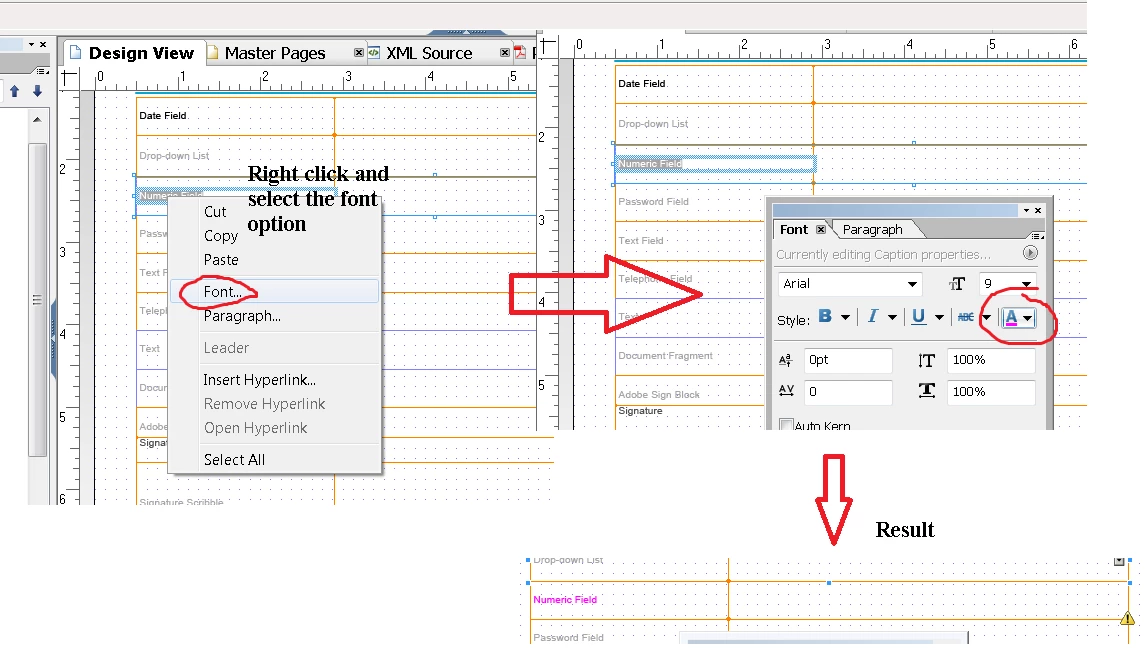
However, the text is very faint grey and bad for accessibility, and I need to change to a darker color.

The XDP template in Designer has no place to change the font color, neither does the OSGi interface.

How can I update the colors (effectively, the "CSS") for generated Documents of Record?

Thanks!​

This post is no longer active and is closed to new replies. Need help? Start a new post to ask your question.
Best answer by Mayank_Gandhi

4 replies

baronforoAuthor
New Participant
March 4, 2019

Manyak,

No worries. We don't want to update the OOTB, since that seems to impact /libs/. We're just mapping Generated DoR to our own XDP. Thanks!

Mayank_Gandhi
Employee
March 4, 2019

Hi Chris,

I missed your update, you can map DOR to your own template in that case which you can assign in the form properties. For OOTB shipped XDP I will have to check.

baronforoAuthor
New Participant
February 20, 2019

Thanks Mayank!

My next question is once we get this DoR template updated, where do we upload it? The original is in libs, but we don't want to modify the libs files.

Thanks again!

Mayank_Gandhi
Mayank_GandhiAccepted solution
Employee
February 18, 2019