
How to display adaptive form title and panel titles | Community
Skip to main content
rli-jonathan
New Participant
Aug 20, 2020 5:20 PM UTC
Solved

How to display adaptive form title and panel titles

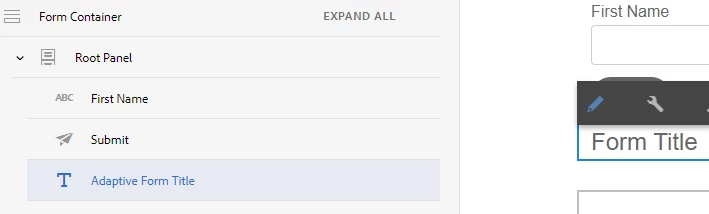
I'm just beginning to learn AEM Adaptive forms. I'm trying to manually implement the same layout that comes with the Basic reference template. 

I can't for the life of me figure out how to get the Form Title and Panel Titles to display. They're not listed in the component structure, and I don't see any configuration options. 

I am on AEM 6.5 if that makes a difference.
This post is no longer active and is closed to new replies. Need help? Start a new post to ask your question.
workflowuserAccepted solution
Employee
Aug 20, 2020 7:12 PM UTC


6 replies

Mayank_Gandhi
Employee
Aug 24, 2020 5:58 AM UTC

Try to give a name to the panels and fragments that you are including in the custom template.

Translate
Mayank_Gandhi
Employee
Aug 24, 2020 10:36 AM UTC
@rli-jonathan : If you're learning forms then below link will you get started:
Translate
workflowuserAccepted solution
Employee
Aug 20, 2020 7:12 PM UTC


Translate
rli-jonathan
New Participant
Aug 20, 2020 6:26 PM UTC
Maybe some screenshots will help? https://imgur.com/a/OOmqG9G
Translate
Employee
Aug 20, 2020 5:54 PM UTC
There is a component called Title that can be added to the form. When you add a panel you can set its title. Where do you want to display this?
Translate