How to hide a Overall Discount(%) Row in adobe forms | Community
Skip to main content
Level 2
Jan 9, 2023 4:44 AM UTC
Solved

How to hide a Overall Discount(%) Row in adobe forms

Hi Experts,

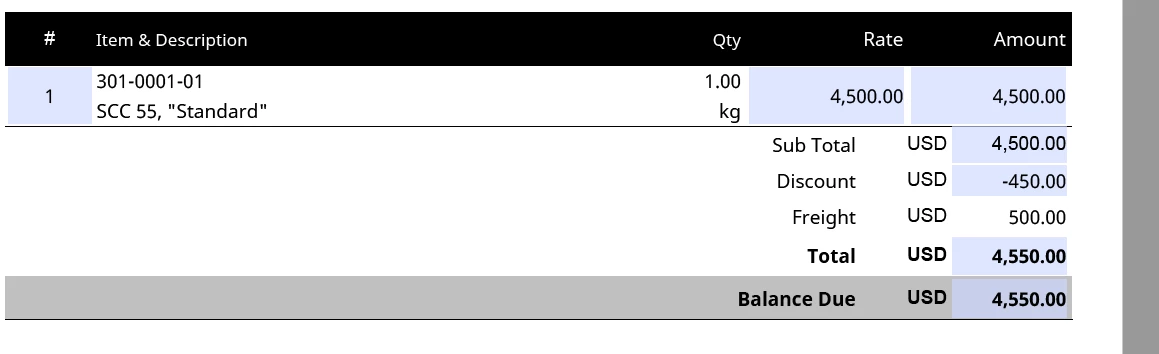
I need to hide a row in adobe forms. If the Overall Discount(%) value in sales order is not present then the row will hide.

var Disc = xfa.resolveNodes("xfa.record.FormPurchaseOrder.PriceAndTax.PriceComponent[*]").length;

for (var i=0; i<=Disc; i++) {
var TypeWord = xfa.resolveNode("xfa.record.FormPurchaseOrder.PriceAndTax.PriceComponent["+ i +"].Description").value;

if(TypeWord == "Overall Discount (%)"){
this.rawValue = xfa.resolveNode("xfa.record.FormPurchaseOrder.PriceAndTax.PriceComponent["+ i +"].CalculatedAmount").value;
}
else 
{
Design.tablesf.Table2.Row3.presence = "hidden";

}

}

Now the Discount value present in sales order also hide the Row.

Experts Please help.

Regards,

Sai

This post is no longer active and is closed to new replies. Need help? Start a new post to ask your question.
Vijay_Katoch
Vijay_KatochAccepted solution
New Participant
Jan 12, 2023 4:06 AM UTC

Hi,

I tried both the ways. 

I used the recent script which you gave and the discount amount value appears zero even after giving overall discount value.

Thanks,

Sai


Use the below in the Row3 init event and remove all the script from the Discount field in Row3.


var Disc = xfa.resolveNodes("xfa.record.FormPurchaseOrder.PriceAndTax.PriceComponent[*]").length;
var discountMatched = false;
for (var i=0; i<=Disc; i++) {
var TypeWord = xfa.resolveNode("xfa.record.FormPurchaseOrder.PriceAndTax.PriceComponent["+ i +"].Description").value;

if(TypeWord == "Overall Discount (%)"){
Discount.rawValue = xfa.resolveNode("xfa.record.FormPurchaseOrder.PriceAndTax.PriceComponent["+ i +"].CalculatedAmount").value;
discountMatched = true;
if(Discount.rawValue == 0.00){
this.presence="hidden";
}
}
else{
this.presence="hidden";
}

if(discountMatched == true) {
break;
}
}

11 replies

Vijay_Katoch
New Participant
Jan 10, 2023 12:55 PM UTC

make your else block like below:


else{
this.Table2.Row3.presence="hidden";
}

Translate
Vijay_Katoch
New Participant
Jan 11, 2023 5:22 AM UTC

As per the email conversation, you can achieve the desired result from below logic.

Add the below logic in the init event of Discount field as your all data comes from xml.


if(Row3.Discount.rawValue== 0)

then hide >

this.Table2.Row3.presence="hidden";

Translate
Sai9Author
Level 2
Jan 11, 2023 9:36 AM UTC

Hi,

I tried both the ways. 

I used the recent script which you gave and the discount amount value appears zero even after giving overall discount value.

Thanks,

Sai

Translate
Vijay_Katoch
New Participant
Jan 10, 2023 7:32 AM UTC

You need to break the loop once the desired value is matched, so put "break;" keyword in your if block.


if(TypeWord == "Overall Discount (%)"){
this.rawValue = xfa.resolveNode("xfa.record.FormPurchaseOrder.PriceAndTax.PriceComponent["+ i +"].CalculatedAmount").value;

break;
}

Translate
Vijay_Katoch
New Participant
Jan 10, 2023 6:00 AM UTC

Share your form if you can, need to check the script in the form.

vkatoch07@gmail.com on google drive.

Thanks

Translate
radzmar
Level 10
Jan 9, 2023 7:46 PM UTC

The script doesn't make clear, how the form is build. 

Where does this execute from? Might be a field, but where exactly is it located? 

Also, what type of field is "Description", a static text or a field? 

Finally, Design.tablesf.Table2.Row3 is another table in the form with just on instance of Row3 or what? 

Translate
Sai9Author
Level 2
Jan 10, 2023 5:24 AM UTC

Hi radzmar,

Thank you for your reply. 

1. This script is used in Sales order form.

2. Description Here I mentioned in the "XML" tag. 

3."Design.tablesf.Table2.Row3 " which is the path to hide the Row

Any help regarding this would be highly appreciated.

Thanks & Regards,

Sai


Translate