How to set custom profile as default for HTML5 forms | Community
Skip to main content
New Participant
March 9, 2022
Solved

How to set custom profile as default for HTML5 forms

  • March 9, 2022
  • 1 reply
  • 666 views

We are using the AEM HTML5 forms feature to present a large number of legacy XDP forms to users on the web. These forms have common functionality which is implemented using a Custom HTML Render Profile.


When we upload a form XDP, we have to individually change the HTML Render Profile from the default, to our custom profile in order to enable our custom features. This is done by going to the uploaded XDP properties in AEM, selecting the Advanced tab and choosing our profile from the HTML Render Profile dropdown:
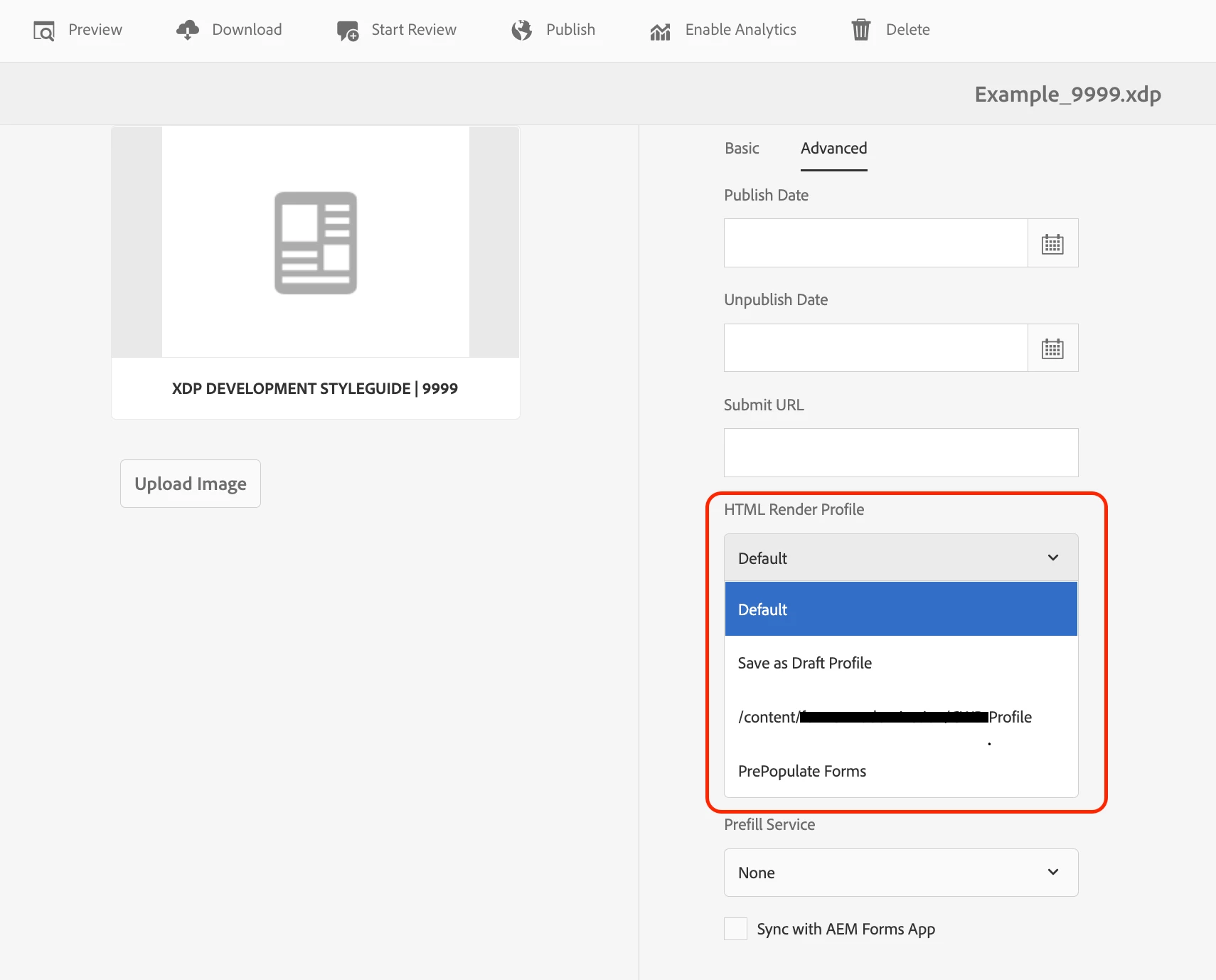


This is time consuming and error prone (we have several hundred forms), so I was wondering if its possible to change the default profile at folder level, or somehow otherwise programatically ensure all forms are using the custom, rather than the default profile.

This post is no longer active and is closed to new replies. Need help? Start a new post to ask your question.
Best answer by Mayank_Tiwari

For every XDP you upload in AEM Forms, the rendering profile property is stored at /content/dam/formsanddocuments/<xdp_name>.xdp/jcr:content/metadata node.

You can either use curl command to update the property with the command below:

https://sourcedcode.com/blog/aem/update-a-node-jcr-property-in-aem-with-curl

curl -v -u admin:admin -X POST http://localhost:4502/content/dam/formsanddocuments/<xdp_name>.xdp/jcr:content/metadata --data-urlencode 'profile=<customProfileName>'

Or you may use a java code to do the same recursively for all the XDPs dynamically, as discussed here:

https://experienceleaguecommunities.adobe.com/t5/adobe-experience-manager/how-to-add-update-properties-in-an-existing-node/m-p/178063

For this, you need to use setProperty method to do the same.


Hope this helps.


1 reply

Mayank_Tiwari
Mayank_TiwariAccepted solution
Employee
March 9, 2022

For every XDP you upload in AEM Forms, the rendering profile property is stored at /content/dam/formsanddocuments/<xdp_name>.xdp/jcr:content/metadata node.

You can either use curl command to update the property with the command below:

https://sourcedcode.com/blog/aem/update-a-node-jcr-property-in-aem-with-curl

curl -v -u admin:admin -X POST http://localhost:4502/content/dam/formsanddocuments/<xdp_name>.xdp/jcr:content/metadata --data-urlencode 'profile=<customProfileName>'

Or you may use a java code to do the same recursively for all the XDPs dynamically, as discussed here:

https://experienceleaguecommunities.adobe.com/t5/adobe-experience-manager/how-to-add-update-properties-in-an-existing-node/m-p/178063

For this, you need to use setProperty method to do the same.


Hope this helps.