If/Else Multiple Conditions - or Switch?? | Community
Skip to main content
July 8, 2011
Solved

If/Else Multiple Conditions - or Switch??

  • July 8, 2011
  • 13 replies
  • 9540 views

Am posting new info on a topic I posted in the wrong category (http://forums.adobe.com/thread/873889?tstart=0) in the hopes that moving it to correct category and providing new info will help.  My form has a value field, and based on the values, radio buttons would be checked accordingly.  The below working code is set as JavaScript on the calculate event of the radio box in question.  All is well so far, it works fine.

The next step am trying to accomplish is that there is another radio box where they would check the Type - A, B or C.  Except for a Type B, the below is in effect.  However, if Type B is selected, regardless of value below, the classification should ALWAYS be set to "1".  So a value of 1,000,000 AND marked as Type B would be classification 1, for example.

I believe the address of the radio group I need to test against is:

form1.sfrmMain.sfrmMainSub1.sfrmMain2.tbMainInfo.Row4[8].sfrmIdeaCAT.rType.rawValue;

But when I try to set a variable in below to use it in the code, it makes the other code not work.  Any ideas how to approach this - is there a simpler way?  Have checked into switch statements but have not been successful in converting below.  Any ideas would be appreciated, thank you.

WORKING CODE:

var myVal = form1.sfrmMain.sfrmMainSub1.sfrmMain2.tbMainInfo.rowEstimates.tblEstimates.Row1.sfrmEstimates.nSavings.rawValue;
var myClass = form1.sfrmMain.rSavClass.rawValue;

if(myVal >= 1000 && myVal <= 9999)
{
myClass ="1";
}
else
if(myVal >= 10000 && myVal <= 24999)
{
myClass ="2";
}
else
if(myVal >= 25000 && myVal <= 99999)
{
myClass="3";
}
else
if(myVal >= 100000 && myVal <= 999999)
{
myClass="4";
}
else
if(myVal >= 1000000)
{
myClass="5";
}
else
{
myClass="0";
}

This post is no longer active and is closed to new replies. Need help? Start a new post to ask your question.
Best answer by Niall_O_Donovan

Hi,

Here is the form back to you: http://www.assuredynamics.com/wp-content/uploads/2011/07/2011-07-11-ShareVersion_Form.pdf

I will delete the link once you have the form.

There were a few issues:

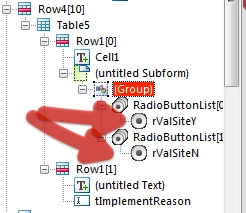
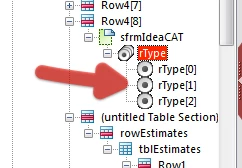
The rType radio buttons were all named the same as the exclusion group, so this is why it was resolving the node. I have renamed them:

On the issue of radio buttons, there were three Yes/No questions where the choices were not in an exclusion group. I have paired these:

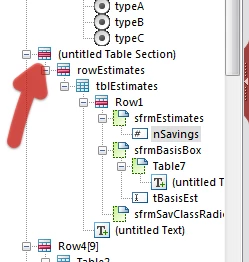
Objects, like nSavings were in unnamed containers, which makes scripting difficult (need to resolve the node):

In the script you are declaring a variable, which has the value of the object that contains the script. Then you are referring to that variable in order to set the value of the object. This is akin to the getField() method in Core/AcroForm JavaScript, but will NOT work here. Instead I have referred to the object using "this.rawValue".

The final script is here:

var myVal = sfrmMainSub1.sfrmMain2.tbMainInfo.section1.rowEstimates.tblEstimates.Row1.sfrmEstimates.nSavings.rawValue;

var myType = xfa.resolveNode("sfrmMainSub1.sfrmMain2.tbMainInfo.Row4[8].sfrmIdeaCAT.rType").rawValue;

// first check if Type B

if (myType === "2")

{

     this.rawValue = "1";

}


// then work through savings levels

else if (myVal >= 1000 && myVal <= 9999)

{

     this.rawValue ="1";

}

else if (myVal >= 10000 && myVal <= 24999)

{

     this.rawValue ="2";

}

else if (myVal >= 25000 && myVal <= 99999)

{

     this.rawValue ="3";

}

else if (myVal >= 100000 && myVal <= 999999)

{

     this.rawValue ="4";

}

else if (myVal >= 1000000)

{

     this.rawValue ="5";

}

else

{

     this.rawValue ="0";

}

I have made the saving classification checkboxes a light grey, so as to indicate that the user does not click these choices. I have also set the Type to Calculated - Read Only in the Object > Value palette.

Lastly, I have changed around the script for the Project Number-Year. Basically the way it was set up if a form that was filled in this year (2011), was opened next year, the reference would automatically change to Project Number-2012. I have changed it to always used the year from the submitted date.

I hope that this is now working for you,

Niall

13 replies

Niall_O_Donovan
New Participant
July 10, 2011

Hi,

It is difficult to say without seeing the form.

Referencing the form objects is clearly a critical step. Have a loop here where we set out out to reference objects correctly. http://assure.ly/kUP02y.

Next, when adding script to radio buttons, I would always tend to add the script to the click event in the radio button exclusion group. The exclusion group is the parent node in the hierarchy that contains all of the individual radio buttons.

The enter event is not the best one to use for radio buttons, as the users selection has not been registered in the object's rawValue.

If the radio button exclusion group is called rType, then rType.rawValue is the same thing as this.rawValue, when the script is in an event of the exclusion group.

Lastly, when testing against a condition, you need double equal signs when testign against equality.

So, I think that the script in the click event of the radio button exclusion group (rType) should look like:

if (this.rawValue == 2)

{

     rSavClass.rawValue = "1";

}

else

{

     rSavClass.rawValue = "0";

}

Hope that helps,

Niall

July 8, 2011

Thank you, I may have gone over my head on this one, not there yet.  Tried the approach posted, and it works for the dollar values ok, but wasn't able to incorporate the Type B aspect.

So I went back to what used to work on the Type radio group to try to start over (JavaScript enter event - var myType = rType.rawValue; if (myType = 2){ rSavClass.rawValue ="1";} else { rSavClass.rawValue ="0";} ), but after renaming the subforms, etc., recently, can't seem to get the reference right.  Got myself too twisted around on this one for sure. Though that used to work on the Type radio group, the value code overwrote the Classification value, so was trying to combine the 2, but now have broken the first.

Any ideas welcome on how to get back on track, thank you so much.

Niall_O_Donovan
New Participant
July 8, 2011

Hi,

I am rushing out the door so can't give too much. However you seem to not be doing anything with  the myClass variable after the if/else statements.

In AcroForms, the JavaScript appropch is to declare a variable and use getField to link an object to the variable. This will NOT work in LC Designer JavaScript.

This would be the approach:

var myVal = form1.sfrmMain.sfrmMainSub1.sfrmMain2.tbMainInfo.rowEstimates.tblEstimates.Row1.sfrmEstimates.nSavings.rawValue;

if(myVal >= 1000 && myVal <= 9999)

{

     form1.sfrmMain.rSavClass.rawValue ="1";

}

else if(myVal >= 10000 && myVal <= 24999)

{

     form1.sfrmMain.rSavClass.rawValue ="2";

}

If the test is based on the values of two objects then you need to include the logic for both objects in the if/else tests.

Also you should be able to shorten the reference to the nSavings object down to a relative reference.

Hope that helps, if not, I hope that someone else can help ;-)

Niall