iframe stop scrolling in AEM 6.4 | Community
Skip to main content
surajitk1518267
New Participant
March 23, 2021
Solved

iframe stop scrolling in AEM 6.4

  • March 23, 2021
  • 1 reply
  • 1464 views

We need to add a iframe in the page and inside iframe we are calling a website which has functionality to zoom in & out.


But as soon we try to zoom in / out using mouse scroll inside iframe, main page start scrolling.

We tried to add the functionality of scrolling="no" but it doesn't work.


We have only below options to edit
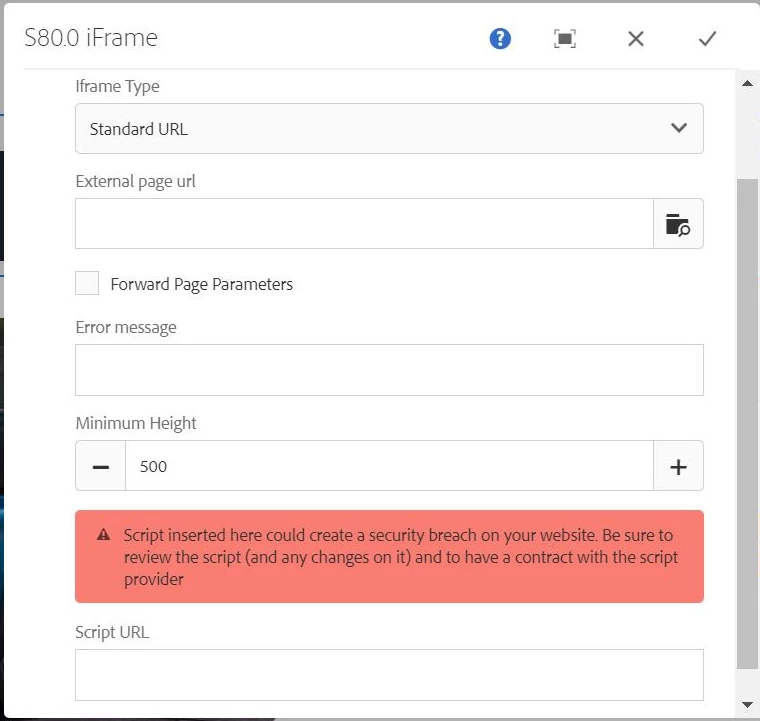


Kindly suggest.

This post is no longer active and is closed to new replies. Need help? Start a new post to ask your question.
Best answer by Pulkit_Jain_

@surajitk1518267 

Could you please elaborate "we are calling a website which has functionality to zoom in & out."- how you have implemented the same? Also, did you check any other browser?

I can test the case over the latest AEM 6.4 build in-house. 

1 reply

Pulkit_Jain_
Pulkit_Jain_Accepted solution
Employee
March 26, 2021

@surajitk1518267 

Could you please elaborate "we are calling a website which has functionality to zoom in & out."- how you have implemented the same? Also, did you check any other browser?

I can test the case over the latest AEM 6.4 build in-house. 

surajitk1518267
New Participant
March 30, 2021
We need to call this website in the iframe. https://kiger.renault.co.in/#/car/kiger