In editable fields i am facing overlapping issue | Community
Skip to main content
New Participant
June 8, 2023
Solved

In editable fields i am facing overlapping issue

  • June 8, 2023
  • 2 replies
  • 835 views

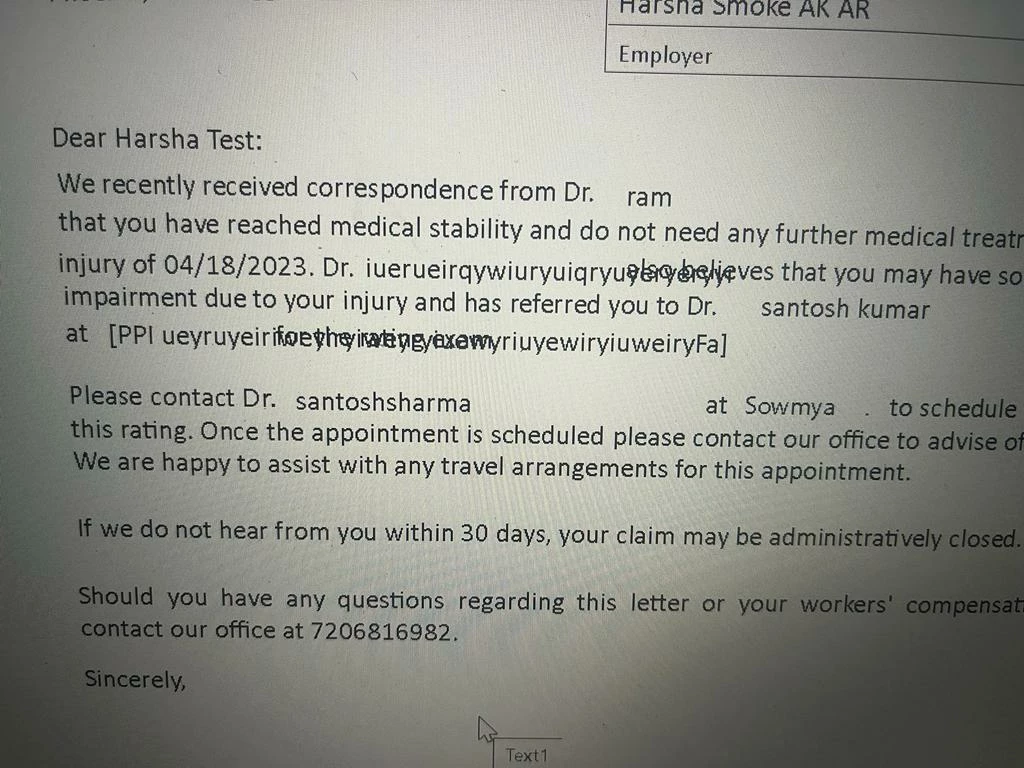
For editable fields i am taking textfield  and trying to give data too much means it is trying to overlapping besides objects.
 

This post is no longer active and is closed to new replies. Need help? Start a new post to ask your question.
Best answer by Vijay_Katoch

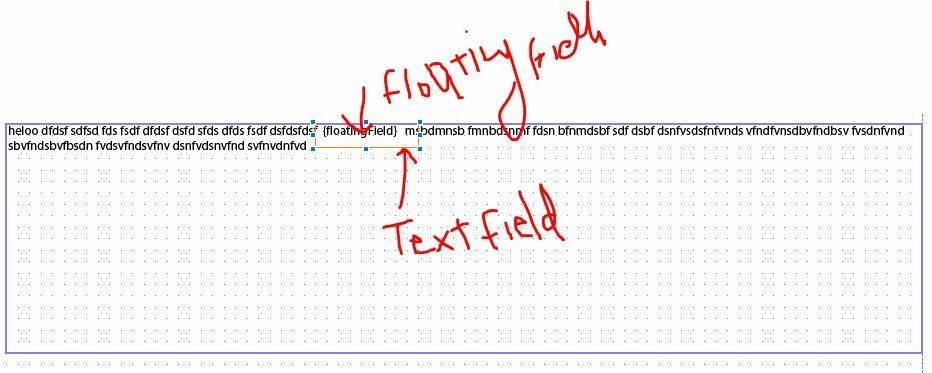
Seems like you are using a textfield with a text object. If the user enters the data inside the text field then it will overlap with the text object. You need to give enough space for the textfield for the data entered by the user. It will behave like this only.


To enter dynamic data inside the text object there is an object called a floating field, in which you can map data in data binding but it's not user-entered.


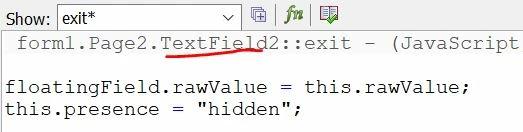
One workaround would be like taking a floating field with textfield and on exit event of textfield, hiding the textfield and setting the data of textfield in the floating field.

In this scenario user will not be able to edit the field again.


Or use below, in this case user can edit the data again:


floatingField.rawValue = this.rawValue;
this.rawValue ="";
 

2 replies

radzmar
New Participant
June 11, 2023

There's another method with floating fields, which you can edit directly in the static text. 

https://web.archive.org/web/20101124093614/http://blogs.adobe.com:80/formfeed/2010/09/editable-floating-fields-v3.html

Vijay_Katoch
Vijay_KatochAccepted solution
New Participant
June 9, 2023

Seems like you are using a textfield with a text object. If the user enters the data inside the text field then it will overlap with the text object. You need to give enough space for the textfield for the data entered by the user. It will behave like this only.


To enter dynamic data inside the text object there is an object called a floating field, in which you can map data in data binding but it's not user-entered.


One workaround would be like taking a floating field with textfield and on exit event of textfield, hiding the textfield and setting the data of textfield in the floating field.

In this scenario user will not be able to edit the field again.


Or use below, in this case user can edit the data again:


floatingField.rawValue = this.rawValue;
this.rawValue ="";