
Is there a way to auto archive files on AEM to a specific folder? | Community
Skip to main content
Tam123456
New Participant
August 1, 2023
Solved

Is there a way to auto archive files on AEM to a specific folder?

  • August 1, 2023
  • 3 replies
  • 1065 views

We know how to set expiration date and unpublish assets from brand portal by setting up the date and time.


First question: Once we set an expiration date on assets and they expire on that date, is there a way to auto archive those expired assets to a specific folder?


Second question: When we set a date for an asset to expire or set a date for it to unpublish, is there a way to get an email notification?
This post is no longer active and is closed to new replies. Need help? Start a new post to ask your question.
Best answer by SivakumarKanoori

@tam123456 :


For your second question there is an OOTB solution availble


Go to Osgi configuration and search for the config:

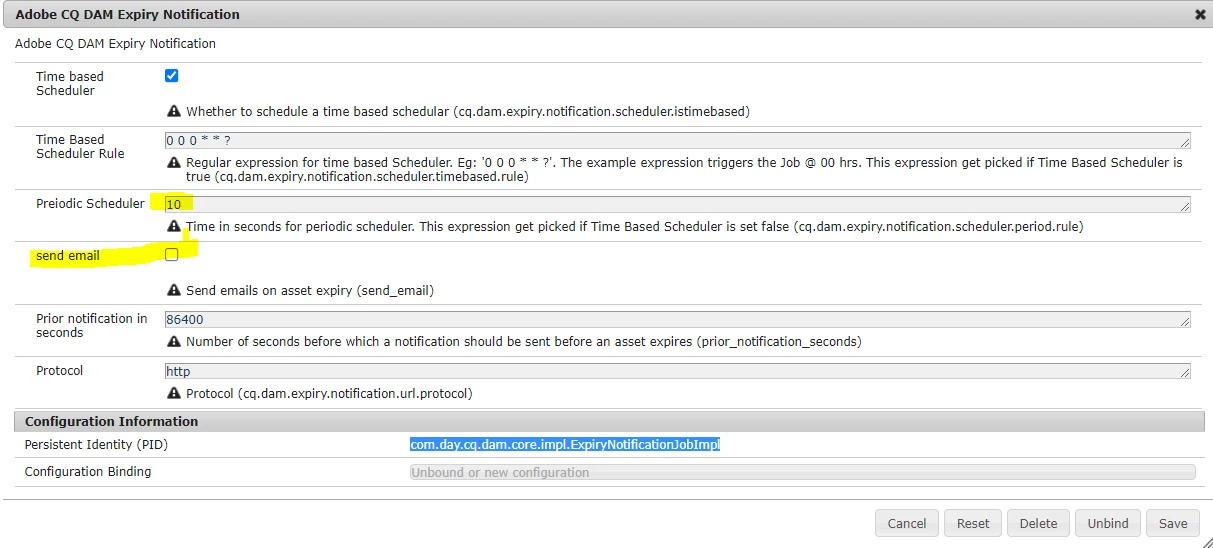
Adobe CQ DAM Expiry Notification -> You can check the box to send email -> it wil send email to the user who uploaded it.. As per the config, this periodic job runs every 10 seconds to check the expired assets and notify the users.


Tried this, and it is working fine.

First question: 

There is no such scenario to move to the separate folder , though it wlil mark the current asset as expired.  May be you can write a scheduler to run on daily basis and move to the separate folder. <You can use querybuider to get the expired assets>

3 replies

SivakumarKanoori
SivakumarKanooriAccepted solution
New Participant
August 4, 2023

@tam123456 :


For your second question there is an OOTB solution availble


Go to Osgi configuration and search for the config:

Adobe CQ DAM Expiry Notification -> You can check the box to send email -> it wil send email to the user who uploaded it.. As per the config, this periodic job runs every 10 seconds to check the expired assets and notify the users.


Tried this, and it is working fine.

First question: 

There is no such scenario to move to the separate folder , though it wlil mark the current asset as expired.  May be you can write a scheduler to run on daily basis and move to the separate folder. <You can use querybuider to get the expired assets>

Thanks,Siva
Sid_Gour
New Participant
August 2, 2023

Hi @tam123456 ,

Both of your questions are interesting usecases in AEM Sites/Assets. I doubt whether we have OOTB functionality to achieve these.

You can definitely achieve these two requirements using custom solutions such as custom workflows, scheduled jobs or event listeners.  

Thanks,

Pulkit_Jain_
Employee
August 2, 2023

@tam123456 

Based on the information provided over various help docs, the auto-archival feature is unavailable with AEM assets. Still, you can post your query here[0] for an expert advice on this topic.

[0] - https://experienceleaguecommunities.adobe.com/t5/adobe-experience-manager-assets/ct-p/experience-manager-assets-community