Is there a way to delet a javascript from a form? | Community
Skip to main content
New Participant
June 1, 2023
Solved

Is there a way to delet a javascript from a form?

  • June 1, 2023
  • 2 replies
  • 2183 views

I have a form that has some javascript I no longer need. I've tried deleting it out of the Script Editor, and even deleting the field it is attached to, but no good.

When I open the form in Acrobat, the debugger always comes up.

What other information would you need?
This post is no longer active and is closed to new replies. Need help? Start a new post to ask your question.
Best answer by Vijay_Katoch

Thanks, sent


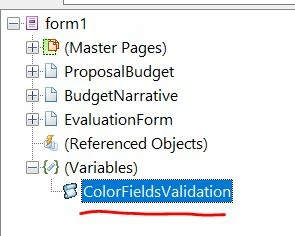
I can see only this script variable in your form, you can select this and remove all the lines from the script editor, then it will be deleted from the form.


2 replies

radzmar
New Participant
June 11, 2023

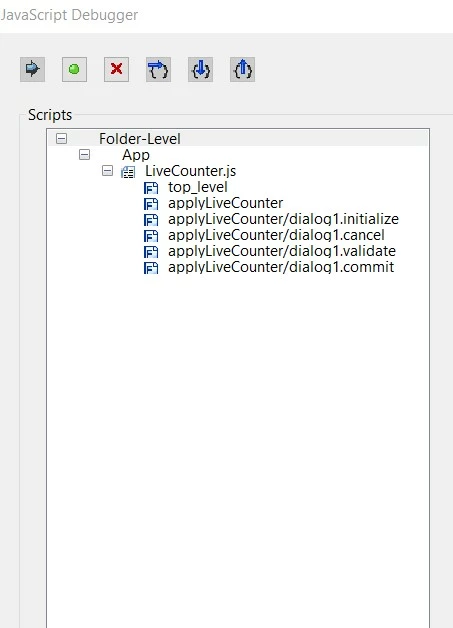
The debugger says, it's a Folder-Level script. So the script you're looking for is not placed in your form but in a js-file saved on your computer. Look into the Javascripts folder of your Acrobat: 


/C/Program Files (x86)/Adobe/Acrobat DC/Acrobat/Javascripts

Vijay_Katoch
New Participant
June 2, 2023

Need to check the form for any reference to javascript(vkatoch07@gmail.com). For debugger, you can disable it in Acrobat choosing from Edit> preferences>Javascript

akunceAuthor
New Participant
June 5, 2023

Thanks you, but I'm not sure do you delete it? That's what I'm having difficulty figuring out.


Vijay_Katoch
New Participant
June 5, 2023

Share your form vkatoch07@gmail.com.


I’ll have a look.