Looking for help with repeating table rows and subform
I’m hoping someone might be able to help me figure out how to accomplish some things with a repeating table subform in a form I’m building. I’ve attached the file here.
https://workspaces.acrobat.com/?d=2nUNZuTf2T4tsdSykMTlXw
I have a table (AssessChart1Table) it set up on pg 7 (Analysis) and have built in buttons(AddRowAssesChart1 and DeleteRowAssesChart1) so the user can add or delete additional rows of data as needed.
The problem is that the user also enters data going across in the header row (AssessChart1HeaderRow1) of this table. There are 10 columns available; however, they may need to add more data than that. Therefore, I made a button (AddMoreCourses) for the user to click to add another instance of the table subform (AssessEvalChart1) and also undo the adding of the subform with this button (UndoAddMoreCourses).
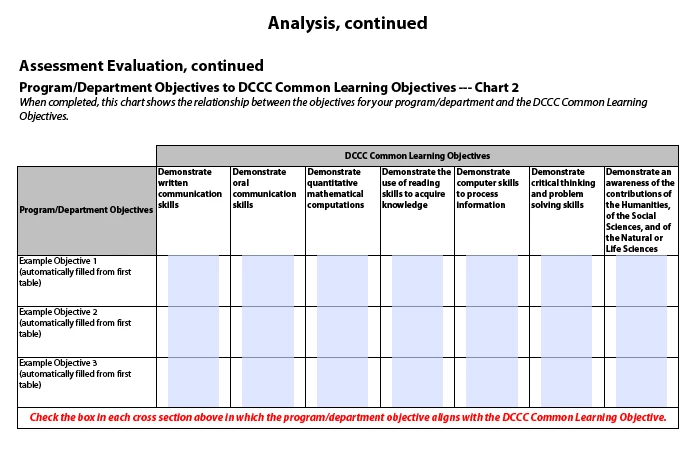
In addition, I have it setup that whatever data the user enters into the cell (Prog-DeptObjChart1) cell of that table gets automatically transferred to another table (AssessChart2Table), cell (Prog-DeptObjChart2), which is located on the next page (AnalysisCont1).
All of the above works fine except that whenever the user presses the button (AddMoreCourses) I don’t want it to automatically fill in the text field cells that are copied over from (AssesChart1HeaderRow3) because I need the user to be able to enter different values in lieu of adding more columns to fit their data. Additionally, I would like the values from the cells in the left column to repeat though because these values won’t change. Currently the values from the cells in the left column that carry down to (AssessChart2Table) get messed up on (AssessChart2Table) anytime I the user pushes Add More Courses button or Undo Add More Courses button.
In summary the tables would look like the attached screenshots:
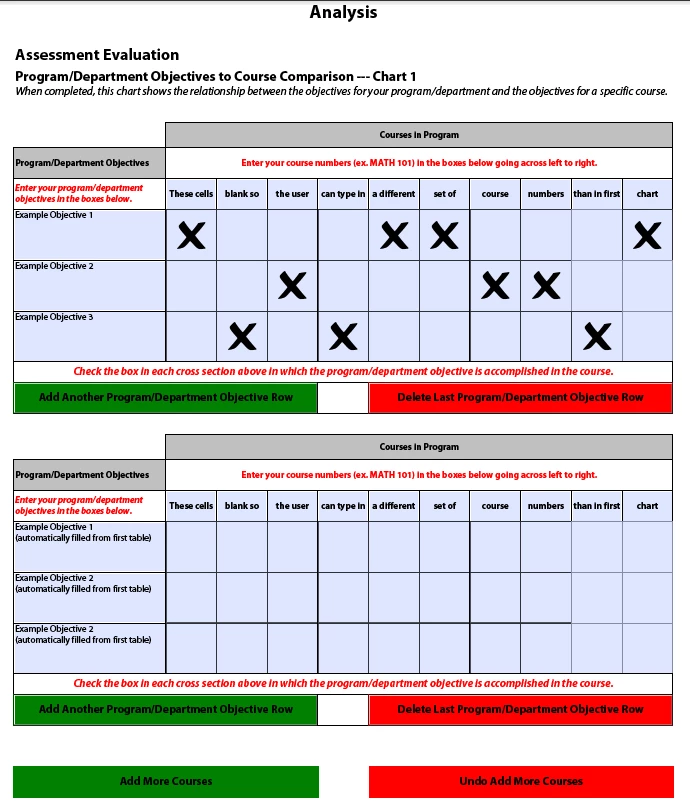 :
:
Any help would be so greatly appreciated. I am not experienced with Livecycle Designer. The form I've built by reading examples and forums.
In case you need this, I'm using Livecycle Designer v. 9.0.0.2.20120627.2.874785 on a Windows 7 Pro platform.
Thank you!