
Multiple toolbars in Wizard mode | Community
Skip to main content
IainClucas
New Participant
October 31, 2022
Solved

Multiple toolbars in Wizard mode

  • October 31, 2022
  • 2 replies
  • 1456 views

We would like to have two toolbars in our forms which are a set of panels that are managed in Wizard mode.

We would like the Next, Save and Submit buttons on a bottom toolbar and a back button on a top toolbar that appears before the current form panel. 


Whilst we are in Wizard mode, so we could have the prev/next buttons, we actually hide the Wizard navigation through CSS.


So has anyone got any suggestions to have back button toolbar in addition to the other bottom toolbar?
This post is no longer active and is closed to new replies. Need help? Start a new post to ask your question.
Best answer by Mayank_Gandhi

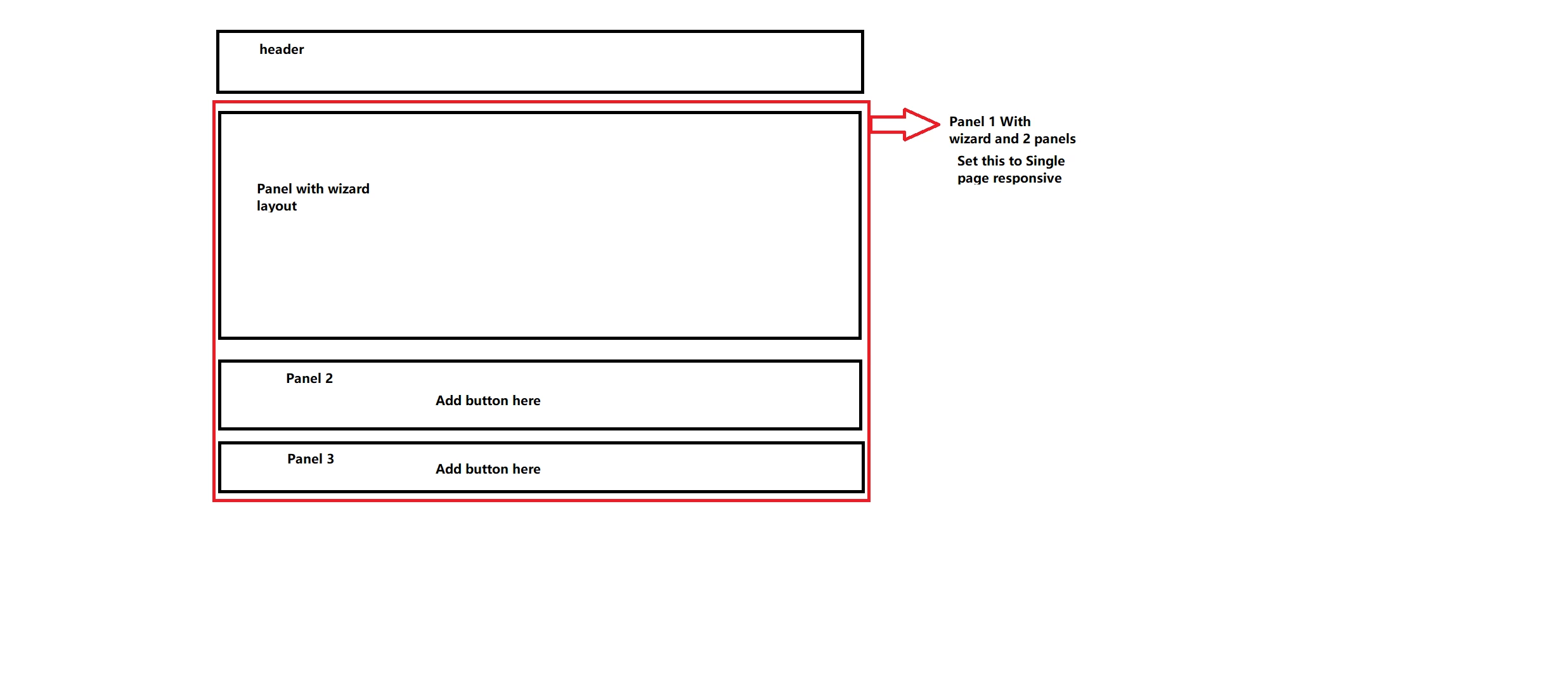
@iainclucas You can actually do it using panels, try this design 


2 replies

Mayank_Gandhi
Mayank_GandhiAccepted solution
Employee
November 1, 2022

@iainclucas You can actually do it using panels, try this design 


IainClucas
New Participant
November 1, 2022

Thanks - I will try to give this a go when I am next in the office. I assume the Wizard panel can go inbetween the other two panels (top and bottom). In this case are you not using a toolbar at all?

Mayank_Gandhi
Employee
November 1, 2022

@iainclucas bingo! That's the design I wanted you to try.

Pulkit_Jain_
Employee
November 1, 2022

@iainclucas 

Wizard layout for Panels comes with OOTB guided navigation so wondering why there is a need for an additional toolbar with similar icons.

Is it the use case where you only want the next button on the bottom toolbar? For additional icons, you can customize the existing panel layouts and add css/js[0].

If validation is a concern, you can ensure an additional check is in place by validating the panel navigation OOTB.


window.guideBridge.validate([], this.panel.navigationContext.currentItem.somExpression)

[0] - https://experienceleague.adobe.com/docs/experience-manager-64/forms/customize-aem-forms/custom-layout-components-forms.html?lang=en 

IainClucas
New Participant
November 1, 2022

The client has a tight set of patterns for all their forms (thousands of them) They state that there should only be on screen the items that are needed (no guided navigation, breadcrumbs, pagination etc) The back button (if on "page 2+" must be the first thing the user can interact with. The form item(s) must come next, followed by the Interaction controls. (Next, Save, Submit etc)


The forms typically adhere to the single form component per "page"/panel approach.


So we are currently using the wizard approach for the flow but hiding it using CSS. It seems to work going forward but the back button as the 1st element is proving more troubling.

Pulkit_Jain_
Employee
November 1, 2022

@iainclucas 

Thanks for explaining this further!

I think @mayank_gandhi provided a nice workaround so you can implement the same.