Need help with expanding text boxes in a table not quite overflowing onto next page | Community
Skip to main content
Level 4
Mar 22, 2023 3:17 PM UTC
Solved

Need help with expanding text boxes in a table not quite overflowing onto next page

Good morning,


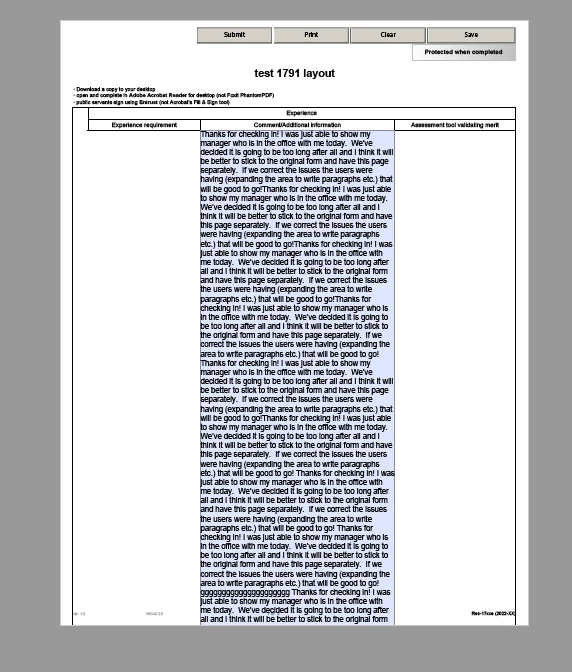
I've done a ton of these and i don't know what is going on this time. I have a Table with (2 headers,1 row) and everything is set to "allow page break" but when i copy a pretty big chunk of text into that box, the overflow onto the next page is not executed. If i have that field out of the table, it works fine. but inside that table, it doesn't carry over properly onto next page.


Now this is a dynamic table, which means "i got the "Repeat Row for each Data" checked.


I just don't get why its not behaving right. Any ideas?? thanks so much.


This post is no longer active and is closed to new replies. Need help? Start a new post to ask your question.
Vijay_Katoch
Vijay_KatochAccepted solution
New Participant
Mar 23, 2023 4:16 PM UTC

I received your Form and fixed this.

You need to do below things:

1) Allow page break for "Page1"

2) Allow page break for table "h_Table_experience"

3) Inside the Row1, wrap the "Button1", "Cell1" and "Cell2" inside the subform individually.


It will work.


Thank You

10 replies

Vijay_Katoch
Vijay_KatochAccepted solution
New Participant
Mar 23, 2023 4:16 PM UTC

I received your Form and fixed this.

You need to do below things:

1) Allow page break for "Page1"

2) Allow page break for table "h_Table_experience"

3) Inside the Row1, wrap the "Button1", "Cell1" and "Cell2" inside the subform individually.


It will work.


Thank You

Translate
Level 4
Mar 23, 2023 6:30 PM UTC

thx for the info Vijay, that solved my issue 🙂 much thx!!!

PAtrick


Translate
Level 4
Mar 23, 2023 7:10 PM UTC

Hi again,


Just one more thing, now that everything works when i wrap each object in a subform, my delete row button no longer works. 😞


Here is the code,

this.parent.instanceManager.removeInstance(this.parent.index);


I've tried the code again with the button not being wrapped in a Subform and it works again, can anything be done for this lil problem too?? thx again!!!

Translate
Vijay_Katoch
New Participant
Mar 23, 2023 4:06 AM UTC

Put the field inside the table in the subform and allow the page break in the subform. It will work.

Translate
Level 4
Mar 23, 2023 2:40 PM UTC

Hi,


I did try that just now, but weird, the subform as the option "gray out". Maybe this is where my problem lies.


Translate
Vijay_Katoch
New Participant
Mar 23, 2023 2:48 PM UTC

May be try to delete the field first and then put again, and then wrap in subform.

if issue persists share it with me.
Share it over Google drive(vkatoch07@gmail.com)

Translate
radzmar
Level 10
Mar 22, 2023 9:05 PM UTC

The option "Repeat Row for each Data" has nothing to do with this. The cell, row and table have to allow page breaks. However, there are conditions with nested tables, where it won't work properly. If you can share the form, we can look into it.

Translate
Level 4
Mar 23, 2023 2:43 PM UTC

Here is the file, maybe you can see whats missing. im out of ideas. how do i share a file? I tried move/drop into this reply box, but it says format unsuported.


Translate