Please help me in solving this... | Community
Skip to main content
New Participant
September 10, 2020
Solved

Please help me in solving this...

  • September 10, 2020
  • 2 replies
  • 1011 views

Please help me, I'm struggling since morning.

I'm working on form Adobe Livecycle Designer which has a Tax field, I want it to be with only 2 decimals without rounding it off.

I'm using FormCalc and the fields are

Field Names : "SubTotal" and "VAT" (VAT is Calculated-Read Only)

formula using in FormCalc (Calculate) "$=SubTotal*5/100"

Ex: for the amount of 1037.50*5/100 = 51.875

and this give the round off result as 51.88

I want this to be 51.87 (I want the result to be without round off)


Topics
 
This post is no longer active and is closed to new replies. Need help? Start a new post to ask your question.
Best answer by Kosta_Prokopiu1

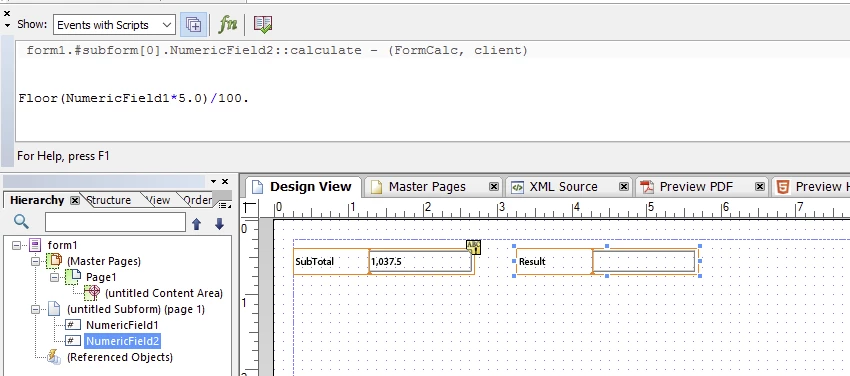
If you always want the .87 to show no matter what the 3rd and further digits are, you can do this:

This will "cut" after 2 digits, I use the display pattern of num{z,zzz,zz9.99}. I hope that helps.

2 replies

Kosta_Prokopiu1
Kosta_Prokopiu1Accepted solution
Employee
November 9, 2020

If you always want the .87 to show no matter what the 3rd and further digits are, you can do this:

This will "cut" after 2 digits, I use the display pattern of num{z,zzz,zz9.99}. I hope that helps.

BrianKasingli
New Participant
November 8, 2020

@syd1980 

This question seems to be an AEM Form's question. If you post this same question in the AEM Form's Forum, you will more likely find an answer from there, https://experienceleaguecommunities.adobe.com/t5/adobe-experience-manager-forms/ct-p/adobe-experience-manager-forms-community