Possible to remove default banner? | Community
Skip to main content
helloktgrrl
New Participant
May 5, 2009
Solved

Possible to remove default banner?

  • May 5, 2009
  • 13 replies
  • 14330 views

Hi, all. When my form is opened in Adobe Reader, there is a default purple banner at the top that says: Please fill out the following form. If you are a form author, choose Distribute Form in the Forms menu to distribute it to your recipients.

Is there a way that I can suppress this banner? Thanks!

Suzanne
This post is no longer active and is closed to new replies. Need help? Start a new post to ask your question.
Best answer by

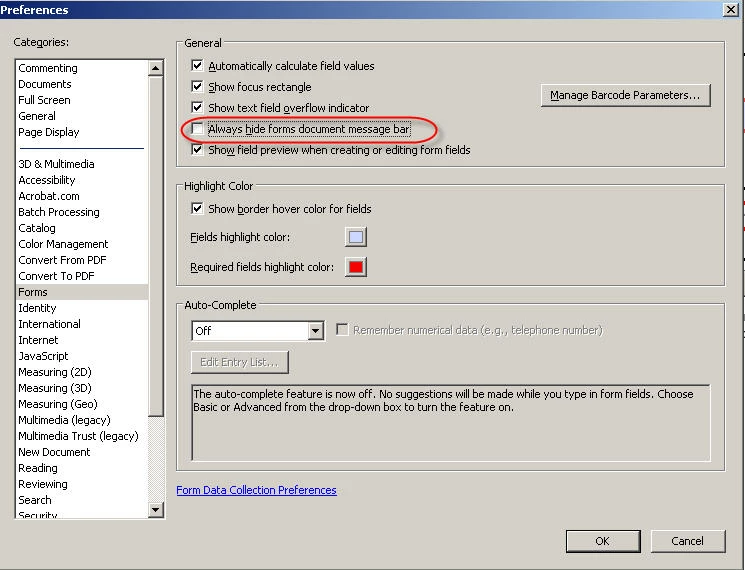
There is a setting in Acrobat/Reader for this. Under Edit/Preferences/Forms have a look at this setting.

13 replies

December 15, 2015

Here is the solution I came up with:

1. Build your form in LiveCycle.

2. Save a copy of the undistributed form.

3. Open the copy in Acrobat (don't open it in LiveCycle).

4. Select File, Save As Other, Reader Extended PDF, Enable More Tools.

5. Save the File. This version should allow reader edit/save rights, but will not contain the Submit Form button on the ribbon at the top.


This works for an interactive XML LiveCycle form.  You won't get a collect responses file if you do it this way, but that didn't matter for my purposes. 

Jono_Moore
New Participant
April 4, 2011

This doesn't work for LiveCycle PDFs, at least with Acrobat 9, all those properties are greyed out.

New Participant
April 1, 2011

This may be a bit late for you, but I wanted to add my response for others that may be searching the internet for answers.

In your orignal form, go to File, then Properties.

Once there, select the Inital View Tab. After that, in the User Interface Options section, click "Hide window controls"

This will disable the "purple bar" completely. You will then need to re-save and re-open the file and voila.

Edited to Add: Oh yeah, this is NOT an April Fools Joke - lol

July 9, 2009

There is no way to turn off the bar programatically. The settings you are playing with only turn the highlightling of the fields on/off. There is a setting in the preferences that will get rid of the bar but as I said it is not exposed through programming. To  turn it off go under the Edit/Preferences/Forms menu. Make sure the "Always hide forms document message bar" option is ticked on. This will turn off that bar (for all forms).

Hope that helps

Paul

Jono_Moore
New Participant
July 8, 2009

There's a bunch of info on app.runtimeHighlight in this thread:

http://forums.adobe.com/message/2067551#2067551

You can't change the colour of the bar itself - just the highlight colour shown in fields.

New Participant
July 8, 2009

I have read and appreciated all the things you contribute to this forum--

I don't think I would have the patience to answer "you can't freakin' attach a document to a pdf using LiveCycle Designer you need the server software" for the millionth time!

Anyway, I can't seem to get either the

app.runTimeHighLite or app.runTimeHighLiteColor from your forum to do anything

tried several things, the one that seems like it should work is

app.runTimeHighLite = "false";

What am I missing that makes me as stupid as the people I just got done making fun of?

If I can't get that stupid purple bar to go away, I don't think the boss is even going to use the form I've spent an inordinate amount of time creating.

This is a form for invention disclosures and the higher ups just don't want people to use the distribute forms feature--they don't really care if the feature is available but don't want the big purple pointer to the function.  My only idea is to maybe turn it black.  But even turning off the highlight color so it's not purple would be a start.

thanks in advance!

Brian

May 7, 2009

You can change the color if it does not work for you or you can disable the color completely.

app.runTimeHighLite is a boolean that will enable/diable the highlight color.

app.runTimeHighLiteColor will allow you to set the color of the highlight if you do not like the default. This can also be changed in the preferences of Acrobat/Reader.

Paul

New Participant
May 7, 2009

Adobe:

What made you think that everyone designing forms, and using them, would want to see that default banner?

  1. It takes up too much space.
  2. Looks "Sesame Street" and clashes with professional form formats.
  3. Why "highlight" fields to a blue color that may not be appropriate to the form's color scheme?
May 6, 2009

My research shows that there is no programatic access to that document message bar. You  can use the preferences as I discussed earlier (change for all docs) or you can click on the document page icon (at the left of the message bar) to collapse it ( on a doc by doc basis).

Paul

helloktgrrl
New Participant
May 5, 2009

Yes, if you can find one, that would be great! Otherwise, I will write a tip sheet to go along with our forms.

Thanks!

Suzanne