repeat subforms for each data item | Community
Skip to main content
New Participant
August 1, 2020
Solved

repeat subforms for each data item

  • August 1, 2020
  • 4 replies
  • 6190 views

Hello,

I would like to ask a question about the "Repeat Subform for each data item" option present in the Aem Forms Designer in Object-> Binding. If I connect the element I want to repeat to the data of the XMl file through the "Data binding" field and select "Repeat Subform for each data item" the result I see in the preview is correct but it gives me a warning like "The maximum repeat value for this subform is set to a higher value than the data connection" if the number of connected data is equal to 1. Is it possible to use the option whether the number of data is > 1 or equal to 1? I have tried with different values also on "Min count"and "Max count" but the warning remains.

This post is no longer active and is closed to new replies. Need help? Start a new post to ask your question.
Best answer by Kosta_Prokopiu1

Hi,

you basically confirmed my assumption. If you use more than 1 fragment as shown below you run into the "data depleated" situation.

Here a basic XML sample which should match your data
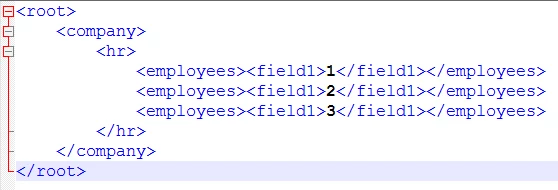
The first repeating subform (no matter if in fragment or directly placed in the design) will depleat your data which is run through from top to bottom during render and never goes back to the beginning. Should subform 1 only read 2 elements, subform 2 would get the one left. But as your subforms dynamically use all employees records subform 2 will never get anything. That you still see one empty has to do with the fact that normally minimum one instance of the subform is thrown but no data for your fields are there.

You could now do the following:
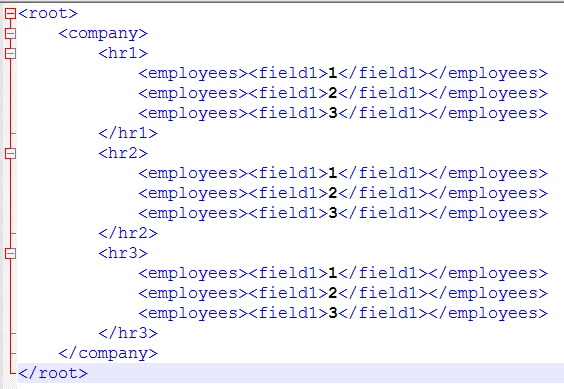
Assign hr1 to the first, hr2 to the second ... - problem here is, that it not only duplicates/triplicates the data but you are not flexibel with your forms - you would have to change the data collection with every form depending on the number of fragments used - and if you don`t know how many would be there at render time - well then things become really ugly and unmaintainable.


You probably have only one option left. Use the data from the dataset directly and NOT bind it. Use a script in EVERY fragment which loops through the data, uses the instance manager to throw a new row and fill the value of each field. This would not deplete the data, and by implementing it consistenly, you do not have differing approaches to filling the fragments.


This is too complicated to quickly conjur up as an example - I don't have time for that. But I hope that it will help you towards a solution.

How experienced are you with the scripting in XFA?

4 replies

Kosta_Prokopiu1
Kosta_Prokopiu1Accepted solution
Employee
August 4, 2020

Hi,

you basically confirmed my assumption. If you use more than 1 fragment as shown below you run into the "data depleated" situation.

Here a basic XML sample which should match your data

The first repeating subform (no matter if in fragment or directly placed in the design) will depleat your data which is run through from top to bottom during render and never goes back to the beginning. Should subform 1 only read 2 elements, subform 2 would get the one left. But as your subforms dynamically use all employees records subform 2 will never get anything. That you still see one empty has to do with the fact that normally minimum one instance of the subform is thrown but no data for your fields are there.

You could now do the following:

Assign hr1 to the first, hr2 to the second ... - problem here is, that it not only duplicates/triplicates the data but you are not flexibel with your forms - you would have to change the data collection with every form depending on the number of fragments used - and if you don`t know how many would be there at render time - well then things become really ugly and unmaintainable.


You probably have only one option left. Use the data from the dataset directly and NOT bind it. Use a script in EVERY fragment which loops through the data, uses the instance manager to throw a new row and fill the value of each field. This would not deplete the data, and by implementing it consistenly, you do not have differing approaches to filling the fragments.


This is too complicated to quickly conjur up as an example - I don't have time for that. But I hope that it will help you towards a solution.

How experienced are you with the scripting in XFA?

utente2Author
New Participant
August 7, 2020
thanks, your answer was helpful, I should study the use of istance manager. I don't have much experience with scripting in XFA (2 - 3 months)
utente2Author
New Participant
August 4, 2020

I can't post the image of the form because it is a customer product, I post a similar scheme that I have created now. Below are the structure and related bindings for the 3 fragments that are used by the general form. As you can see all 3 refer to the same type of data in the xml file (any errors in the names don't matter, they are examples)


utente2Author
New Participant
August 3, 2020

I tried to do as you wrote, in one case it works, in the other it doesn't. I try to explain better (I don't speak good English): I created a form that uses fragments. In the fragments I inserted the binding as indicated. If I preview directly from the fragment files, everything is ok, if instead I run the form that includes them, it displays all the pages only for one fragment. For the other ones it is as if it found only one page and did not see the repetition. Fragments use the same data in the XML. In addition, if from the main document I calculate the number of occurrences of these data in the XML it gives me a higher number than the one actually present, while it gives the correct number if I remove the fragments.

Kosta_Prokopiu1
Employee
August 4, 2020
are the fragments using the exact same section of the XML and you have >1 fragment that tries to access the same data in your form? That is not possible - the data gets sequentially "consumed" by the first fragment in the rendering sequence - the other ones will not get the data. That is a fact of the product. You will have to work around that either by duplicating the data in the XML and assigning the tags accordingly or by using script that fills the subsequent fragments. Both is difficult when you have dynamic, varying forms that make use of that one fragment. The number of occurences depends on what exactly you are counting and how. Can you post a screenshot of how your form ist structured in Designer?
Kosta_Prokopiu1
Employee
August 3, 2020

The sample XML:

<root>
<repeatsection>
<repeatline>
<fieldx>content</fieldx>
</repeatline>
<repeatline>
<fieldx>content</fieldx>
</repeatline>
</repeatsection>
</root>


Then the design, a subform for the section and one for the lines repeating and a field

Set the repeat to min 1 - no other setting required

and your field

Not sure where you see this warning - is this a triangle in Designer? Try this approach and tell me if you still get that particular message...