Ruler in adobe live cycle designer in mm | Community
Skip to main content
August 12, 2011
Solved

Ruler in adobe live cycle designer in mm

Hi All,

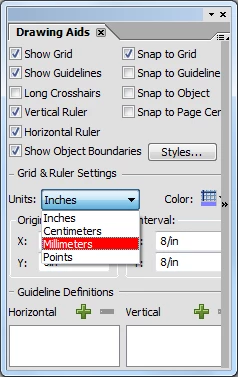
Is there any way in adobe designer where i can set the x and y co-ordinate in mm instead of inches in layout properties of an object?

I want to design form with particular specifications and those specifications are in mm and in designer the ruler is in inches how do i convert it in mm.

Regards

Abhishek

This post is no longer active and is closed to new replies. Need help? Start a new post to ask your question.
radzmar
radzmarAccepted solution
Level 10
August 12, 2011

Doubleclick the ruler and select the measurement.

3 replies

August 12, 2011

Thanks guys!!!

Translate
radzmar
radzmarAccepted solution
Level 10
August 12, 2011

Doubleclick the ruler and select the measurement.

Translate
Debadas
Level 4
August 12, 2011

Hello Abhishek,

You can directly specify the particular specifications of an object (in mm), which are given,

in the X and Y co-ordinates of the layout palette.

e.g. -: X: 23mm        Y: 45mm

This amount is automatically changed to inch format.

Thanks,

Debadas.

Translate