
Solved
Spinner in html 5 input type
Whenever i enable HTML 5 input type for numeric component, the numeric pinner like below is also popping up. Can I hide this using the theme editor? or is there any other way to hide this?
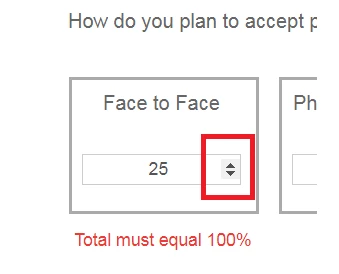
Whenever i enable HTML 5 input type for numeric component, the numeric pinner like below is also popping up. Can I hide this using the theme editor? or is there any other way to hide this?
Hi deepakt84913413
You don't appear to be able to change this in the theme editor as you need to do the following in CSS:
.numericInput input[type=number]::-webkit-inner-spin-button,
.numericInput input[type=number]::-webkit-outer-spin-button {
-webkit-appearance: none;
margin: 0;
}
Theme editor caters for the "::before" and "::after" pseudo selectors.
The ::-webkit-inner-spin-button pseudo selector, can't be input into the theme editor as far as I am aware.
Instead you can add the CSS above to a client library and reference that on your form (in addition to your theme). I tested it and this does remove the up and down arrows:
before

after

Thanks,
James
Enter your E-mail address. We'll send you an e-mail with instructions to reset your password.