text field format in AEM Designer | Community
Skip to main content
ayecona
Level 5
Aug 14, 2019 2:25 PM UTC
Solved

text field format in AEM Designer

this is my adaptive form... the title for the text box are part of the component text field. they are on top of the text field
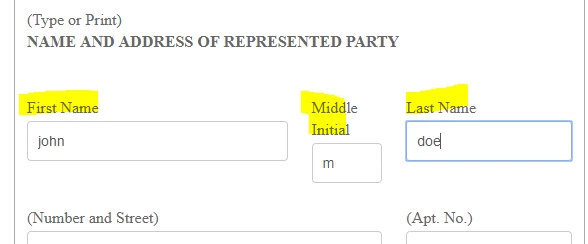
when I get my PDF this is the way it looks on the left of it....
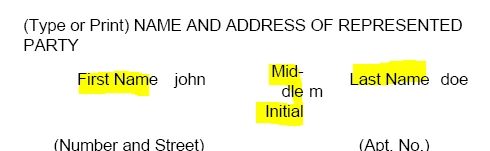
that is because the DOR template has them on the left side.
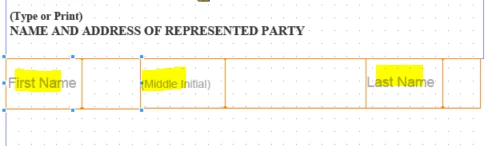
QUESTION:

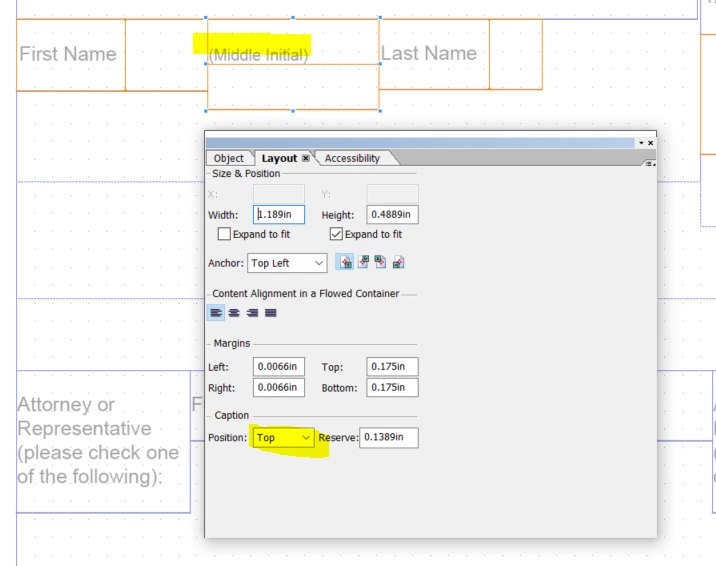
In AEM designer how do I place the title of this text field on top just like the Adaptive form so that my pdf is exactly the same as the adaptive form??

thanks
This post is no longer active and is closed to new replies. Need help? Start a new post to ask your question.
ayecona
ayeconaAccepted solution
Level 5
Aug 14, 2019 2:36 PM UTC

got it....

2 replies

Mayank_Gandhi
Employee
Aug 14, 2019 2:39 PM UTC

You can right-click the field and go-to style editor and change the layout for caption.

Translate
ayecona
ayeconaAuthorAccepted solution
Level 5
Aug 14, 2019 2:36 PM UTC

got it....

Translate