There was issue in invoking the Forms and Document Workflow. | Community
Skip to main content
New Participant
September 18, 2019
Solved

There was issue in invoking the Forms and Document Workflow.

  • September 18, 2019
  • 22 replies
  • 14473 views

I am trying to invoke a forms workflow whenwe submit a adaptive form. I made the configurations as shown below

Perform the following steps to enable your AEM forms server to submit data to an AEM Forms on JEE server:

  1. Go to AEM web configuration console at http://[host]:[port]/system/console/configMgr.
  2. Locate and click the Adobe LiveCycle Client SDK Configuration component.
  3. Click to edit the configuration server URL, username, and password for the AEM Forms on JEE server.
  4. Review the settings and click Save.

I am able to see the process in the drop down But when i submit the Form it is throwing an exception
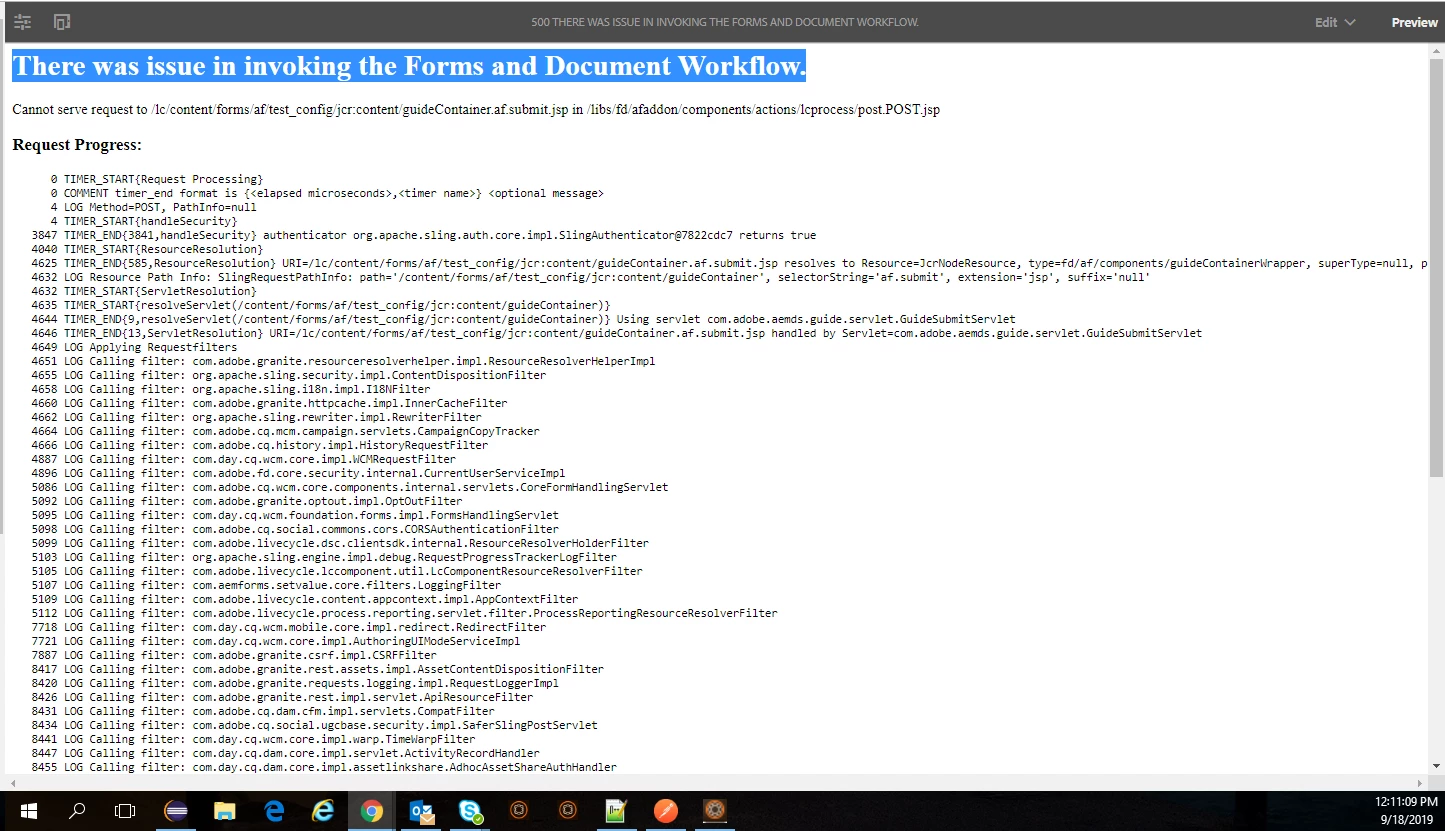
Can any one suggest What else need to be done

This post is no longer active and is closed to new replies. Need help? Start a new post to ask your question.
Best answer by Pulkit_Jain_

Our documentation here[0] implicitly assumes that the Developer must have:

- Changed the "Require callers to authenticate" to "No" for the service created for this application/process as below:

Adminui > Home > Services > Applications and Services > Services Management > "Your Application" > Security (other tabs are Pooling, Endpoint)> Require callers to authenticate- change to "No".

- Added the service (MyApplication/processes/NameOfProcess) to the list- Services Names, which should be invoked as system user by default in the "Livecycle Client SDK configuration" under configMgr.

[0] Configuring AEM Forms to submit form data to an AEM Forms on JEE process

22 replies

Mayank_Gandhi
Employee
September 20, 2019

Let's start from scratch:

As you are able to see the process in the drodown it means settings are configured correctly. What was the result when you updated the security setting for the process. Did you set it to invoker and try?

Share server,access and error log snippet when you invoke the process.

Employee
September 19, 2019

you can create custom submit and in the custom submit use the code that I gave you in the previous reply

Custom Submit in Adaptive Forms

Santhosh4Author
New Participant
September 19, 2019

Can you provide me a step by step process to try

Santhosh4Author
New Participant
September 19, 2019

I am not getting the point of JSP page. I am little new to this LC process

Employee
September 19, 2019

for testing purposes can you try invoking the process from JSP page. The following code should get you started

String processName = "AemForms/Processes/GetData";                 

com.adobe.livecycle.dsc.clientsdk.ServiceClientFactoryProvider scfp = sling.getService(com.adobe.livecycle.dsc.clientsdk.ServiceClientFactoryProvider.class);

com.adobe.idp.dsc.clientsdk.ServiceClientFactory serviceClientFactory = scfp.getDefaultServiceClientFactory();

// this is for passing parameters to your workbench process

Map paramsMap = new HashMap();

paramsMap.put("name",request.getParameter("name"));

com.adobe.idp.dsc.InvocationRequest ir = serviceClientFactory.createInvocationRequest(processName,"invoke",paramsMap,true);

// in the above code we are invoking a short lived process, hence the last parameter is true

ir.setProperty(com.adobe.livecycle.dsc.clientsdk.InvocationProperties.INVOKER_TYPE,com.adobe.livecycle.dsc.clientsdk.InvocationProperties.INVOKER_TYPE_SYSTEM);

com.adobe.idp.dsc.InvocationResponse invocationResponse = serviceClientFactory.getServiceClient().invoke(ir);

String content = (String)invocationResponse.getOutputParameter("data"));

Santhosh4Author
New Participant
September 19, 2019

I had setup the security option to NO

Employee
September 19, 2019

what  is the security setting for the process that you are trying to invoke

for testing purposes can you remove the security on the process from admin UI

Santhosh4Author
New Participant
September 19, 2019

211074 LOG Making DSC call to system.service_registry.getHeadActiveConfiguration

231355 LOG Successfully Completed the DSC call to Server at http://wdvra98a0814.wellsfargo.com:8080

231359 TIMER_END{20288,DSC}

231540 TIMER_START{DSC}

231546 LOG Making DSC call to MyApplication2/Config_OSGi.invoke

255620 LOG Failed to complete the DSC call to Server at http://wdvra98a0814.wellsfargo.com:8080

255623 TIMER_END{24082,DSC}

Santhosh4Author
New Participant
September 19, 2019

I did it still i am seeing the same issue

Employee
September 18, 2019

Have you whitelisted sun.util.com packages?