Trying to hide a column but the header reappear on the next pages | Community
Skip to main content
June 7, 2013
Solved

Trying to hide a column but the header reappear on the next pages

  • June 7, 2013
  • 11 replies
  • 9895 views

Hello everyone,

     Here is my little concern, i have a table, a pretty normal one. What i am trying to do is this :

     I'd like to be able to hide a complete column based on data. I have actually been able to hide a column completely, but my problem is that when the table breaks into a second page, the second page's header "cell" of the column i have hidden reappear.

Here is how i did my hiding :

          - In the table Initialize script, i verify a condition, and if this condition is filled, i hide the header cell.


                 if (Verif.name4_we.rawValue == "" or Verif.name4_we.isNull) then

                       HeaderRow.Cell3.presence = "hidden"

                 endif

          - For the normal rows, i still verify the exact same condition and if the condition is filled, i hide the cell.

                 if (data.Page1.Test.Table1.Verif.name4_we.rawValue == "" or data.Page1.Test.Table1.Verif.name4_we.isNull) then

                        $.presence = "hidden"

                 endif

This setup works pretty well if i only have one page : 
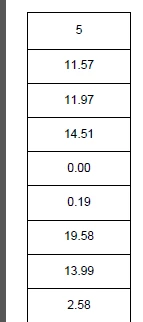

5 is my header row name(i know it might be confusing i'm sorry), this is page 1, column 6 and 7 are hidden actually.

This is what happen on the next pages :
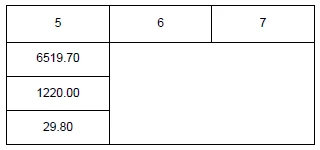

As you can see, only the header reappear, you can clearly notice that the items are still in hidden but since the header appear, it look
like there was a complete column.

Does anyone have an idea of what could be my issue?

Thanks alot!
Max

This post is no longer active and is closed to new replies. Need help? Start a new post to ask your question.
Best answer by

Are you able to change the width of your columns?

Here is the final way i did it :

First of all, you have to double click on the ruler to open the Drawing Aids palettes (or go in the top menu -> palettes -> Drawing Aids) and set the Units to Points.

You need a tables and a structure, a table that will actually show the information, and a structure that will be imported from your program with the correct widths(columns to be hidden will have a value of 0.001 in the structure). The structure is hidden in the layout.

In your table initialize script, write something like this :

//Set the columns width using our imported structure.//Empty ones have a width of 0.001

var width = Concat(data.Page1.struct.col1, "pt ",

                                           data.Page1.struct.col2, "pt ",

                                           data.Page1.struct.col3, "pt ",

                                           data.Page1.struct.col4, "pt ",

                                           data.Page1.struct.col5, "pt ",

                                           data.Page1.struct.col6, "pt ",

                                           data.Page1.struct.col7, "pt ",

                                           data.Page1.struct.col8, "pt ",

                                           data.Page1.struct.col9, "pt ",

                                           data.Page1.struct.col10, "pt")

Table.columnWidths=width

Explanation : You concatenate every rawValue of your table that contains the width of your columns with "pt " (the unit), this way you can set the widths of every columns in only one command (Table.columnWidths=width).

This should resize the whole column, including the header. (It works on my side)

Don't bother to ask if you have any other questions

Max

11 replies

Jono_Moore
New Participant
June 7, 2013

The problem with columns is that there aren't any. Tables are just a series of repeating subforms, there's no column to operate on.

I've never had to try doing it but I've seen some methods for handling it.
Here's one: http://forms.stefcameron.com/2006/10/28/scripting-table-columns/