Using Assign Task Workflow step for Emails in Dynamic Table | Community
Skip to main content
New Participant
October 8, 2020
Solved

Using Assign Task Workflow step for Emails in Dynamic Table

  • October 8, 2020
  • 4 replies
  • 1754 views

Use case:

A user enters an email into each row of a dynamic table. Once the adaptive form is submitted to the workflow, there should be an assign task for each email for review and signature.
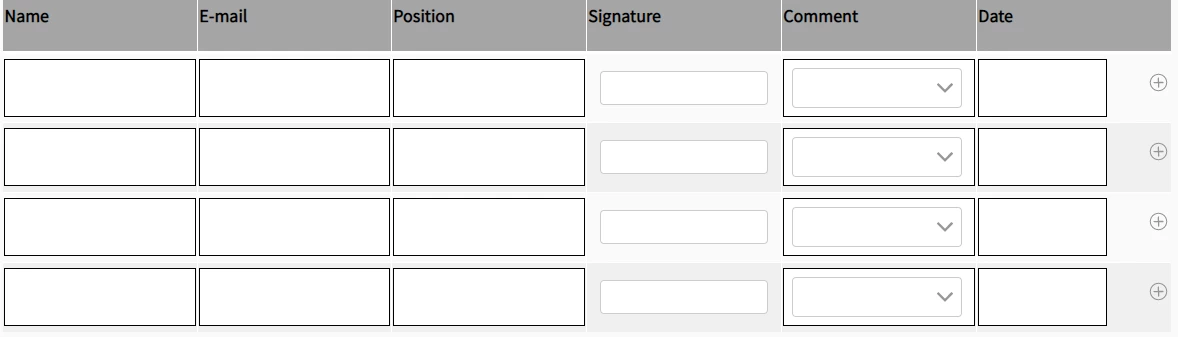
 

I have tried using an array list for the email variable in the workflow, but the step only lets you choose 1 assignee. Is it possible to use the assign task step for a dynamic number of emails in a table?


This post is no longer active and is closed to new replies. Need help? Start a new post to ask your question.
Best answer by GirishBedekar

you will have to implement the getPArticipant  method and in that method you will have to create an AEM user group. In that group, you will have to add the users identified by the email entered in the form. This group can then be used to in the assign task step


4 replies

New Participant
October 9, 2020

In the sign document component under the signers tab I thin you can click on add signers to configure more signers

New Participant
October 9, 2020

You can send the form for signing using Adobe sign to all the users specified in the form

but you cannot create individual assign task to the users specified in the form

techddxAuthor
New Participant
October 9, 2020

How would you use Adobe sign to send to all emails in the dynamic table? I only see the option to assign to one email at a time under the adobe sign settings in the adaptive form. Would it have to be uploaded and done directly in Adobe Sign, after the adaptive form is filled?

New Participant
October 9, 2020

also when you assign to a group, one of the group members will have to claim the task. It will not be like a task is assigned to all the members of the group


techddxAuthor
New Participant
October 9, 2020
Does that mean only one person can review and sign the form?
GirishBedekarAccepted solution
New Participant
October 9, 2020

you will have to implement the getPArticipant  method and in that method you will have to create an AEM user group. In that group, you will have to add the users identified by the email entered in the form. This group can then be used to in the assign task step