2018.1.001 app icons show Preflight icons | Community
Skip to main content
Scott_Landis
New Participant
January 25, 2018
Solved

2018.1.001 app icons show Preflight icons

  • January 25, 2018
  • 16 replies
  • 16485 views

Hi All,

Just built for the first time for iOS with 2018.1.001. The icons and splash screens for the app are now showing the preflight icon instead of my app icon.

The app is signed for enterprise distribution.

Please advise on a fix.

-Scott
This post is no longer active and is closed to new replies. Need help? Start a new post to ask your question.
Best answer by penguinant

The missing splash screen image for iPhoneX is a known issue and a fix is currently being implemented for an upcoming release of AEM Mobile.

In the meantime there is a workaround you could do.

  • Unzip the downloaded IPA
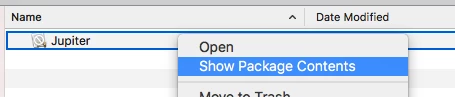
  • Show package contents of Jupiter
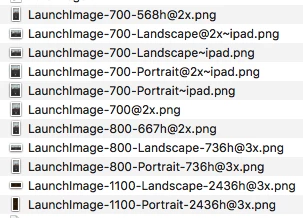
  • Replace 'LaunchImage-1100-Landscape-2436h@3x.png' and 'LaunchImage-1100-Portrait-2436h@3x.png' with your own splash screen images
  • Re-zip the IPA
  • Run the IPA through the signing tool as usual

Anthony

16 replies

AndrewTop
Employee
February 14, 2018

You should now be able to upload iPhone X splash screens when editing the Apps in the portal.  Those will be used in the IPA as the 1100 images.

Please let us know if you run into any problems.

Scott_Landis
New Participant
February 7, 2018

Thanks Anthony.

penguinantAccepted solution
Employee
February 7, 2018

The missing splash screen image for iPhoneX is a known issue and a fix is currently being implemented for an upcoming release of AEM Mobile.

In the meantime there is a workaround you could do.

  • Unzip the downloaded IPA
  • Show package contents of Jupiter
  • Replace 'LaunchImage-1100-Landscape-2436h@3x.png' and 'LaunchImage-1100-Portrait-2436h@3x.png' with your own splash screen images
  • Re-zip the IPA
  • Run the IPA through the signing tool as usual

Anthony

TommyDAQ-Bates
New Participant
February 6, 2018

Thank you! Updating now.

Scott_Landis
New Participant
February 6, 2018

Vinod, Going to Xcode 9.2 fixes the app icon issue but does not fix the splash screen on the iPhone X. Is there any timeline for that fix? I'm quickly approaching a deployment deadline and cannot deploy with the iPhone X displaying a mismatched splash screen.

Employee
February 6, 2018

Along with newer version of AEM Mobile App Signing tool. You also need to update to Xcode 9.2 or later. To download Xcode for free from the Apple app store, go to https://itunes.apple.com/us/app/xcode/id497799835.

--

Vinod Tanwar

TommyDAQ-Bates
New Participant
February 6, 2018

Jumping on this band wagon. We are building a custom Preflight app, actually updating one that we've been using for the past year.

Signing Tool: release.2018.1

Xcode: 9.1

Splash Screens are appearing. However...

App Icon is showing default AEM Preflight icon.

The Custom app icon is visible DURING the installation process, but as soon as installation is finished, it reverts to the AEM icon.

Is there a fix for this?

Scott_Landis
New Participant
January 26, 2018

After re-reading the release notes for 2018.1.001, it seems that it is intended that the iPhone X displays the "default" images for the iPhone X, since there is no option to add iPhone X sized splash screens in the App Build menu. And the default images are Adobe branded Preflight assets?

Is this true?

I can't see how I can convince a client that this is ok, and I do not expect that Apple will accept an app that has a mismatched splash screen on their flagship phone.

Scott_Landis
New Participant
January 25, 2018

Sorry Anthony, spoke too soon.

By getting the new patches I got the fix needed on iPad but iPhone X still displays the Preflight splash screen (icon is fine).

Scott_Landis
New Participant
January 25, 2018

Opened Xcode to confirm version and I got a new set of patches, which seems to have fixed the issue.

Thanks for the help.