2018.1.001 app icons show Preflight icons | Community
Skip to main content
Scott_Landis
New Participant
January 25, 2018
Solved

2018.1.001 app icons show Preflight icons

  • January 25, 2018
  • 16 replies
  • 16485 views

Hi All,

Just built for the first time for iOS with 2018.1.001. The icons and splash screens for the app are now showing the preflight icon instead of my app icon.

The app is signed for enterprise distribution.

Please advise on a fix.

-Scott
This post is no longer active and is closed to new replies. Need help? Start a new post to ask your question.
Best answer by penguinant

The missing splash screen image for iPhoneX is a known issue and a fix is currently being implemented for an upcoming release of AEM Mobile.

In the meantime there is a workaround you could do.

  • Unzip the downloaded IPA
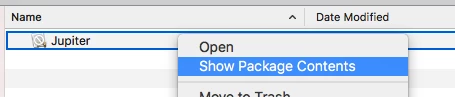
  • Show package contents of Jupiter
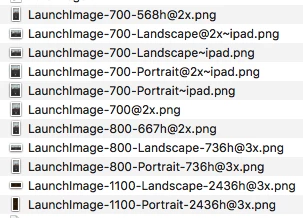
  • Replace 'LaunchImage-1100-Landscape-2436h@3x.png' and 'LaunchImage-1100-Portrait-2436h@3x.png' with your own splash screen images
  • Re-zip the IPA
  • Run the IPA through the signing tool as usual

Anthony

16 replies

Employee
January 25, 2018

If you are still having issues please attach your ~/aemm-sign-tool.log.

Employee
January 25, 2018

Something like this: Unauthorized - Apple Developer

Unless you have the full XCode IDE installed.

Employee
January 25, 2018

Have you also upgraded all your tools to XCode 9?

Employee
January 25, 2018

The signing tool should be handling the icon replacement now so it does sound like you may have discovered an issue.

Scott_Landis
New Participant
January 25, 2018

Yes, I am using the updated version of the app signing tool.

Employee
January 25, 2018

Hi Scott,

Are you enterprise signing your app with the 2018.1 version of the app signing tool?

The 2018.1 version of the iOS viewer upgraded to using XCode9 in order to better support iOS 11 which also required an update to the signing tool as well.

Anthony