Add an ability to "Replace a file" from the asset's properties page | Community
Skip to main content
New Participant
May 18, 2023
Investigating

Add an ability to "Replace a file" from the asset's properties page

  • May 18, 2023
  • 12 replies
  • 4680 views
Request for Feature Enhancement (RFE) Summary:

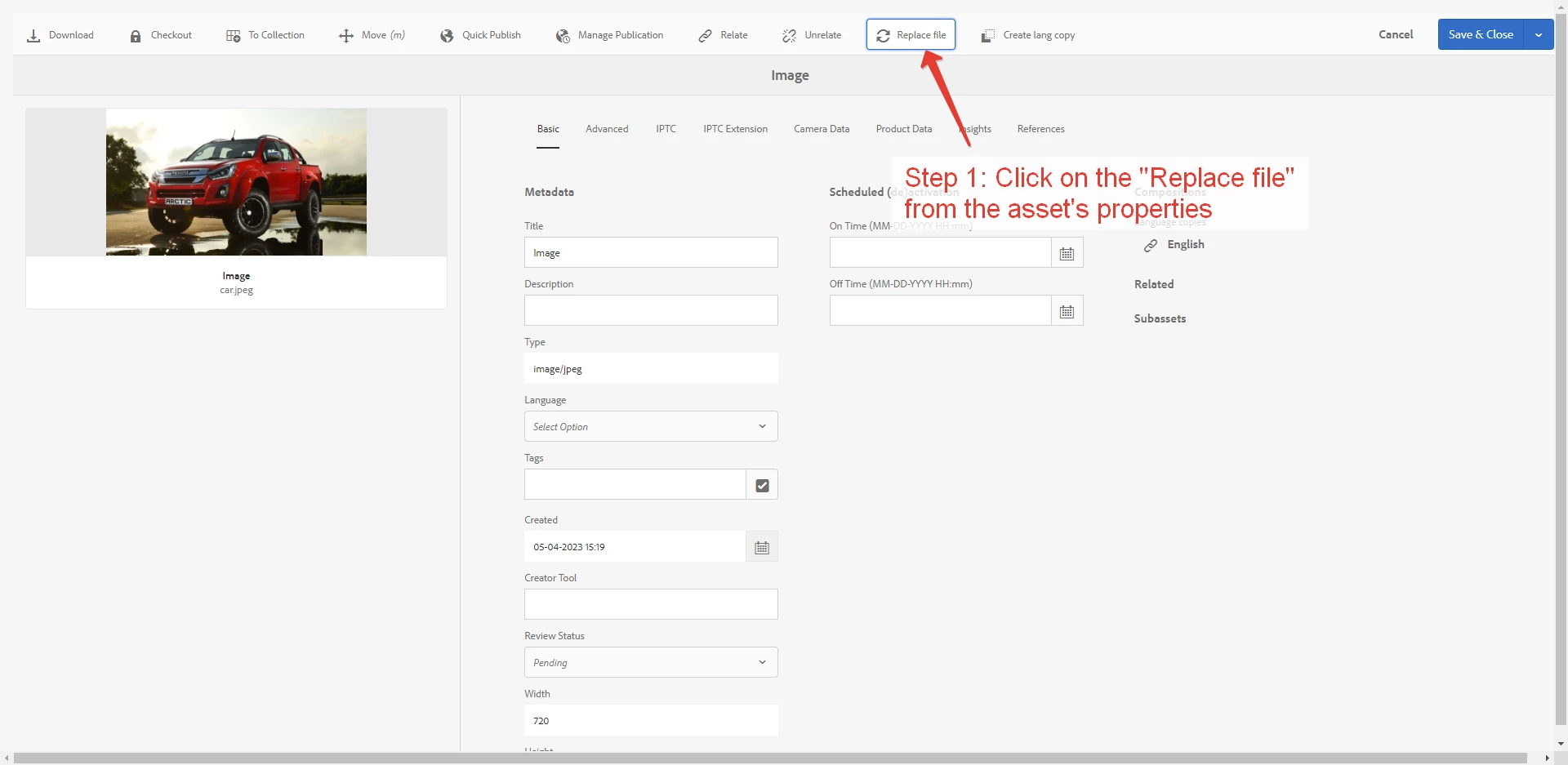
Content managers need an ability to "Replace a file" from the asset's properties.

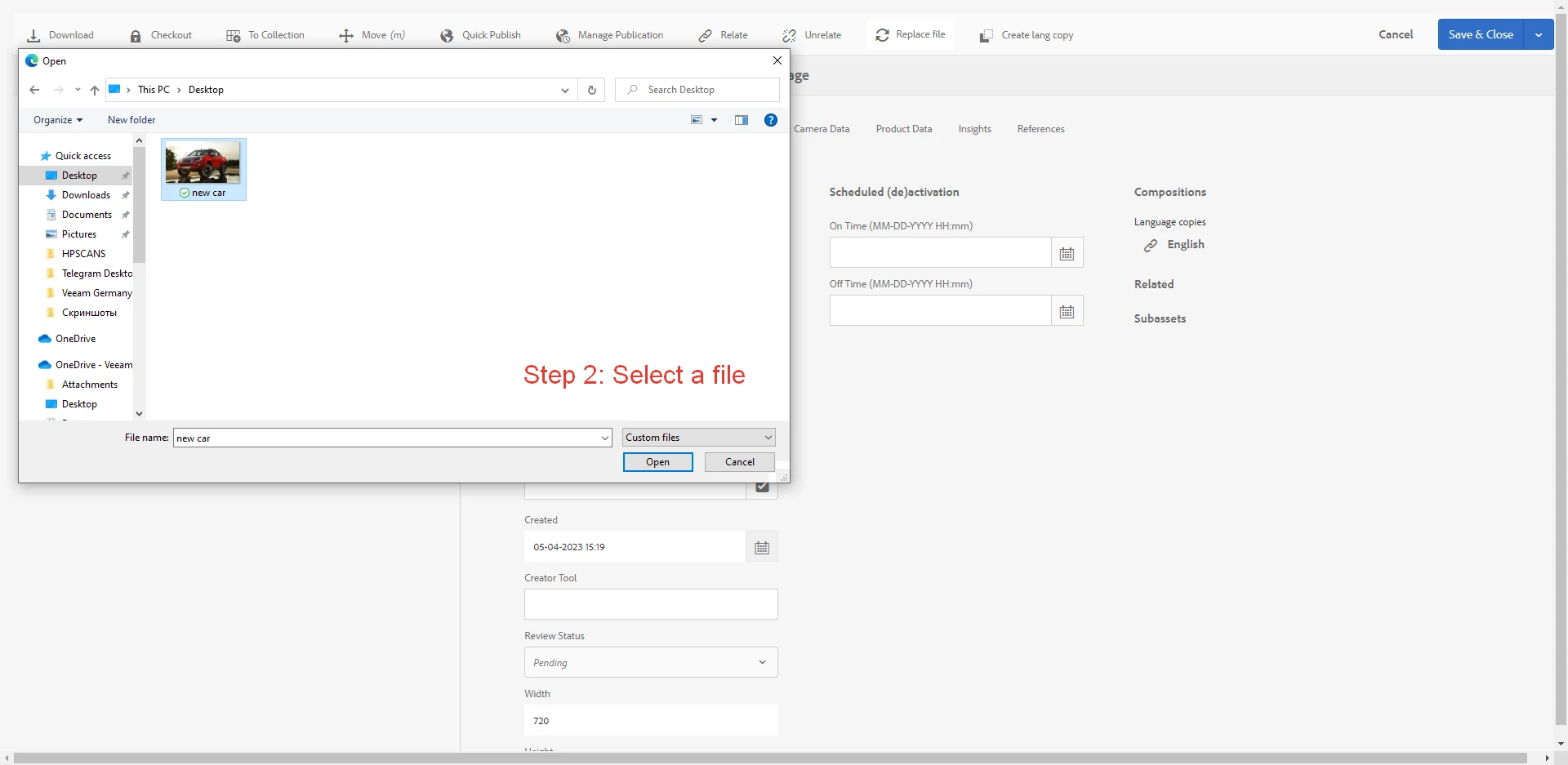
We implemented an override for them (pictures attached). In future we'd like to have this feature as Out-of-the-box functionality.

Use-case: Content manager creates an asset's language copy, then "Reveal in Asset", then goes to the asset's properties and need to Replace the original file by translated version of file, having stored it on local computer with different name.
Current/Experienced Behavior:

Content manager can update an asset's file by one of the 2 ways:

  1. Create a Version:
    Open the folder in the DAM. Find his/her asset file. Select it and click on the "+ Create" button, then select "Version" button.
  2. Replace an original file OR Create a version:
    Save a future image with the SAME name as an original asset's file in the DAM. Drag and drop the future image to the DAM. System suggests "Create a version" or "Replace".
Improved/Expected Behavior:

User Story:

As a Content manager, I want to be able to "Replace a file" from the asset's properties to avoid walking through assets listing and files renaming.


Acceptance criteria:

  1. Content manager can update an asset's file from the asset's properties by uploading the file from his/her local computer.
  2. Content manager can choose 2 options: "Create version" or "Replace".
  3. If "Replace" option is selected, AEM saves the file to the same directory and automatically rename uploaded file to the same name as the original asset (original file is deleted).
  4. If "Create version" option is selected, AEM creates a version of the file (original file is saved).
  5. Uploading file with different extension than original asset is not uploaded and the error is displayed.
  6. The button "Replace file" is displayed on menu above asset properties page.
Environment Details (AEM version/service pack, any other specifics if applicable): AEM Managed Services, v6.5.14
Customer-name/Organization name: Veeam Software
Screenshot (if applicable):

We implemented an override for Content managers:

Code package (if applicable):  

12 replies

New Participant
July 31, 2025

We would also like this behavior implemented in AEM Assets. Versioning is a routine activity for our content managers, and needed to retitle files for a new version to be created in Assets is unintuitive for them and also tedious 

PolinaAbAuthor
New Participant
May 17, 2024

@alext- hello! Do you have any news about this Idea?=)

@jasonwinn not yet, this Idea is under "Investigating" status.

JasonWinn
New Participant
May 15, 2024

Has this been implemented or how can I request this functionality on my instance? We require the same functionality to Replace or Create a New Version of an asset with out having to upload with the same name. 

PolinaAbAuthor
New Participant
March 25, 2024

@alext- hey! Sorry for the late response! Just in case, this idea is still actual for us 🙂

I provided with an example, that's why my second image has another name "new car". But it's totally fine, if the functionality will work with the same image's name only. For example, replace an image "car" to the another image with "car" name is ok for us.


The main thing, what we ask about - Content managers need an ability to "Replace a file" from the asset's properties.

Employee
February 8, 2024

Hi @polinaab can you clarify why the asset uses different name and whether you want to maintain the file with a new name? 

alexbethke
New Participant
December 18, 2023

@polinaab thanks for explaining. It really seems to be something similar but different 🙂

PolinaAbAuthor
New Participant
December 15, 2023

@alexbethke hello!

Sorry, I didn't get your proposal. It sounds like a different behavior from what I described in the task's description.

We asked for a function that will allow Editor to replace the current asset's file to another file from the asset's properties.


Business case: 

There is a landing page on /en locale where the file is attached and available for the end-user to read (e.g. https://www.veeam.com/wp-ransomware-trends-executive-summary-europe.html ).

Editor needs to create a language copy of the Page and the related asset's file, so that the landing page is displayed on /de locale with the translated file to /de (e.g. https://www.veeam.com/de/wp-ransomware-trends-executive-summary-europe.html ).


In reality, we have the following Use-case how Content Managers work with assets:

> Content Manager creates an asset's language copy, then "Reveal in Asset" (Out of the box solution that leads to the Asset's editor), then goes to the asset's properties and need to Replace the "original" file by "translated version" of the file, having stored it on local computer with different name.

alexbethke
New Participant
December 14, 2023

We have a finding here with this function and I'd like to know if this works as designed...

Following scenario:

  • the editor uploads a file with the same name as an existing (published) file and then clicks on 'Replace'
  • then moves the new file to have a new name
  • then publishes the new file

In that moment both files are published and the editor has no possibility to get rid of the old published file as there is no connection between old file and new file.

PolinaAbAuthor
New Participant
June 5, 2023

@alext- hi! Sure.

In reality, we have the following Use-case how Content Managers work with assets:

> Content manager creates an asset's language copy, then "Reveal in Asset", then goes to the asset's properties and need to Replace the "original" file by "translated version" of the file, having stored it on local computer with different name.

So, whenever a Content Manager needs to replace an asset or create a version, he/she has a direct link to this asset.

But, currently, it's impossible to update the file from the asset's properties and they need to get back to the assets-listing, search their file though the omni-search and replace it from the listing (that's quite inconvenient).


As a result, we have 2 use-cases how a content manage needs to update the asset: from the omni-search and from the asset's properties.

Employee
June 1, 2023

@polinaab could you elaborate on why two distinct options for creating a version and replacing are needed?