AEM Google Maps API Integration | Community
Skip to main content
AEM_Forum
New Participant
November 18, 2017
Solved

AEM Google Maps API Integration

  • November 18, 2017
  • 16 replies
  • 13052 views

Hi,

I tried AEM Google Maps API Integration descried in the below UR:

Adobe Experience Manager Help | Integrating custom Adobe Experience Manager Component with third-party libraries

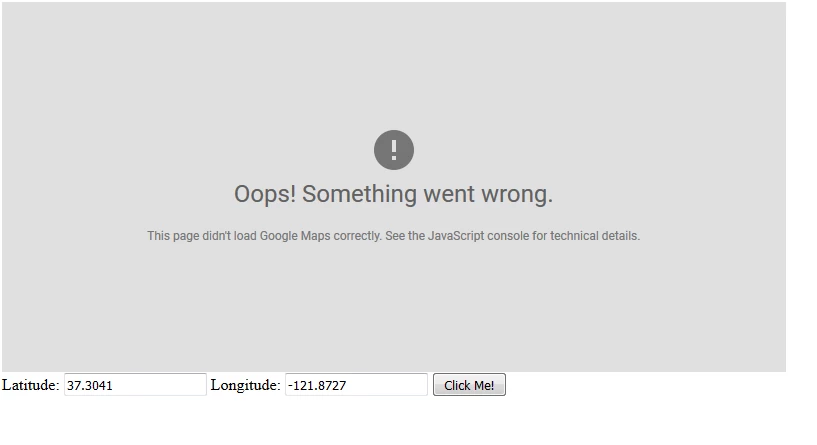
When I created a page and opened it, the following is what I see.

I read that this code was tested on Adobe CQ 5.5, Adobe CQ 5.6, while I am using AEM 6.1.

Kindly guide me.

Thanks,

Rama.

This post is no longer active and is closed to new replies. Need help? Start a new post to ask your question.
Best answer by kautuk_sahni

Just replace maptemplate.jps with following code :

<html>

  <head>

    <style>

       #map {

        height: 400px;

        width: 100%;

       }

    </style>

  </head>

  <body>

    <h3>My Google Maps Demo</h3>

    <div id="map"></div>

    <script>

      function initMap() {

        var uluru = {lat: -25.363, lng: 131.044};

        var map = new google.maps.Map(document.getElementById('map'), {

          zoom: 4,

          center: uluru

        });

        var marker = new google.maps.Marker({

          position: uluru,

          map: map

        });

      }

    </script>

    <script async defer

    src="https://maps.googleapis.com/maps/api/js?key=AIzaSyCVJYehUvkKZNcxsWx8vjD6FPDZBCRegX4&callback=initMap">

    </script>

      <script type="text/javascript">

     function getMap(lat,lng) {

        var myOptions = {

          center: new google.maps.LatLng(lat,lng),

          zoom: 8,

          mapTypeId: google.maps.MapTypeId.ROADMAP

        };

        var map = new google.maps.Map(document.getElementById("map"),

            myOptions);

      }

    </script>

      <form >

  Latitude: <input type="text" name="lat" value="37.3041" />

  Longitude: <input type="text" name="lng" value="-121.8727"/>

  <button type="button" onclick="getMap(lat.value,lng.value)" >Click Me!</button>

</form>

  </body>

    <cq:include path="par" resourceType="foundation/components/parsys" />

</html>

And make sure not to add <> before and after your API token. In above code replace API key with your API key.

It would work. Just tested it on AEM 6.3

16 replies

AEM_Forum
AEM_ForumAuthor
New Participant
November 22, 2017

Hi Kautuk,

This has worked like a magic.

Thanks a million for directing me correctly.

Rama.

kautuk_sahni
kautuk_sahniAccepted solution
Employee
November 22, 2017

Just replace maptemplate.jps with following code :

<html>

  <head>

    <style>

       #map {

        height: 400px;

        width: 100%;

       }

    </style>

  </head>

  <body>

    <h3>My Google Maps Demo</h3>

    <div id="map"></div>

    <script>

      function initMap() {

        var uluru = {lat: -25.363, lng: 131.044};

        var map = new google.maps.Map(document.getElementById('map'), {

          zoom: 4,

          center: uluru

        });

        var marker = new google.maps.Marker({

          position: uluru,

          map: map

        });

      }

    </script>

    <script async defer

    src="https://maps.googleapis.com/maps/api/js?key=AIzaSyCVJYehUvkKZNcxsWx8vjD6FPDZBCRegX4&callback=initMap">

    </script>

      <script type="text/javascript">

     function getMap(lat,lng) {

        var myOptions = {

          center: new google.maps.LatLng(lat,lng),

          zoom: 8,

          mapTypeId: google.maps.MapTypeId.ROADMAP

        };

        var map = new google.maps.Map(document.getElementById("map"),

            myOptions);

      }

    </script>

      <form >

  Latitude: <input type="text" name="lat" value="37.3041" />

  Longitude: <input type="text" name="lng" value="-121.8727"/>

  <button type="button" onclick="getMap(lat.value,lng.value)" >Click Me!</button>

</form>

  </body>

    <cq:include path="par" resourceType="foundation/components/parsys" />

</html>

And make sure not to add <> before and after your API token. In above code replace API key with your API key.

It would work. Just tested it on AEM 6.3
Kautuk Sahni
AEM_Forum
AEM_ForumAuthor
New Participant
November 22, 2017

Hi Scott,

PFB the sharable link.

GoogleMaps.zip - Google Drive

Appreciate your support.

Thanks,

Rama.

smacdonald2008
New Participant
November 21, 2017

Put into a GOOGLE DRIVE and send me URL!

AEM_Forum
AEM_ForumAuthor
New Participant
November 21, 2017

Hi Scott,

I replaced your_google_map_key with my Google key value.

Your page worked, without you having to register your domain?

Is there a way I could send in my package to you?

Thanks,

Rama.

smacdonald2008
New Participant
November 20, 2017

More information here -- i just got my Google key here:

Getting Started  |  Google Maps JavaScript API  |  Google Developers

Once i embedded the KEY into the code - it worked perfectly on 6.3 --

smacdonald2008
New Participant
November 20, 2017

There is a note in the article that states --

Replace your_google_map_key with your Google key value.

Make sure you can get Google Maps workign in a non-AEM web app first, Then once you get it working with your key and everything works - then port it into AEM.

kautuk_sahni
Employee
November 20, 2017

[This is more of Google Maps Question than AEM]

Some Pointers to check here:

1. Make sure you inserted the API key correctly

2. Make sure you generated "Google Maps JavaScript API" key not Android, iOS, etc. key.

3. While copying API, make your you have enabled it

4. Try the HTML code mentioned here Adding a Google Map with a Marker to Your Website  |  Google Maps JavaScript API  |  Google Developers  instead of code present in Article. [Make sure to cope API key in the code]

5. Also try copy pasting the code directly in HTML file and check in the Chrome browser.

6. Just check if there is some restrictions set within API console https://console.developers.google.com/flows/enableapi , if so revove it.

6. If above things still doesn't work, please create a question in Google Forums.

@edubey "You have to allow certain domains on your google map account."

I guess this is not required now. But it would be great if you can share some information related to this.

Kautuk Sahni
edubey
New Participant
November 20, 2017

These domains would be registered on your Google cloud platform

Check this link

Authentication and Authorization  |  Google Maps APIs Premium Plan  |  Google Developers  

AEM_Forum
AEM_ForumAuthor
New Participant
November 20, 2017

Hi,

Could you please guide me on this domain registration?

The AEM Google Maps API Integration descried in the below URL does not address this requirement,

Adobe Experience Manager Help | Integrating custom Adobe Experience Manager Component with third-party libraries

Thanks,

Rama.