AEM Quickstart Jar file Not Working | Community
Skip to main content
New Participant
October 9, 2017
Solved

AEM Quickstart Jar file Not Working

  • October 9, 2017
  • 12 replies
  • 16662 views

I downloaded the quickstart jar file (link provided by Adobe support team) but it's only showing loading
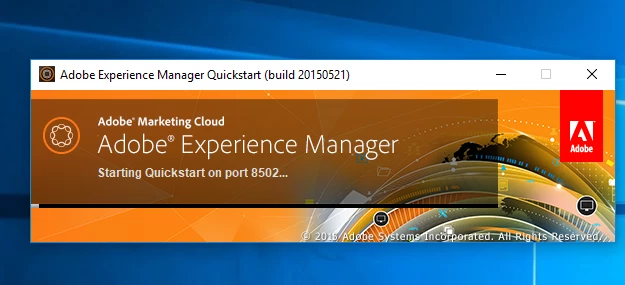
I also changed the port number from the default 6502, but its not working.

Any idea?

This post is no longer active and is closed to new replies. Need help? Start a new post to ask your question.
Best answer by kautuk_sahni

I guess this is AEM 6.1 build.

Can you please share your system details and JDK/JRE in use?

I would recommend you to have JRE 1.7 and please read Technical Requirements - docs.adobe.com

~kautuk

12 replies

anusha912862987
New Participant
November 29, 2018

this works, thank you brother

New Participant
October 23, 2021

Hello,
I have a jar file of AEM 6.5. I created the two instances (author and publish) but when I start the jar file the crx quickstart folder is created, with the "logs" folder inside, and an empty "upgrade" notepad file.


It should be noted that before doing this I installed Maven on my pc.

Can anyone help me? I can't start AEM from my pc.

New Participant
October 9, 2017

Thanks, It worked

New Participant
September 26, 2023

Hi , I am facing the same issue now, how to resolve it..?

kautuk_sahni
Employee
October 9, 2017

Try Downgrade JDK to 1.7 (do not keep 2 version of JDKs), do it in the new directory and then check.

~kautuk

Kautuk Sahni
New Participant
October 9, 2017

Java version is 9, let me check for 1.7 version

New Participant
October 9, 2017

Hi, System ram is 24 GB, previously i ran 6.3 instance and it worked but now I'm running 6.1 instance.

kautuk_sahni
kautuk_sahniAccepted solution
Employee
October 9, 2017

I guess this is AEM 6.1 build.

Can you please share your system details and JDK/JRE in use?

I would recommend you to have JRE 1.7 and please read Technical Requirements - docs.adobe.com

~kautuk

Kautuk Sahni
October 9, 2017

What type of os you are using for Adobe Experience Manager. The error may be because of the OS.

Thank you.

Ratna_Kumar
New Participant
October 9, 2017

Hi,

What's your RAM size in your computer. It also depends on RAM.

If you not able to start via clicking the JAR, try to start the JAR using command prompt in this way: java -jar cq-author-p4502.jar

~Ratna.

New Participant
October 9, 2017

Yes, I'm running for the first time and even waited for an hour but no progress

New Participant
October 9, 2017

No such file is there, only stderr and stdout is present