
Card images not displaying correctly on iOS devices | Community
Skip to main content
well_dunn
New Participant
September 21, 2018
Solved

Card images not displaying correctly on iOS devices

  • September 21, 2018
  • 13 replies
  • 14794 views

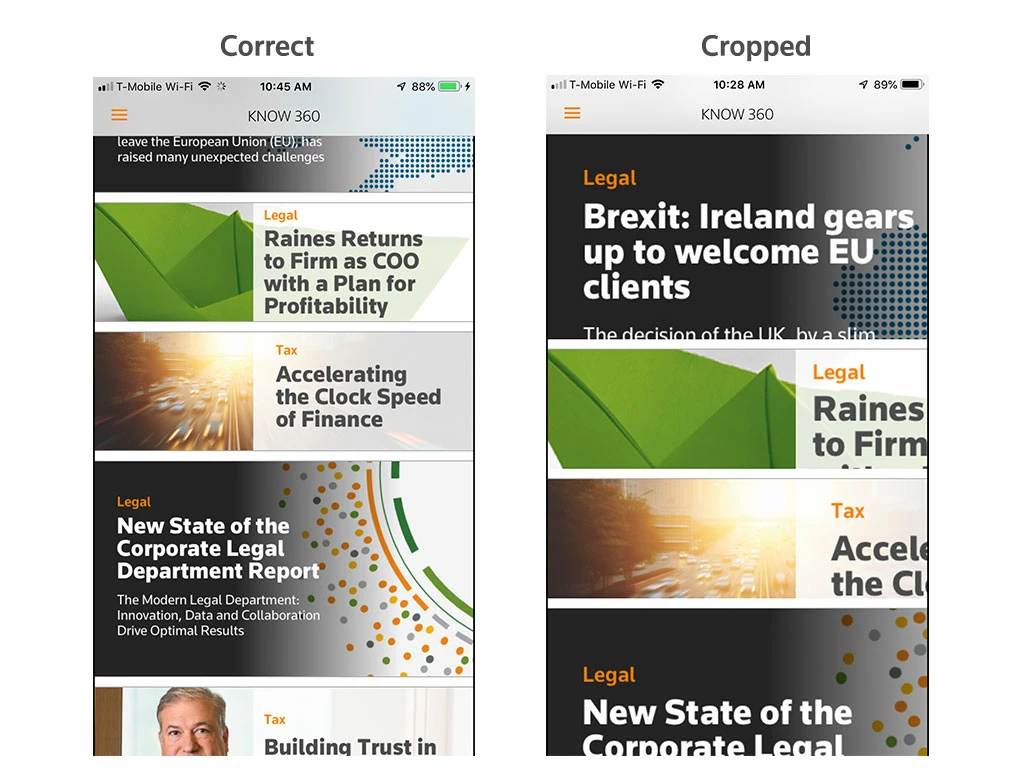
Recently card images seem to load at their proper size and then increase in size getting cropped within the card. It's happening in the two apps I work on, and in the AEM preflight app. I have see in happen in iOS 12 and 11 on an iPhone 5, 6+, and iPads. Did something change? or is this a bug?
Quitting and restarting the apps or devices didn't solve the problem. I've attached screen shots of when I open one of the apps, and a few moments later what happens to the card images when they enlarge within their frame.
This post is no longer active and is closed to new replies. Need help? Start a new post to ask your question.
Best answer by Mobile_Support

Hi there,

We actually caught this one quite recently in our in-house testing and have a pending-release fix that we hope to get out in the next few weeks. Stay tuned and monitor: Bug fix release notes for Adobe Experience Manager Mobile

thanks,

Darren

13 replies

AndrewTop
Employee
January 17, 2019

Hi Alex,

It might be obvious, but can you make sure you used the latest App Builder?  Some people used older ones and had problems with the results.  I believe support will ask which version you used.

--

Andrew

New Participant
January 17, 2019

Will do, thanks for the quick response.

Darren_Melanson
Employee
January 17, 2019

Hi Alex,

Odd... we haven't seen this issue since it was fixed.

To best help you, can you ping cresupp@adobe.com with all the relevant details so we can help you out?

thanks,

Darren

New Participant
January 17, 2019

Hi - we just launched a new build of our app finally and this issue is still occurring. We thought it was fixed in our test app but now we are seeing it again. Is there any update on this, and is anyone else seeing this issue?

Darren Melanson

New Participant
October 25, 2018

Thanks for the update Darren, we will give this a shot. Appreciate it!

Darren_Melanson
Employee
October 25, 2018

We've just rolled out a change that should address this problem - you will need to rebuild your apps. We haven't pushed a new version of the preflight app yet though, that will usually take 24 hours or so.

New Participant
October 19, 2018

Hi Darren,

Is this something that can be fixed by enabling WKWebView for our apps? Are there any other workarounds that our team or the AEM Mobile team could use, at least temporarily? This is affecting our production apps and we need to find a fix...

Regards,

Alex

Darren_Melanson
Employee
October 19, 2018

Hi Alex,

Apple has documented a known issue in UIKit that is causing this problem for our viewer.

ref: iOS 12 Release Notes | Apple Developer Documentation

see: UIKit Known Issues

We've attempted to implement their workaround, but it has proven to be very challenging due to the nature of the implementation.

One of 2 things will happen:

1) Apple releases an iOS update that fixes this (this is a regression on their behalf - so I hope they do)

2) We release a fix to bypass this regression - but as eluded above, this isn't straight forward and might take time to get perfect.

You might see others complaining about this who use this functionality as well: issue with collection view sizing |Apple Developer Forums

I hope Apple fixes this as it's the right thing to do.

-

Darren

New Participant
October 18, 2018

Hi -

We have been struggling with this for several weeks in our apps, and continue to see this issue as of today (10/18). Is there any update on this, and any insight into when a definitive fix will be in place?

Thanks,

Alex

Darren_Melanson
Employee
September 28, 2018

Wanted to provide an update - we did roll out a few fixes on 9/27 related to the card zooming issue in iOS but have found other problems which we continue to work on. We anticipate another set of fixes to get pushed out at or around 10/6. I understand the implications this is having on your business and are working hard to get this resolved as quickly as possible. I really appreciate your patience while we get this all fixed up.