data-sly-resource | Cannot find servlet to handle resource error | Community
Skip to main content
Oct 3, 2017 5:43 AM UTC
Solved

data-sly-resource | Cannot find servlet to handle resource error

Hello,

I am new to HTL (formerly known as Sightly) and am trying to understand its data-sly-resource attribute.

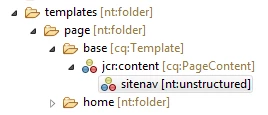
  •      I've added a node to my template which has a jcr:primaryType=nt:unstructured and sling:resourceType=/apps/myproject/components/structure/templates/sitenav (this is a navigation bar component). 
  •      Also, the template has a sling:resourceType set to /apps/myproject/components/structure/templates/basepage.

apps/myproject/templates/page/base

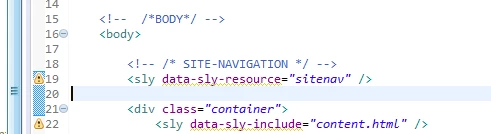
Further, the data-sly-resource="sitenav" is added in the /apps/components/structure/templates/basepage/basepage.html (basepage is the component that the template point to with sling:resourceType.

/apps/myproject/components/structure/templates/basepage/basepage.html

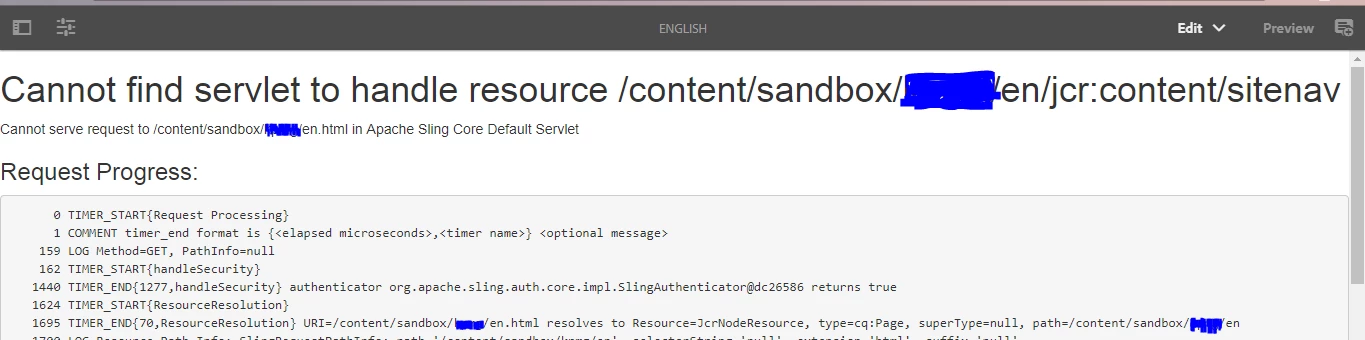
Now, on creating a webpage with the above mentioned template, I was expecting the Site-navigation to appear on the page, instead this is the result:

Webpage

It'll be great if someone can help me understand what I'm doing wrong here?

Also, when I add the entire path of the sitenav component...

path for resourceType...

it works....

Webpage works...with Site Navigation at the top...

Thanks in advance

smacdonald2008​, if possible, please look into this.  Thanks!

This post is no longer active and is closed to new replies. Need help? Start a new post to ask your question.
smacdonald2008
smacdonald2008Accepted solution
Level 10
Oct 4, 2017 3:42 PM UTC

- we show how to reference HTL component in the article that i pointed you to. I recommend that you take the time to go through this.

You will learn how to use syntax such as:

<div data-sly-resource="${'header' @ resourceType='summit_toys/components/structure/header'}"></div>

<div data-sly-resource="${'navigation' @ resourceType='summit_toys/components/structure/navigation'}"></div>

<div data-sly-include="content.html"></div>

<div data-sly-resource="${'footer' @ resourceType='summit_toys/components/structure/footer'}"></div>

Also for HTL general questions - refer to the spec here: htl-spec/SPECIFICATION.md at master · Adobe-Marketing-Cloud/htl-spec · GitHub

15 replies

VeenaVikraman
New Participant
Oct 5, 2017 3:46 PM UTC

Thanks Akash   That was something which I never explored

Translate
Oct 5, 2017 2:49 AM UTC

Hi Veena,

The data-sly-resource="<name>" would work anytime the node with that particular 'name' is available either under the template(/apps/<project>/templates/<templatename>/jcr:content) or under page(/content/<cq:Page>/jcr:content).  Screenshots are included for reference:

template.../apps/<project>/templates/<templatename>/jcr:content

page....(/content/<cq:Page>/jcr:content)

Saying this, I would now prefer to include the entire path of the component to reference it to avoid manual work of inserting the component on every page that is created.

Thanks & Regards,

Translate
smacdonald2008
smacdonald2008Accepted solution
Level 10
Oct 4, 2017 3:42 PM UTC

- we show how to reference HTL component in the article that i pointed you to. I recommend that you take the time to go through this.

You will learn how to use syntax such as:

<div data-sly-resource="${'header' @ resourceType='summit_toys/components/structure/header'}"></div>

<div data-sly-resource="${'navigation' @ resourceType='summit_toys/components/structure/navigation'}"></div>

<div data-sly-include="content.html"></div>

<div data-sly-resource="${'footer' @ resourceType='summit_toys/components/structure/footer'}"></div>

Also for HTL general questions - refer to the spec here: htl-spec/SPECIFICATION.md at master · Adobe-Marketing-Cloud/htl-spec · GitHub

Translate
VeenaVikraman
New Participant
Oct 4, 2017 12:17 PM UTC

Yes that is correct. But I still have confusion for the

<sly data-sly-resource="<name>" />

Translate
viveksachdeva
New Participant
Oct 4, 2017 7:18 AM UTC

From what I think, node name is mandatory and resource type is optional. So you can shorten it by removing the resourceType from it only.

Translate
viveksachdeva
New Participant
Oct 4, 2017 7:17 AM UTC

This is how templates inherently work. Once page is create out of template, it works even if you delete the template... Basically all properties of template are copied to the page. If you want it to be available on all pages, you would need to author it atleast once after making a change..

Translate
Oct 4, 2017 7:02 AM UTC

Hi Veena,

Also, wouldn't a shorter version of referencing a resource be:

<sly data-sly-resource="path/to/component" />

instead of

<sly data-sly-resource="${ 'testNode' @ resourceType='path/to/component' }" />

right?

Translate
VeenaVikraman
New Participant
Oct 4, 2017 6:41 AM UTC

cool. Yes I have seen that. But may be if Feike sees this question and can give bit more guidance that would be better i guess.

Translate
Oct 4, 2017 6:30 AM UTC

Hi Veena,

Yes, i think that is what I will do.  I saw the shorter version in the example Archetype11 app and though it is simpler to write, it can result in some additional manual effort to update each page-node if a new component is included.  Here's a screenshot of the Archetype11 app:

Archtype11  - /apps/<project>/components/structure/page/partials/main.html

Thanks

Translate
VeenaVikraman
New Participant
Oct 4, 2017 6:09 AM UTC

So why you want to add this one particularly, won't this
<sly data-sly-resource="${'sitenavigation' @ reourceType='path/to/sitenav/component'}" /> syntax work for you ??

Translate