data-sly-resource | Cannot find servlet to handle resource error | Community
Skip to main content
October 3, 2017
Solved

data-sly-resource | Cannot find servlet to handle resource error

  • October 3, 2017
  • 15 replies
  • 8104 views

Hello,

I am new to HTL (formerly known as Sightly) and am trying to understand its data-sly-resource attribute.

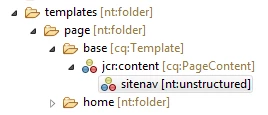
  •      I've added a node to my template which has a jcr:primaryType=nt:unstructured and sling:resourceType=/apps/myproject/components/structure/templates/sitenav (this is a navigation bar component). 
  •      Also, the template has a sling:resourceType set to /apps/myproject/components/structure/templates/basepage.

apps/myproject/templates/page/base

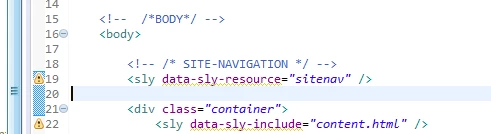
Further, the data-sly-resource="sitenav" is added in the /apps/components/structure/templates/basepage/basepage.html (basepage is the component that the template point to with sling:resourceType.

/apps/myproject/components/structure/templates/basepage/basepage.html

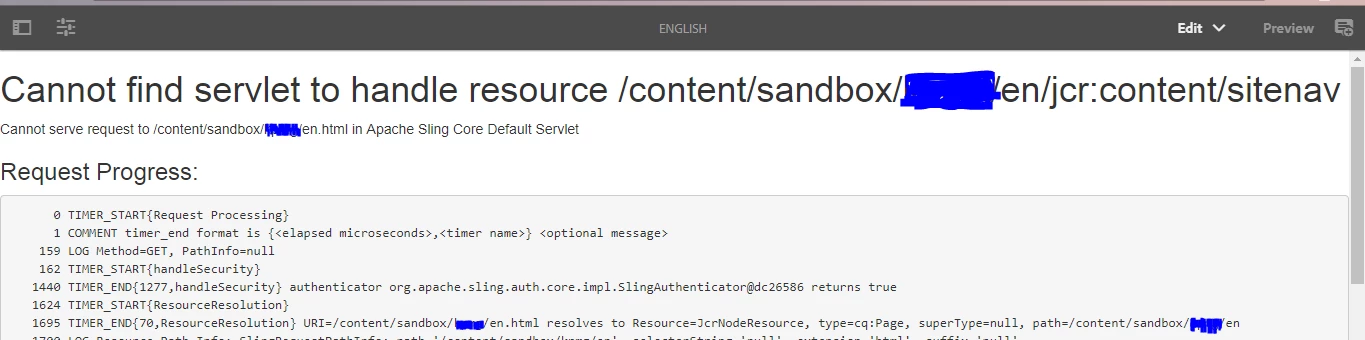
Now, on creating a webpage with the above mentioned template, I was expecting the Site-navigation to appear on the page, instead this is the result:

Webpage

It'll be great if someone can help me understand what I'm doing wrong here?

Also, when I add the entire path of the sitenav component...

path for resourceType...

it works....

Webpage works...with Site Navigation at the top...

Thanks in advance

smacdonald2008​, if possible, please look into this.  Thanks!

This post is no longer active and is closed to new replies. Need help? Start a new post to ask your question.
Best answer by smacdonald2008

- we show how to reference HTL component in the article that i pointed you to. I recommend that you take the time to go through this.

You will learn how to use syntax such as:

<div data-sly-resource="${'header' @ resourceType='summit_toys/components/structure/header'}"></div>

<div data-sly-resource="${'navigation' @ resourceType='summit_toys/components/structure/navigation'}"></div>

<div data-sly-include="content.html"></div>

<div data-sly-resource="${'footer' @ resourceType='summit_toys/components/structure/footer'}"></div>

Also for HTL general questions - refer to the spec here: htl-spec/SPECIFICATION.md at master · Adobe-Marketing-Cloud/htl-spec · GitHub

15 replies

October 4, 2017

Hi Veena,

What if I add another line of code in the HTML (after creating a page) such as this:

<sly data-sly-resource="sidebar" />

Now, since the page is already created and the above line of code is inserted later, the sidebar resource will not be available for this page.  In such case, the sidebar resource will be have to added to every page node on which we want the sidebar? What if there are many number of pages on which we want the sidebar?

Please suggest.

VeenaVikraman
New Participant
October 4, 2017

okay , let me try to explain that to you.

    When you have <sly data-sly-resource="sitenav" /> that means , a resource by name "sitenav" under the current page node , (Not under the template) will be included and the "sling:resourceType" in the node will be executed.

  Feike Visser​ has explained it here data-sly-resource attributes . He is the best person to explain more on this I believe.

Thanks

Veena

October 4, 2017

Hi Veena,

Thank you for your response.

I'm basically trying to be able to reference a component in my HTL template by simply writing the name.  Like so:

<sly data-sly-resource="sitenav" />

instead of:

<sly data-sly-resource="${'sitenavigation' @ reourceType='path/to/sitenav/component'}" />
VeenaVikraman
New Participant
October 4, 2017

  - Akash, Can you explain what exactly are you trying to achieve here ? I don't think this is the right way to do this ?

Basically why this works for you is because ; here you are including /apps/xxx/components/structure/templates/sitenav (your sitenav component path)  to your template as a resource with name 'sitenavigation'. So when the template is executed , when you author your sitenav component , it will create a node (also a resource) for the sitenav component with name 'sitenavigation'

smacdonald2008
New Participant
October 4, 2017

The best way to learn the basics of creating a sample site by using HTL is going through this step by step. Watch video too.   Scott's Digital Community: Creating your First Adobe Experience Manager 6.3 website