Date value is not populating in page and not retain in dialog | Community
Skip to main content
August 3, 2017
Solved

Date value is not populating in page and not retain in dialog

  • August 3, 2017
  • 14 replies
  • 7539 views

HI,

I am not able to populate the Date value from datepicker. Please find the JCR nodes below:
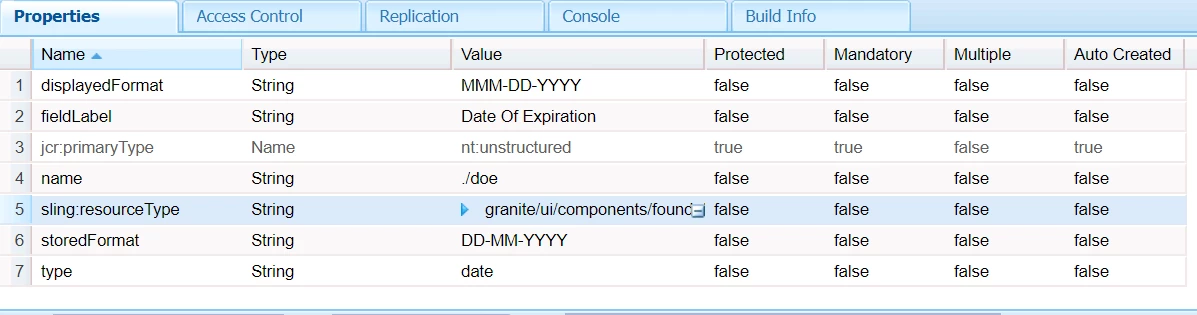
code in sightly <h1>${properties.doe}</h1>

Regards,

Sandhya.

This post is no longer active and is closed to new replies. Need help? Start a new post to ask your question.
Best answer by susheel

Hi sandhya,

For the value storage datetime will work as we discussed. Seems like format in sightly is not working in 6.2. So we need to write a formatter like below for your component.

package apps.project.components.author.componentname;

import java.text.SimpleDateFormat;

import java.util.Calendar;

import com.adobe.cq.sightly.WCMUsePojo;

public class DateFormatter extends WCMUsePojo {

    private String formattedDate;

    @Override

    public void activate() {

    Calendar date  = get("date", Calendar.class);

    String format =  get("format",String.class);

    SimpleDateFormat formatter = new SimpleDateFormat(format);

    formattedDate = formatter.format(date.getTime());

    }   

    public String getFormattedDate() {

        return formattedDate;

    }

}

<sly data-sly-use.date="${'DateFormatter' @ date=properties.doe,format='dd/MM/yyyy'}">
    ${date.formattedDate}
</sly>

14 replies

smacdonald2008
New Participant
December 5, 2017

We have a new article that shows use of displaying a DATE value in HTL -- also Sling Model and Coral 3 Multi-Field - https://helpx.adobe.com/experience-manager/using/multifield_coral_aem63.html

August 4, 2017

Thank you so much for your help and quick response.

susheel
New Participant
August 3, 2017
smacdonald2008
New Participant
August 3, 2017

susheel singh - great community interaction here

susheel
susheelAccepted solution
New Participant
August 3, 2017

Hi sandhya,

For the value storage datetime will work as we discussed. Seems like format in sightly is not working in 6.2. So we need to write a formatter like below for your component.

package apps.project.components.author.componentname;

import java.text.SimpleDateFormat;

import java.util.Calendar;

import com.adobe.cq.sightly.WCMUsePojo;

public class DateFormatter extends WCMUsePojo {

    private String formattedDate;

    @Override

    public void activate() {

    Calendar date  = get("date", Calendar.class);

    String format =  get("format",String.class);

    SimpleDateFormat formatter = new SimpleDateFormat(format);

    formattedDate = formatter.format(date.getTime());

    }   

    public String getFormattedDate() {

        return formattedDate;

    }

}

<sly data-sly-use.date="${'DateFormatter' @ date=properties.doe,format='dd/MM/yyyy'}">
    ${date.formattedDate}
</sly>

August 3, 2017

HI Susheel,

I have requested for the access,Please provide the permission to access  google drive.

Regards,

Sandhya.

susheel
New Participant
August 3, 2017
August 3, 2017

Can you please share your code(pkg),so that i can compare with my code.

Regards,

Sandhya.

August 3, 2017

HI,

Yes,DOE value is storing under content node.

On page :: trying to get value from  ${'YYYY-MM-DD' @ format=properties.doe,type='datetime'}

  \

After updating to datetime, did you save the datetime value from dialog. -- Saving in dialog means value node?

susheel
New Participant
August 3, 2017

You are sharing the component node screenshot.

I am asking about the /content where the component is created.

After updating to datetime, did you save the datetime value from dialog.

If yes what do you see exactly on your page, can you add screenshot.

Which version of AEM are you using. I tested this on AEM 6.3