Google Maps Service | Community
Skip to main content
robin_wadhwa
New Participant
October 17, 2018
Solved

Google Maps Service

  • October 17, 2018
  • 15 replies
  • 6612 views

In java am trying to get Latitude and Longitude dynamically by passing the address.

GeoApiContext context = new GeoApiContext.Builder().apiKey("KEY") .build();

            String address = ""1600 Amphitheatre Parkway Mountain View, CA 94043";

            GeocodingResult[] results = GeocodingApi.geocode(context, address).await();

Added These two dependencies :

<dependency>

  <groupId>com.google.maps</groupId>

  <artifactId>google-maps-services</artifactId>

  <version>0.9.0</version>

</dependency>

<dependency>

  <groupId>org.slf4j</groupId>

  <artifactId>slf4j-simple</artifactId>

</dependency>

Note: There is no compilation error.

But AEM is not able to resolve these.

com.google.maps -- Cannot be resolved

com.google.maps.errors -- Cannot be resolved

com.google.maps.model -- Cannot be resolved

What all dependencies I need to add ?
This post is no longer active and is closed to new replies. Need help? Start a new post to ask your question.
Best answer by smacdonald2008

I developed a small service with your Google MAP API code:

package com.adobe.aem.core;

import java.io.DataOutputStream;

import java.io.EOFException;

import java.io.File;

import java.io.FileInputStream;

import java.io.FileOutputStream;

import java.io.IOException;

import java.io.ObjectInputStream;

import com.google.maps.DirectionsApi.RouteRestriction;

import com.google.maps.DistanceMatrixApi;

import com.google.maps.DistanceMatrixApiRequest;

import com.google.maps.GeoApiContext;

import com.google.maps.GeocodingApi;

import com.google.maps.errors.ApiException;

import com.google.maps.model.DistanceMatrix;

import com.google.maps.model.GeocodingResult;

import com.google.maps.model.LatLng;

import com.google.maps.model.TravelMode;

public class MapImpl {

public String getLat()

{

try{

GeoApiContext context = new GeoApiContext.Builder().apiKey("KEY") .build();

        String address = "1600 Amphitheatre Parkway Mountain View, CA 94043";

        GeocodingResult[] results = GeocodingApi.geocode(context, address).await();

}

catch(Exception e)

{

e.printStackTrace();

}

return "" ;

}

}

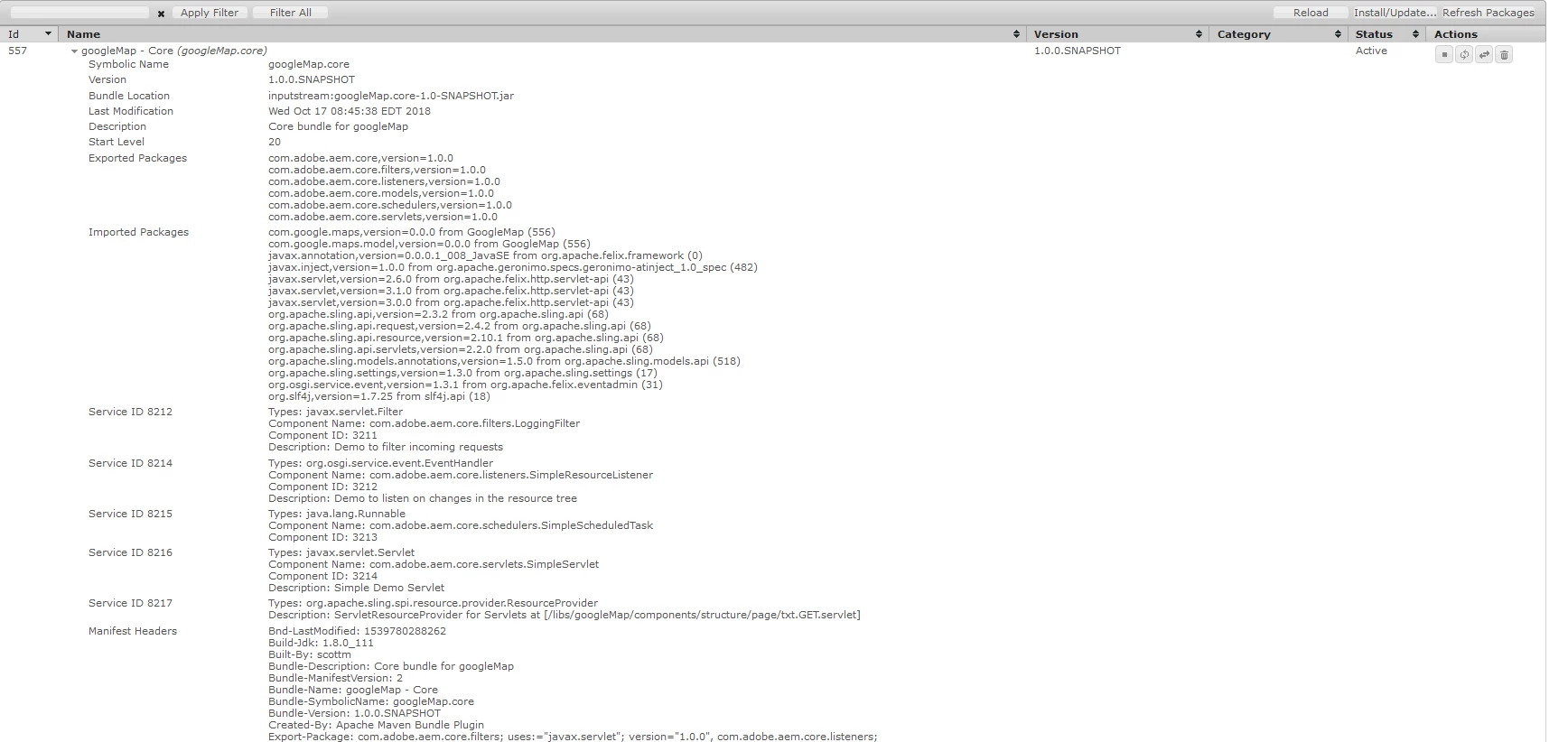
I added the dependencies you mentioned. Then built this OSGi bundle as a Maven 13 Archetype project. This now goes into ACTIVE state

The key was to wrap the Google MAP JAR into an OSGi bundle and deploy. Now my service that uses the GOOGLE MAP API can go into Active state. So we have 2 OSGi bundles here:

If you do not know how to use an Eclipse Plug-in project to wrap a JAR into an OSGi bundle - follow these instructions in this article (we wrap simple JSON JAR as an example):

Adobe Experience Manager Help | Submitting Adobe Experience Manager form data to Java Sling Servlets

15 replies

New Participant
June 20, 2023

HI Robin

I was also facing the same issue with pervious version of google map service.

But with newer version the issue has been resolved now.

You can directly add dependencies in your core pom file like below.


<!-- https://mvnrepository.com/artifact/com.google.maps/google-maps-services -->
<dependency>
<groupId>com.google.maps</groupId>
<artifactId>google-maps-services</artifactId>
<version>2.2.0</version>
</dependency>


And after maven clean process it will automatically resolved the dependency.


smacdonald2008
New Participant
October 17, 2018

that is a great point! So there are 2 choices here - wrap the JAR that exposes the Java packages (sometimes you need to follow this in case of driver files) or use:

<Embed-Dependency>appengine-tools-api,appengine-api-1.0-sdk,okio,okhttp,google-maps-services;inline=true </Embed-Dependency>


I am still trying to figure out how to get the Google MAP API to work using the   Embed-Dependency way as opposed to wrapping the API JAR.  As i solved some with <Embed-Dependency> then new ones showed up. This became a dependency issue. Sometimes its just easier to wrap the JAR API into an OSGi bundle - like this Google MAP API. If there are only a few easy ones to add, then go the  <Embed-Dependency> route.

Peter_Puzanovs
New Participant
October 17, 2018

Sir, I don't doubt that it works. It does work. All I'm highlighting here, is that when developers follow this approach, Adobe customer can end up with lot's of Jar's, that were probably better be embedded only in places where they are actually needed and not exposed to entire OSGi system.

Regards,

Peter

smacdonald2008
New Participant
October 17, 2018

Adding a JAR (from Maven repo) to the AEM Service container is simply another way to get the required Java packages into AEM so a OSGi bundle that needs them can find the Java packages.

I have found that this method as talked about here works

CQ-OPS - How to Turn a JDBC Driver JAR into an OSGi Bundle... 

In this example - Jayan wraps a driver file

Peter_Puzanovs
New Participant
October 17, 2018

smacdonald2008​ would be still quite cautious about adding pretty much random Jar's into your main OSGi run time. Would consider it's much safer to include needed jar's to your project classpath using <Embed-Dependency call as it would avoid problems in long term.

smacdonald2008
smacdonald2008Accepted solution
New Participant
October 17, 2018

I developed a small service with your Google MAP API code:

package com.adobe.aem.core;

import java.io.DataOutputStream;

import java.io.EOFException;

import java.io.File;

import java.io.FileInputStream;

import java.io.FileOutputStream;

import java.io.IOException;

import java.io.ObjectInputStream;

import com.google.maps.DirectionsApi.RouteRestriction;

import com.google.maps.DistanceMatrixApi;

import com.google.maps.DistanceMatrixApiRequest;

import com.google.maps.GeoApiContext;

import com.google.maps.GeocodingApi;

import com.google.maps.errors.ApiException;

import com.google.maps.model.DistanceMatrix;

import com.google.maps.model.GeocodingResult;

import com.google.maps.model.LatLng;

import com.google.maps.model.TravelMode;

public class MapImpl {

public String getLat()

{

try{

GeoApiContext context = new GeoApiContext.Builder().apiKey("KEY") .build();

        String address = "1600 Amphitheatre Parkway Mountain View, CA 94043";

        GeocodingResult[] results = GeocodingApi.geocode(context, address).await();

}

catch(Exception e)

{

e.printStackTrace();

}

return "" ;

}

}

I added the dependencies you mentioned. Then built this OSGi bundle as a Maven 13 Archetype project. This now goes into ACTIVE state

The key was to wrap the Google MAP JAR into an OSGi bundle and deploy. Now my service that uses the GOOGLE MAP API can go into Active state. So we have 2 OSGi bundles here:

If you do not know how to use an Eclipse Plug-in project to wrap a JAR into an OSGi bundle - follow these instructions in this article (we wrap simple JSON JAR as an example):

Adobe Experience Manager Help | Submitting Adobe Experience Manager form data to Java Sling Servlets

robin_wadhwa
New Participant
October 17, 2018

In my code I am trying to read an excel file and storing the data into nodes.

As in excel latitude and longitude is not available but address is there(city , street address, zip code). Here google API plays its role.

import Statements for google API:-

import com.google.maps.GeoApiContext;

import com.google.maps.GeocodingApi;

import com.google.maps.errors.ApiException;

import com.google.maps.model.GeocodingResult;

Code I am using to get Latitude and Longitude :-

            String address = fileImportModal.getAddress()+" "

                    +fileImportModal.getCity()+" "

                    +fileImportModal.getState()+" "

                    +fileImportModal.getZipCode();


            GeoApiContext context = new GeoApiContext.Builder()

                    .apiKey("KEY")

                    .build();

            GeocodingResult[] results =  GeocodingApi.geocode(context,

                    address).await();

            double latitude = results[0].geometry.location.lat;

            double longitude = results[0].geometry.location.lng;


            hcpNode.setProperty(RestoreConstants.DOC_LATITUDE, latitude);

            hcpNode.setProperty(RestoreConstants.DOC_LONGITUDE, longitude);

Thanks.

smacdonald2008
New Participant
October 17, 2018

I wrapped the Google API JAR into an OSGi bundle and it now exports these packages-

Can you post the full Java file with import statements of the code you are using. I will try to get it running in AEM

Peter_Puzanovs
New Participant
October 17, 2018

Dear Robin,

In your example you most likely want to avoid getting android libs. Therefore, you could add following rule:

<Import-Package>!android.os,!android.util, your other rules</Import-Package>

You need to look which part of google library you want to utilize,

Looking at functionality you want to use and configure Apache plugin to your needs[1]

[1] Apache Felix - Apache Felix Maven Bundle Plugin (BND)

Regards

Peter

smacdonald2008
New Participant
October 17, 2018

Did you try to download the JAR and place it into an OSGi bundle and deploy that - i am going to see if this works or if this leads to only more dependency errors.
