How to restore deleted page in AEM 6.3 | Community
Skip to main content
JakubWang
New Participant
March 19, 2019
Solved

How to restore deleted page in AEM 6.3

  • March 19, 2019
  • 12 replies
  • 20985 views

As in subject.

Fot the life of mine I can't find anything about that in the documentation nor in forums and the feature is nowhere to be found in the touch ui.

This post is no longer active and is closed to new replies. Need help? Start a new post to ask your question.
Best answer by Gaurav-Behl

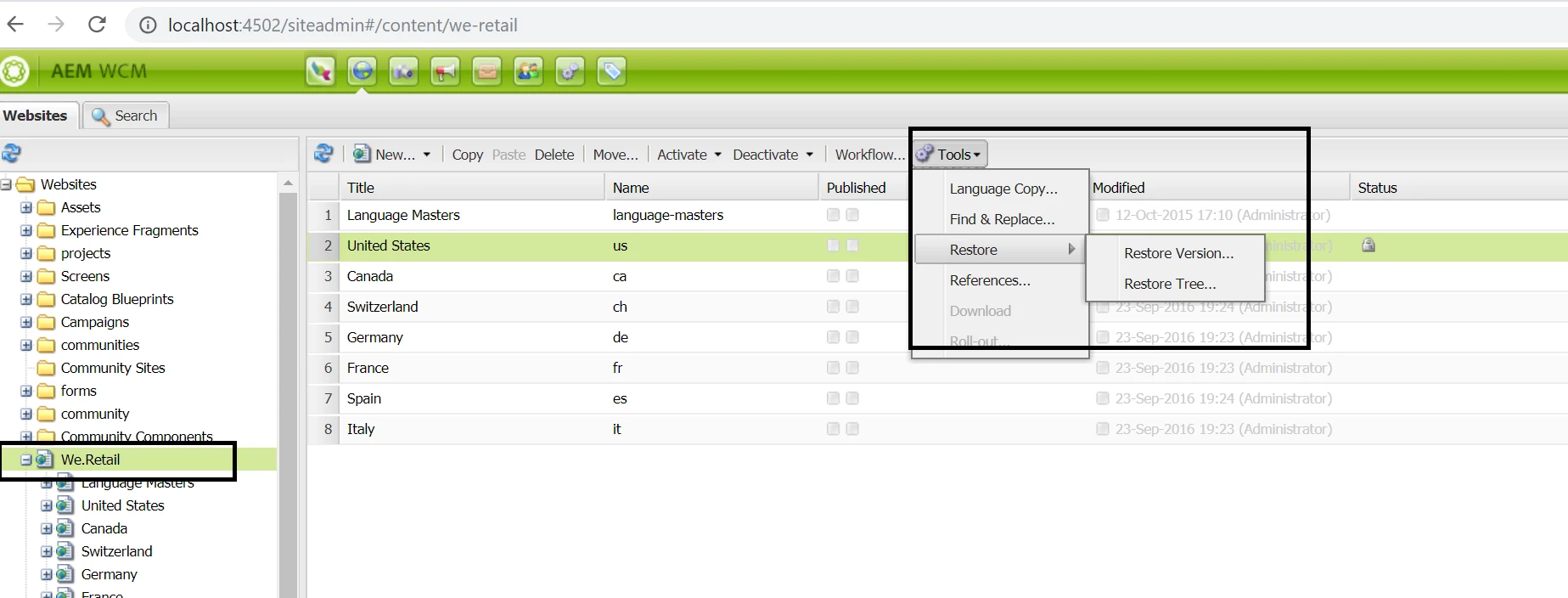
Probably, you're checking the same in TOUCH UI.

Open http://localhost:4502/siteadmin#/content  -- this would enable CLASSIC UI. Then follow the links shared by Arun/Vishu. You'd see the "deleted" page under the selected parent page with an option to recover.
12 replies

New Participant
March 3, 2023

On Touch UI this option is not available.


what we need to do on AEM as a cloud service - AEMCaas ? It does not have Classic UI.

harryl53317155
New Participant
May 30, 2019

Thanks for the quick response.  Yes, we knew we can restore a page to previous versions. Restoring a deleted page is pretty different; do you know when Adobe will add this functionality?  thanks.

arunpatidar
New Participant
May 30, 2019

No, but from versions, you can restore

Working with Page Versions

Arun Patidar
harryl53317155
New Participant
May 30, 2019

How can we restore a deleted page within a touch UI ( not using WCM, classic UI)? Does AEM have a concept of "Trash" can?

JakubWang
JakubWangAuthor
New Participant
March 19, 2019

That was it. Thank you. Much appreciated.

So simple but yet so counter intuitive and not explained anywhere in plain English.

Gaurav-Behl
New Participant
March 19, 2019

Login to the server on which you've deleted the page using -  http://<servername>/siteadmin#/content

**This link uses "siteadmin#" and not "sites.html"

Revert in case you still face issues.

JakubWang
JakubWangAuthor
New Participant
March 19, 2019

Thanks,

Yes I'm using Touch UI (even though I have Classic UI selected in my account preferences).

I don't have access to local environment. I'm an Author who is managing content on live site. Is there anything I can do to enable Classic UI there?

Gaurav-Behl
Gaurav-BehlAccepted solution
New Participant
March 19, 2019

Probably, you're checking the same in TOUCH UI.

Open http://localhost:4502/siteadmin#/content  -- this would enable CLASSIC UI. Then follow the links shared by Arun/Vishu. You'd see the "deleted" page under the selected parent page with an option to recover.

New Participant
June 5, 2020

thanks for the info !! 🙂

JakubWang
JakubWangAuthor
New Participant
March 19, 2019

The links you've shared look nothing like the UI I see on my end.

I use AEM Sites 6.3 and it looks completely different and there is no Tools menu at all.

JakubWang
JakubWangAuthor
New Participant
March 19, 2019

If I don't see the page to begin with how can I use any of the page versions features.

I'm new to this experience and I must be missing something embarrassingly simple here.