Investigating the cause of open sessions and bad site performance! | Community
Skip to main content
New Participant
October 5, 2017
Solved

Investigating the cause of open sessions and bad site performance!

  • October 5, 2017
  • 13 replies
  • 4883 views

Hi everyone,

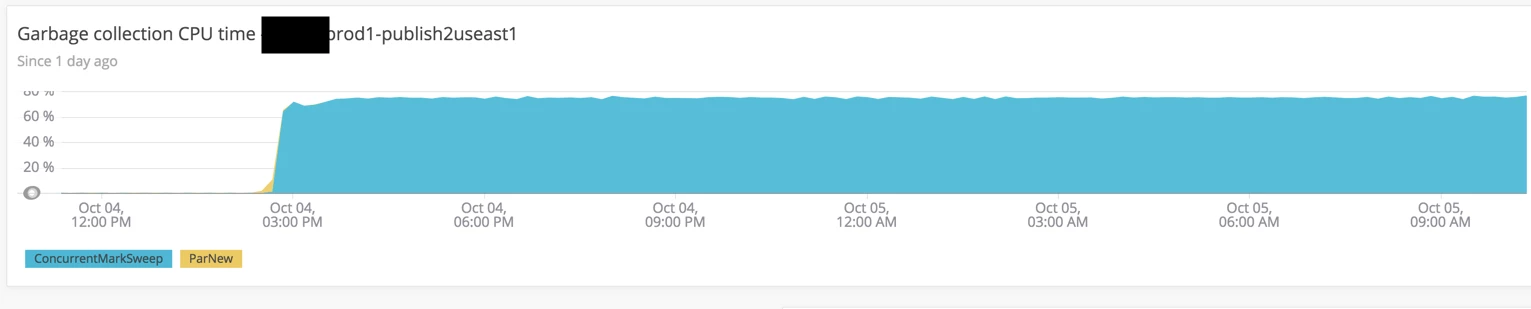
My AEM Production instance is experiencing very high garbage collection CPU Usage and performance issues. I think it might be because of sessions being left open.

I am checking /system/console/jmx on one of the publishers experiencing high garbage collection (over 60% cpu usage over 10+ hours)

I know that by default, there is ~85 SessionStatistics mbeans, and right now there is ~119 SessionStatistics mbeans. I think that very large objects on the heap are being retained due to these sessions staying open. These large objects are related to Search or QueryBuilder (based on a heap dump I checked)

The sessions that are staying open and their start times are directly related to the spikes in garbage collection.

org.apache.jackrabbit.oakSessionStatistics"repository-reader-service@session-434675@Oct 4, 2017 2:39:22 PM"
org.apache.jackrabbit.oakSessionStatistics"repository-reader-service@session-435491@Oct 4, 2017 2:40:34 PM"
org.apache.jackrabbit.oakSessionStatistics"repository-reader-service@session-442302@Oct 4, 2017 2:49:22 PM"
org.apache.jackrabbit.oakSessionStatistics"repository-reader-service@session-443169@Oct 4, 2017 2:50:34 PM"
org.apache.jackrabbit.oakSessionStatistics"repository-reader-service@session-467825@Oct 4, 2017 3:35:40 PM"
org.apache.jackrabbit.oakSessionStatistics"repository-reader-service@session-468804@Oct 4, 2017 3:38:06 PM"
org.apache.jackrabbit.oakSessionStatistics"repository-reader-service@session-471911@Oct 4, 2017 3:45:39 PM"
org.apache.jackrabbit.oakSessionStatistics"repository-reader-service@session-472840@Oct 4, 2017 3:47:59 PM"

These are the sessions being started that seem to spike my  GC CPU usage.
There is about 3 other sessions that are associated with each of these repository-reader-services that are staying open, Two from admin@session, and one from anonymous@session.

Is there anywhere i can find out more information about repository-reader-services sessions being started? What should my next steps be in solving this problem?

Any advice is GREATLY appreciated!

Thank you!

Ian

This post is no longer active and is closed to new replies. Need help? Start a new post to ask your question.
Best answer by joerghoh

Hi,

The JCR queries need memory to perform the query. But when search takes a long time, and more and more queries come in, then the memory usage increase with each query.

If you gc.log doesn't show any increase in garbage collection and you don't get OutOfMemory exceptions, there is no issue with memory at all. Rather focus on improving the searches to speed them up.

Jörg

13 replies

jimt82977416
New Participant
July 17, 2019

Universal GC Log analyser, GCeasy's advanced machine learning algorithm saves time and hassle from dealing with cryptic CG logs. You can quickly detect memory leaks, long GC pauses, premature object promotions plus many other performance impacting problems. Powerful to tune your application's memory and GC settings. Key performance Indicators and GC statistics section of the report, helps you to tune to perfection.

iannovicAuthor
New Participant
October 6, 2017

Ok I will focus on search speed then,

Thank you for your insight and time

joerghoh
joerghohAccepted solution
Employee
October 6, 2017

Hi,

The JCR queries need memory to perform the query. But when search takes a long time, and more and more queries come in, then the memory usage increase with each query.

If you gc.log doesn't show any increase in garbage collection and you don't get OutOfMemory exceptions, there is no issue with memory at all. Rather focus on improving the searches to speed them up.

Jörg

iannovicAuthor
New Participant
October 6, 2017

Hi smacdonald2008,

I am speaking to daycare about adjusting the GC parameters and trying this.

Thank you for reaching out to support!

Ian

iannovicAuthor
New Participant
October 6, 2017

Hi Jorg,

The search.html component has a very big index on the /content/sites/global/en/*. I imagine this needs to be broken up into smaller indices. If these JCR Queries are causing lots of load on the system is the memory usage constantly at capacity? Wouldn't we be seeing some level of trends up and down to reflect these requests?

Do you think any of these JCR Queries are persisting on the heap?

Here are some graphs of the publisher's heap

Why are the JCR Queries persisting in memory for such a long period of time? Wouldn't that be because they are unreclaimable (in an open session)?

Thank you again for all of your help

Ian

joerghoh
Employee
October 6, 2017

Your system is doing a lot of queries. Look for the string "/content/sites/global/en/search.html" and it will show that the system is executing a JCR query, which can take considerable time and causes load on the system.

$ grep /content/sites/global/en/search.html jstack.14721.190924.299822273 
"10.43.32.115 [1507244970665] GET /content/sites/global/en/search.html HTTP/1.1" #13759 prio=5 os_prio=0 tid=0x00007fe5640e5000 nid=0x53ba runnable [0x00007fe5136a7000]
"10.43.32.115 [1507146486819] GET /content/sites/global/en/search.html HTTP/1.1" #4987 prio=5 os_prio=0 tid=0x00007fe56ccfd800 nid=0x6466 runnable [0x00007fe5242de000]
"10.43.32.115 [1507145885754] GET /content/sites/global/en/search.html HTTP/1.1" #4882 prio=5 os_prio=0 tid=0x00007fe578510000 nid=0x536c runnable [0x00007fe51d8b8000]
"10.43.32.115 [1507145746704] GET /content/sites/global/en/search.html HTTP/1.1" #4879 prio=5 os_prio=0 tid=0x00007fe564046800 nid=0x5369 runnable [0x00007fe51d1af000]
"10.43.32.115 [1507146346446] GET /content/sites/global/en/search.html HTTP/1.1" #4799 prio=5 os_prio=0 tid=0x00007fe5904ae000 nid=0x4932 runnable [0x00007fe5137a4000]
"10.43.32.115 [1507143034783] GET /content/sites/global/en/search.html HTTP/1.1" #4608 prio=5 os_prio=0 tid=0x00007fe5700f4800 nid=0x2f35 runnable [0x00007fe50f8fe000]
"10.43.32.115 [1507142962835] GET /content/sites/global/en/search.html HTTP/1.1" #4597 prio=5 os_prio=0 tid=0x00007fe58c12f800 nid=0x2ef4 runnable [0x00007fe522089000]
"10.43.32.115 [1507142434757] GET /content/sites/global/en/search.html HTTP/1.1" #4366 prio=5 os_prio=0 tid=0x00007fe568250000 nid=0x348 runnable [0x00007fe51c775000]
"10.43.32.115 [1507142362789] GET /content/sites/global/en/search.html HTTP/1.1" #3542 prio=5 os_prio=0 tid=0x00007fe588024800 nid=0x675a runnable [0x00007fe51ce72000]
$
iannovicAuthor
New Participant
October 6, 2017

Hi,

joerghoh
Employee
October 6, 2017

Hi,

that's not an issue, as this a ThreadPool worker waiting for something to do. It's not impacting your performance and also not eating up CPU. If you can provide a complete threaddump, we can have a better look at it.

Jörg

iannovicAuthor
New Participant
October 5, 2017

Hi Jorg, thank you for your response.

My version is AEM 6.2, and we do not have AEM Forms deployed at the moment. I will check threaddumps, and I have to check and see if GC logs are being recorded (I do not think they are, I haven't seen or looked at them before).

In the thread dump analyzer, this stack trace below was blocking 8 threads:

oak-repository-executor-1

oak-repository-executor-1 - priority:5 - threadId:0x00007fe5a0ff1000 - nativeId:0x3a80 - state:RUNNABLE

stackTrace:

java.lang.Thread.State: RUNNABLE

at java.util.concurrent.locks.AbstractQueuedSynchronizer$ConditionObject.addConditionWaiter(AbstractQueuedSynchronizer.java:1855)

at java.util.concurrent.locks.AbstractQueuedSynchronizer$ConditionObject.awaitNanos(AbstractQueuedSynchronizer.java:2068)

at java.util.concurrent.ScheduledThreadPoolExecutor$DelayedWorkQueue.take(ScheduledThreadPoolExecutor.java:1093)

at java.util.concurrent.ScheduledThreadPoolExecutor$DelayedWorkQueue.take(ScheduledThreadPoolExecutor.java:809)

at java.util.concurrent.ThreadPoolExecutor.getTask(ThreadPoolExecutor.java:1067)

at java.util.concurrent.ThreadPoolExecutor.runWorker(ThreadPoolExecutor.java:1127)

at java.util.concurrent.ThreadPoolExecutor$Worker.run(ThreadPoolExecutor.java:617)

at java.lang.Thread.run(Thread.java:745)

Locked ownable synchronizers:

- <0x0000000741632470> (a java.util.concurrent.locks.ReentrantLock$NonfairSync)

do you make anything of this?

iannovicAuthor
New Participant
October 5, 2017

Hi,

Thank you for the reply and check in with support, I will try this and update on this thread