Multitifield with image in aem 6.4 doesn't store the image values in multiifield items | Community
Skip to main content
New Participant
April 4, 2019
Solved

Multitifield with image in aem 6.4 doesn't store the image values in multiifield items

  • April 4, 2019
  • 16 replies
  • 8582 views

Hi, I have created multifield with image in aem 6.4.  The image resource type is "cq/gui/components/authoring/dialog/fileupload".  When i author the content, other properties are getting stored in multifield item nodes, the image is stored under parent node of the item nodes.

Below is the dialog structure,
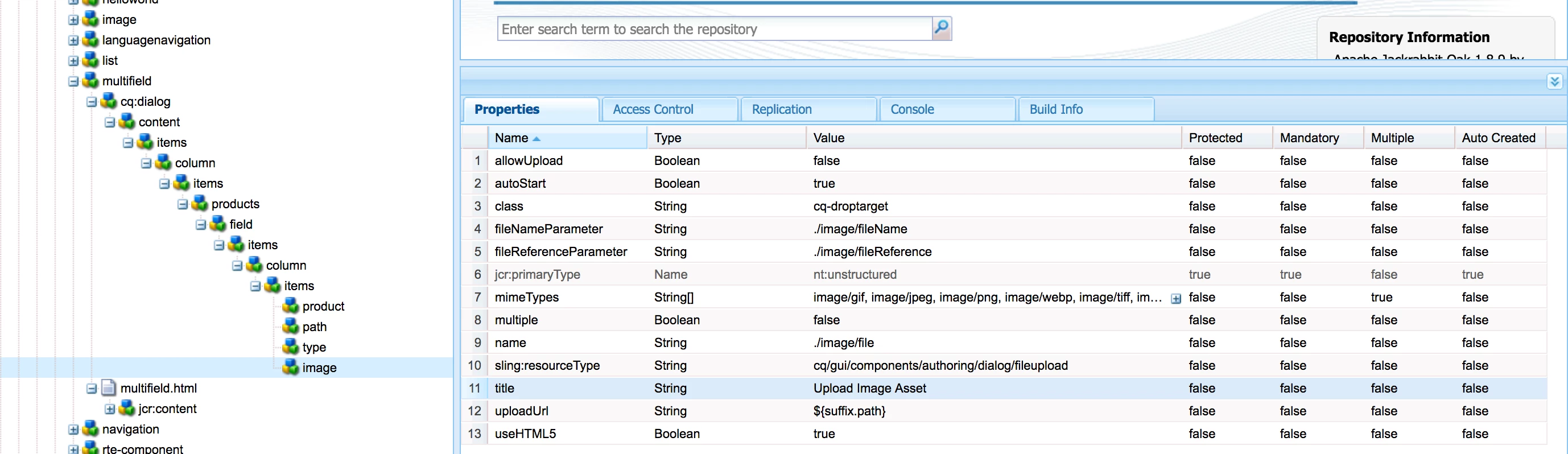
Below is my page content structure,

i need to store that image under the item0 node.

I have tried with coral 2 and coral 3 fileupload for image, these things not at all working for me.

Coral 2 fileupload also fine if anyone suggest the structure.

Any suggestion on this would be more helpful.

Thanks,

Velu

This post is no longer active and is closed to new replies. Need help? Start a new post to ask your question.
Best answer by vish.dhaliwal

Hello Everyone,

"cq/gui/components/authoring/dialog/fileupload" inside the Multifield is not currently supported. 

There is an existing Jira, CQ-4241149, for "cq/gui/components/authoring/dialog/fileupload", which is still in progress.

Regards,

Vishu

16 replies

New Participant
October 30, 2019

Hi All,

With service pack 6.4.6 images getting stored properly.  But multifield delete functionality is not working,  it doesn't removing the node properly.  Find below image for reference,

Here i have deleted the first element of multifield and submitted the dialog.  Instead of removing item0 and renaming the other nodes, it just rearranged the nodes and moved the form fields to item0 except image field values.

It happens in AEM from 6.4.4 version.

Is this AEM bug?  Any idea on this.

Thanks,

Velmurugan

New Participant
May 10, 2019

Please use service pack 6.4.4

New Participant
May 10, 2019

Hi Keshav,

We took reference from below url and created customised clientlib.

Experiencing Adobe Experience Manager - Day CQ: AEM 6440 - Touch UI Composite Image Multifield

Thanks,

Velu

kchaurasiya
New Participant
May 2, 2019

Hi All,

I am facing the same issues. Have any one got any updates or solution on the same.

Thank You..Good day..!!

smacdonald2008
New Participant
April 5, 2019

Thanks for confirming!!

vish.dhaliwalAccepted solution
Employee
April 5, 2019

Hello Everyone,

"cq/gui/components/authoring/dialog/fileupload" inside the Multifield is not currently supported. 

There is an existing Jira, CQ-4241149, for "cq/gui/components/authoring/dialog/fileupload", which is still in progress.

Regards,

Vishu

vivianac
New Participant
October 6, 2020

Hello @vish.dhaliwal ! I'm currently experiencing something very similar, on AEM 6.4 with file upload field of type "granite/ui/components/foundation/form/fileupload" placed inside a multifield of type "granite/ui/components/coral/foundation/form/multifield". Is this still a known issue? or maybe i'm not storing the structure correctly, considering that i would need to store the image under the "item0" node? Some suggestions would be helpful. Thank you!

Shashi_Mulugu
New Participant
April 5, 2019

Correct.

smacdonald2008​, This issue is for many of us and also hindering the process of integrating with Scene7 P2P where we can Drag and Drop Image from Content Finder.

New Participant
April 5, 2019

Thanks @@smacdonald2008..

Seems the same coral ui3 issue persist from 6.3.1 as per the thread Coral Fileupload not working when placed inside Coral multi-field

If you fix this issue then that would be helpful for many people.  Please let us know if you have any update on this.

Thanks again,

Velu

Prince_Shivhare
New Participant
April 5, 2019

Have you tried adding another field in multifield. because in my case, when I was using fileupload so it was creating a problem for authors. so I used pathbrowser then.

when you drag n drop the image in first multifield and then in another multifield you did the same with different image, and again when you reopen the dialog after authoring then same image which was in first multifield appears in all.