Multitifield with image in aem 6.4 doesn't store the image values in multiifield items | Community
Skip to main content
New Participant
April 4, 2019
Solved

Multitifield with image in aem 6.4 doesn't store the image values in multiifield items

  • April 4, 2019
  • 16 replies
  • 8582 views

Hi, I have created multifield with image in aem 6.4.  The image resource type is "cq/gui/components/authoring/dialog/fileupload".  When i author the content, other properties are getting stored in multifield item nodes, the image is stored under parent node of the item nodes.

Below is the dialog structure,
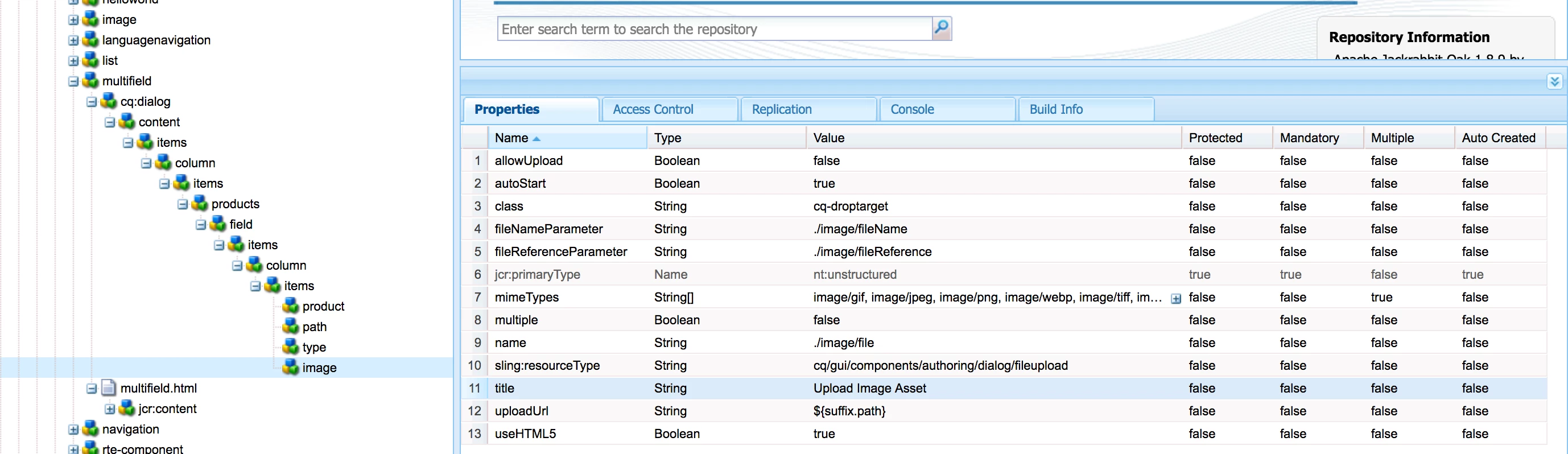
Below is my page content structure,

i need to store that image under the item0 node.

I have tried with coral 2 and coral 3 fileupload for image, these things not at all working for me.

Coral 2 fileupload also fine if anyone suggest the structure.

Any suggestion on this would be more helpful.

Thanks,

Velu

This post is no longer active and is closed to new replies. Need help? Start a new post to ask your question.
Best answer by vish.dhaliwal

Hello Everyone,

"cq/gui/components/authoring/dialog/fileupload" inside the Multifield is not currently supported. 

There is an existing Jira, CQ-4241149, for "cq/gui/components/authoring/dialog/fileupload", which is still in progress.

Regards,

Vishu

16 replies

arunpatidar
New Participant
April 4, 2019

same issue in 6.3 as well with fileupload and coral2 upload as well. Though Coral2 fileupload creates node inside item0 node but only for one item.

Similar thread Coral Fileupload not working when placed inside Coral multi-field

Arun Patidar
smacdonald2008
New Participant
April 4, 2019

I saw the same issue - checking with the team.

smacdonald2008
New Participant
April 4, 2019

I will test this as well

arunpatidar
New Participant
April 4, 2019

Sorry, I overlooked. I didn't notice '/' between image and fileName.

I'll check this and get back to you.

Arun Patidar
New Participant
April 4, 2019

Hi Arun,

Thanks for reply!

Yeah I'm checking on the correct path only, the fileReference property is inside the image node because i have given the fileReferenceParamater value as "./image/fileReference". 

So the property created under the image node, it will not create the node with name(fileReferenceParamater) given.  Actually i have drag and drop the image from dam, didn't upload it.

Above is my cq:dialog xml. You can use it to reproduce the issue.  The image node should create inside the every item if we configure.

Thanks,

Velu

arunpatidar
New Participant
April 4, 2019

Hi,

Are you sure, your are checking at right place. Because your image node in dialog structure doesn't match node created in content path.

E.g.

the node is created with name 'image' but it should be similar to fileReferenceParamter

The file upload in disabled but you are uploading file, right?

Could you please share your component dialog package?

Arun Patidar