RTE doesn't work when placed in a page dialog? | Community
Skip to main content
New Participant
February 14, 2018
Solved

RTE doesn't work when placed in a page dialog?

  • February 14, 2018
  • 13 replies
  • 10253 views

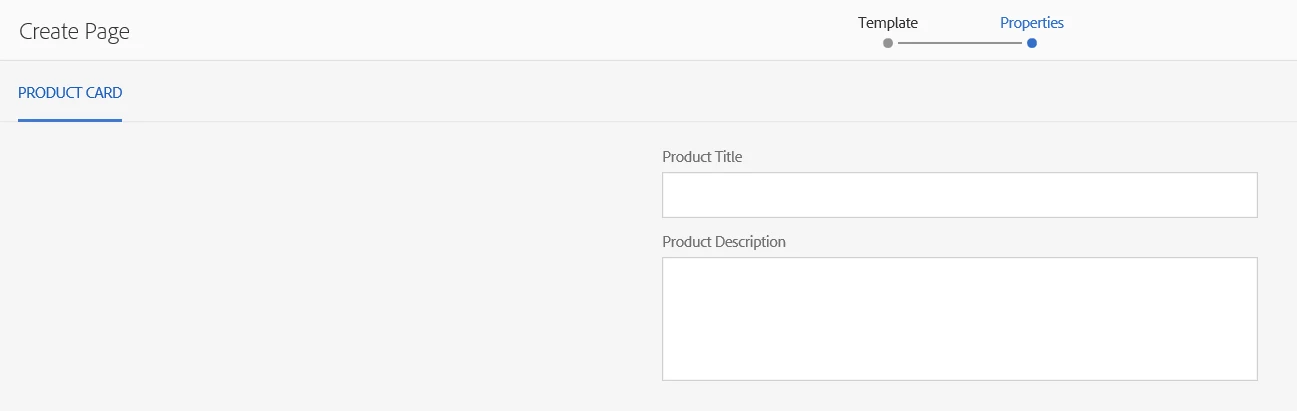
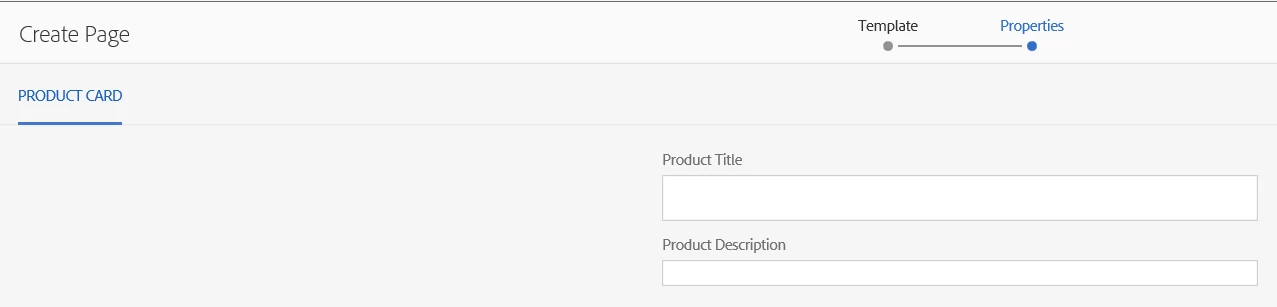
I have created a static template for some product pages. Simplified for debugging it looks like this at page creation time:

However when the Product Description field is replaced by a richtext, the input collapses to this:

What could cause this?

This post is no longer active and is closed to new replies. Need help? Start a new post to ask your question.
Best answer by praveenjain

Root Cause : The div created for RTE filed during page creation does not contain contenteditable="true" but contains when Edited from Page properties.

<div class="coral-RichText-editable coral-Form-field coral-Textfield coral-Textfield--multiline coral-RichText is-edited webkit chrome" data-config-path="/mnt/override/apps/gwc/watchman/components/page/localePage/_cq_dialog/content/items/tabs/items/ctc/items/column/items/ctcicontext.infinity.json" data-use-fixed-inline-toolbar="true" data-custom-start="null" data-editor-type="text" data-external-style-sheets="" contenteditable="true" style="outline-style: none;"><p>Call Now</p></div>

Fix:

If you need to make it editable during page creation

You need to write js on foundation-contentloaded (component clientlib) $(document).on("foundation-contentloaded",function(){}

and add contenteditable="true" in div. It will starting working fine.
13 replies

alexr21Author
New Participant
March 1, 2018

Per Adobe Daycare "RTE on Page Creation is not and OOTB AEM feature and not supported OOTB" and so jainpraveen12​'s answer is the correct one, although it is only a partial fix (the toolbar still won't display).

New Participant
February 25, 2018

alexr2​ No, Multifield works fine in touch UI during page creation process.

Issue with your attached dialog is you are using "foundation/form/fieldset" inside "coral/foundation/form/multifield", which is causing problem. Instead used all coral fields, it will work fine.

Use: granite/ui/components/coral/foundation/form/fieldset

alexr21Author
New Participant
February 16, 2018

Thanks jainpraveen12​. I will try this shortly. Do you have any idea why Multifield also doesn't work on Page Properties? Could it be a similar missing class?

praveenjainAccepted solution
New Participant
February 16, 2018

Root Cause : The div created for RTE filed during page creation does not contain contenteditable="true" but contains when Edited from Page properties.

<div class="coral-RichText-editable coral-Form-field coral-Textfield coral-Textfield--multiline coral-RichText is-edited webkit chrome" data-config-path="/mnt/override/apps/gwc/watchman/components/page/localePage/_cq_dialog/content/items/tabs/items/ctc/items/column/items/ctcicontext.infinity.json" data-use-fixed-inline-toolbar="true" data-custom-start="null" data-editor-type="text" data-external-style-sheets="" contenteditable="true" style="outline-style: none;"><p>Call Now</p></div>

Fix:

If you need to make it editable during page creation

You need to write js on foundation-contentloaded (component clientlib) $(document).on("foundation-contentloaded",function(){}

and add contenteditable="true" in div. It will starting working fine.
alexr21Author
New Participant
February 15, 2018

As a temporary work-around, we've determined that the RTE works fine if you save (Create Page) and then re-open the Page Properties in edit mode.

smacdonald2008
New Participant
February 15, 2018

I checked with our internal team. Here is an article that shows use of the RTE in a non-component.

This one’s in asset metadata editor

http://experience-aem.blogspot.in/2017/04/aem-62-touch-ui-rich-text-rte-in-asset-metadata-editor.html

alexr21Author
New Participant
February 15, 2018

jainpraveen12​ the useFixedInlineToolbar=true was already in use, so that's not the cause of this issue.

Here's the dialog xml:

https://drive.google.com/file/d/17c5WDoa17CCLCpVfolcrOj1-M2MS1obi/view?usp=sharing

alexr21Author
New Participant
February 15, 2018

smacdonald2008 It's for a description field which we need to reference in other pages. Think of a page containing a really long article, and then having a requirement to create a "top articles of the month" page where you want to pull in just the titles and summaries of those original articles.

smacdonald2008
New Participant
February 15, 2018

WHy do you need a RTE in a page dialog. A RTE is typically used to get rich text to display in web sites. For Page dialogs, the default types should suffice in gather information about the page.

New Participant
February 15, 2018

You should add useFixedInlineToolbar property in RTE field as true, as shown below then only inline RTE editing will be enabled.

Component Dialog RTE works in full screen mode, here in Template we are doing inline editing in touch UI , hence these changes needs to be made.

If it still doesn't work, please provide the dialog xml, i can check if anything missing.

Also If you are using TouchUI Laptop/System, please disabled and try again.