Unable to see Allowed Components list in custom layout container | Community
Skip to main content
srikanthp689160
New Participant
January 24, 2019
Solved

Unable to see Allowed Components list in custom layout container

  • January 24, 2019
  • 13 replies
  • 6568 views

Hi Team,

We are trying to create custom Layout Container(wcm/foundation/components/responsivegrid) component in AEM 6.4 to have fixed width and full width layouts in our project. Below are the steps i followed to create an editable template but unable to see Allowed Components even after creating a policy and configuring components.

  1. Create an editable template, open it to find a Layout Container(wcm/foundation/components/responsivegrid)
  2. Create a policy at Layout Container root level to allow custom Layout Container
  3. Drag and drop custom Layout Container
  4. Create and set another policy to allow project specific components for example, title, text, etc...
  5. Unlock custom Layout Container, i do not see allowed components here, whereas for OOTB Layout Container, am able to see Allowed Components list.
  6. I believe this section is necessary to edit component policies where style system configurations can be set

Attached screenshot of we.retail hero-page template where it works
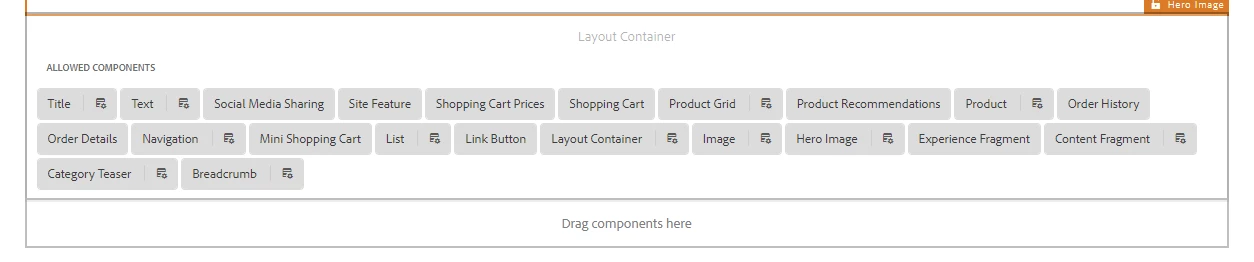
Note: sling:resourceSuperType of our custom layout container component is wcm/foundation/components/responsivegrid, we have just added dialog fields for full-width and fixed-width to add bootstrap classes container-fluid and container respectively.

Can someone please let us know if the above approach is correct or could you please point me to references to achieve our requirement.

This post is no longer active and is closed to new replies. Need help? Start a new post to ask your question.
Best answer by leoberliant

As per your post, the goal is to have "have fixed width and full-width layouts".

I don't think that you really need a custom layout component. In your editable template, you can add a layout container and then set teh width in Layout mode.

More staff can be applied to a layout container with a style. You can review this approach in WKND sample project:

https://helpx.adobe.com/experience-manager/kt/sites/using/getting-started-wknd-tutorial-develop/part4.html#putting-it-together

13 replies

srikanthp689160
New Participant
October 14, 2020

Hi @marcuss38348279, We have achieved above requirement by adding styles to OOTB layout container instead of custom component. We have added css classes container and container-fluid in Style System of Layout Container component, refer below screenshot


New Participant
October 14, 2020
Hi, @srikanthp689160 did you ever find a solution for this?
arunpatidar
New Participant
September 14, 2019

Hi,

The container core component is meant to be used to combine 2 or more components like lego blocks.

To set policies and allow components, you should be using Layout Container component, this component can be found inside  General group.

Arun Patidar
New Participant
September 13, 2019

I'll mention if you use ArchType 20 (I haven't checked earlier versions) to create an AEM project it will create a container component in your project's apps directory that uses a sling:resourceSuperType of the core components container object.

If you try to use that container you see the issues mentioned above.

If the OOTB layout container should be used, then why is the container component generated within the project when it lacks the functionality to show the allowed components within the container and doesn't let you set policies on those components?

It also doesn't work with the content exporter, if I view the model.json of a page, any components in my apps container aren't included, while they are when using the OOTB layout container.

srikanthp689160
New Participant
January 30, 2019

Thanks everyone for the response. Followed the approach to handle it with the help of style system.

Thanks & Regards,

Srikanth Pogula.

Gaurav-Behl
New Participant
January 25, 2019

Just use your custom classes on OOB layout container as mentioned by Leo/Scott above, it would work fine

srikanthp689160
New Participant
January 25, 2019

Hi,

It works if i remove the class(container/container-fluid) applied to the wrapper, but it does not serve my purpose because then custom layout component is exact copy of OOTB layout container.

smacdonald2008
New Participant
January 24, 2019

I agree with Leo - you should be able to use the OOTB layout container to address your requirements.

leoberliantAccepted solution
Employee
January 24, 2019

As per your post, the goal is to have "have fixed width and full-width layouts".

I don't think that you really need a custom layout component. In your editable template, you can add a layout container and then set teh width in Layout mode.

More staff can be applied to a layout container with a style. You can review this approach in WKND sample project:

https://helpx.adobe.com/experience-manager/kt/sites/using/getting-started-wknd-tutorial-develop/part4.html#putting-it-together

antoniom5495929
New Participant
January 24, 2019

Hi,

have you tried to remove the style applied to the class that you are using in your wrapper?