
Are you experiencing the GTW Disconnect Issue? | Community
Skip to main content
KellyJoHorton
Level 3
January 25, 2019
Question

Are you experiencing the GTW Disconnect Issue?

There are many of us who are experiencing the issue where the sync between GoTo Webinar and Marketo fails on a regular basis. I'd like to use this post to keep people updated on the progress of hopefully fixing this bug since we can't all be added to the internal Marketo Jira ticket. If Marketo Product could update us on progress in the comments we'd appreciate it. Please comment if you are experiencing this problem.

In the meantime do the following:

  1. Set up an alert for webinar statuses that are "Registration Error". This is the only way you will know when the sync breaks. I send an alert to myself and one of the marketing managers when the sync breaks.
  2. When you get an alert go to Admin > LaunchPoint. You will see a 400 error under the Status column for your GoToWebinar integration.
  3. Double click to refresh your connection.
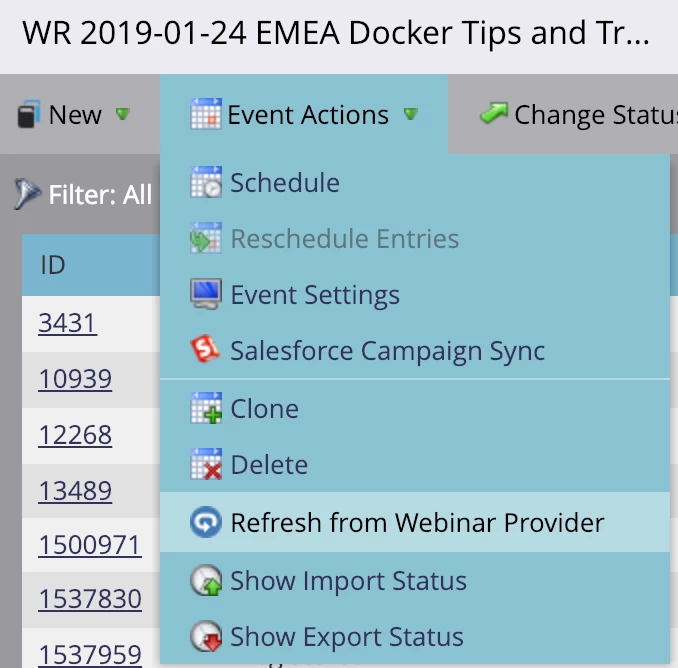
  4. Go to each current webinar program you have and choose Event Actions > Refresh from Webinar Provider to update all program member statuses to match what's in GTW.
This post is no longer active and is closed to new replies. Need help? Start a new post to ask your question.

26 replies

Charlotte_Lfg
Level 2
April 12, 2022

It's 2022, and it's still happening! The guys on the G2W side have just redirected me here, they don't seem to know what's going on.

The registration error alert is a good move, but that's like putting a bandaid on a wooden leg. 

Has anyone any news regarding that issue? 

Thanks

Translate
Thanks, Charlotte
ChristinaZuniga
Level 9
March 18, 2019

Everyone here: I spoke to my G2W rep about this issue and he had no idea what I was talking about. If you've opened tickets with Marketo about this, make sure you have a corresponding ticket to G2W. Reach out to your G2W rep and make it painful for them - they should know every failure you experience. We're pushing this on the Marketo side, but we need to make this as visible as possible on the LogMeIn side, especially since their frequent layoffs mean things might be dropped as people leave.

Translate
Michael_Florin-2
Level 10
March 19, 2019

We haven't experienced any more disconnects in the past two weeks or so. So I hope this is over.

Christina, as far as I can tell, the G2W product team was aware of these issues. LMI's marketing is also a GTW customer - so to speak - and the authentication issues hit us as hard as anybody else.

Translate
ChristinaZuniga
Level 9
March 19, 2019

I just had another error today. Perhaps my CSM with LMI doesn't know about this issue or he didn't want to say it's a known issue, but primarily the conversations have been on marketing nation so my encouragement was to ensure people are talking directly to LMI, not just Marketo.

It looks like we worked at Citrix at the same time @Michael Florin​, I was at G2A in 2015. At that time, there were authentication problems and the MOPs team in California had the connection drop regularly, although not as frequently as today, so this has been an issue for longer than a year.

Translate
KellyJoHorton
Level 3
March 15, 2019

I had another disconnect this week, so it's definitely not fixed.

Translate
Kelly Jo HortonSenior Client PartnerEtumos503.928.1928khorton@etumos.com
Crystal_Grandis
Level 1
March 6, 2019

We are experiencing the same issue! Does anyone have any suggestions on how to sync the registrants into GTW that registered during the time period where there were syncing issues? For example, we had 29 people in Marketo come in as a Registration Error. Tried refreshing the Webinar provider in Marketo, but still not seeing these people show up in GTW.

Translate
Michael_Florin-2
Level 10
March 6, 2019

Look at the members tab, select status "Registration Error", highlight them all and set their status to "Registered". That syncs them to GTW.

Translate
Amy_Goldfine
Level 9
March 6, 2019

To clarify, filter for Program Status = Registration Error, select the people (use shift for -clickmulti-select), click "change program status" and select "Registered". Wait and see if they stay Registered after Marketo pings GTW.

Translate
Amy GoldfineMarketo Champion & Adobe Community Advisor
Amy_Goldfine
Level 9
February 13, 2019

It's baaaaacccccckkkkk

Translate
Amy GoldfineMarketo Champion & Adobe Community Advisor
Steven_Vanderb3
Level 9
February 13, 2019

Engineering was re-engaged again on this at a high priority. Apologies for the inconvenience.

Translate
Michael_Florin-2
Level 10
February 26, 2019

We got this message from Marketo Support on Feb 22nd: "Engineering deployed a patch that should resolve the issue, you will need to re-validate your credentials again and it should work now. "

But we're still seeing failures. This is not over.

Translate
Steven_Vanderb3
Level 9
February 7, 2019

We identified an issue and ran a fix today for the GTW disconnects. You'll need to re-authenticate in Launchpoint one more time but the disconnects should be fixed after that. Feel free to reach out to Support for any additional issues.

Translate
Amy_Goldfine
Level 9
February 7, 2019

Thanks Steve, I was just coming here to post that I received this information in reply to my support ticket! We'll keep you guys posted.

Translate
Amy GoldfineMarketo Champion & Adobe Community Advisor
Level 2
February 4, 2019

Another weekend, another mountain of registration errors and missed international webinars early on a Monday morning. Guys, please get this figured out.

Translate
Amy_Goldfine
Level 9
January 30, 2019

I just heard back from Marketo Support: "I've raised this with our engineers and they are working with GTW to identify what is causing this issue." So that is good that they are taking this seriously.

Fellow Marketing Nation members with this issue, please post in here if you have not already, so that Marketo and GoTo are aware of the scale of the issue!

Actually, if you are using GoToWebinar (or any webinar provider!) and don't have an Alert set up for registration errors, this is a good time to do so! Also until this gets fixed, it might be a good idea to check Launchpoint daily for a disconnect to try to prevent those reg errors from happening.

Step 1: Create a basic alert email. This is what ours looks like.

Step 2: Create a smart campaign

Smart Campaign Trigger: Program Status Changes, Program is Any, New Status = Registration Error

Flow Steps: Send Alert to [your email or an internal alias]

Translate
Amy GoldfineMarketo Champion & Adobe Community Advisor
Samantha_McCol1
Level 2
January 29, 2019

We had this same issue with the last webinar we ran, but not with our current one.

Translate
Rachit_Puri2
Level 5
January 29, 2019

Yes, raised a support ticket with them for this one. Not sure why this is still happening.

Translate